Internal Linking Audit That Actually Improves Rankings
Run a practical internal linking audit to find orphan pages, fix broken links, and prioritize fixes that move revenue on your Shopify store.
Published 10 min read
In this article
- Table of Contents
- Why Your Store's Internal Links Deserve an Audit
- Pulling the Right Data Before You Touch Anything
- Reading the Link Equity Map Across Your Store
- Prioritizing Fixes by Revenue, Not by Count
- Common Fixes That Quietly Make Things Worse
- A Realistic Before-and-After From a Shopify Audit
- Your Internal Linking Audit Checklist and Benchmark
A store adds products every week, publishes blog posts on schedule, and still watches priority collections stall outside the results that matter. The content isn't always the problem. Often, nobody has built a clear path from the pages Google already crawls to the pages the store needs to sell. An internal linking audit finds those missing paths, exposes weak ones, and ranks the repairs by commercial value instead of treating every orphaned URL as equally urgent.
Table of Contents
- Why Your Store's Internal Links Deserve an Audit
- Pulling the Right Data Before You Touch Anything
- Reading the Link Equity Map Across Your Store
- Prioritizing Fixes by Revenue, Not by Count
- Common Fixes That Quietly Make Things Worse
- A Realistic Before-and-After From a Shopify Audit
- Your Internal Linking Audit Checklist and Benchmark
Why Your Store's Internal Links Deserve an Audit
A familiar pattern starts with a strong product that never gains traction. Its title targets a sensible query, the price is competitive, and the product description answers real questions. Yet the only route to it runs through a crowded collection grid, store search, or a menu that depends on scripts. A blog post may show the opposite pattern. It earns impressions for a few weeks, then fades because related articles never link to it and it never links onward to a relevant collection.
Those aren't separate content failures. They're usually symptoms of the same structural problem, and that's where an internal linking audit earns its keep. Google has treated this structure as foundational since October 7, 2008, when Google's early guidance on link architecture described internal linking as essential to site design and indexing. That guidance ties link architecture to Googlebot's ability to discover pages and to how visitors move through the site. It also recommends keeping important pages clickable from the homepage through a logical structure, with text links as generally the safest format for crawlability.
Symptoms That Point to Structure, Not Content
The clearest symptoms tend to repeat across Shopify stores, regardless of niche.
- Orphaned pages: Valuable products or posts receive no incoming links from other store pages.
- Excessive click depth: Priority collections sit several clicks from the homepage, buried under intermediate pages.
- Weak category connections: Articles discuss a problem in detail but never point readers to the collection that solves it.
- Script dependent paths: Navigation relies on store search or interactive elements rather than standard crawlable links.
An XML sitemap doesn't fix any of this. A sitemap lists URLs, but it doesn't show Google how pages relate, which ones matter most, or how a shopper should move between them. The audit exists to answer exactly those questions across blog posts, product pages, collections, and informational landing pages.
A useful audit doesn't produce a count of problems. It produces a prioritized list of structural fixes.
That distinction matters because a raw problem count pushes merchants toward busywork. A prioritized list points to the handful of connections that make important pages discoverable, clarify the hierarchy, and stop strong content from sitting isolated. Everything that follows serves that goal.
Pulling the Right Data Before You Touch Anything
Audits go wrong at the export stage more often than at the analysis stage. A flat list of URLs looks tidy and answers almost nothing. The export needs one row per internal link, not one row per page, because the relationships between pages are the actual subject.
Columns Worth Capturing
A standard site crawler can produce the necessary dataset in a single afternoon. Each link record should carry the following fields.
- Source URL: The page containing the link, which reveals which templates generate the most connections.
- Destination URL: The target page, used to count incoming links per URL.
- Anchor text: The clickable words, needed to check whether the description matches the destination.
- HTTP status: The destination's response, which surfaces broken and redirected targets.
- Follow attribute: Whether the link passes value normally or carries a restricting attribute.
- Template location: Navigation, footer, product grid, or body content, since placement changes how a link should be judged.
- Click depth: The number of clicks from the homepage to the destination.
Google's current documentation explains why implementation details belong in that export. Crawlers can generally follow a link built as an HTML anchor element with an href attribute, while links built through unsupported formats or script events may not be reliably extracted, as Google's guidance on crawlable links sets out. The same guidance establishes the audit's simplest threshold. Every page a site considers important should receive a link from at least one other page on the site.
Where Crawler Output and the Live Store Diverge
A crawler report and a rendered Shopify theme don't always agree. Mega menus, predictive search, and filter interfaces often build links with JavaScript after the page loads. A raw crawl may miss those links entirely or, conversely, record filter and sort combinations as if they were distinct content pages. Locale variants create the same distortion, multiplying one product into several URL rows.
The practical routine is straightforward. Run one crawl that renders JavaScript and one that doesn't, then compare the link counts. Strip obvious filter parameters into a separate sheet rather than deleting them, since they still consume crawl attention. Keep locale URLs grouped by their base product or collection. The result is a clean working sheet where every later question, from equity distribution to anchor quality, can be answered without re-crawling.
Practical rule: If a dataset can't show which template placed a link, it can't explain why a page looks well linked but still performs poorly.
Reading the Link Equity Map Across Your Store
With clean data in hand, the temptation is to sort by incoming link count and stop. That surface count hides the patterns that create risk. Equity distribution at URL level tells a sharper story, especially once counts are split by page type and template location.
The map below shows how link equity typically concentrates across a store's page types.
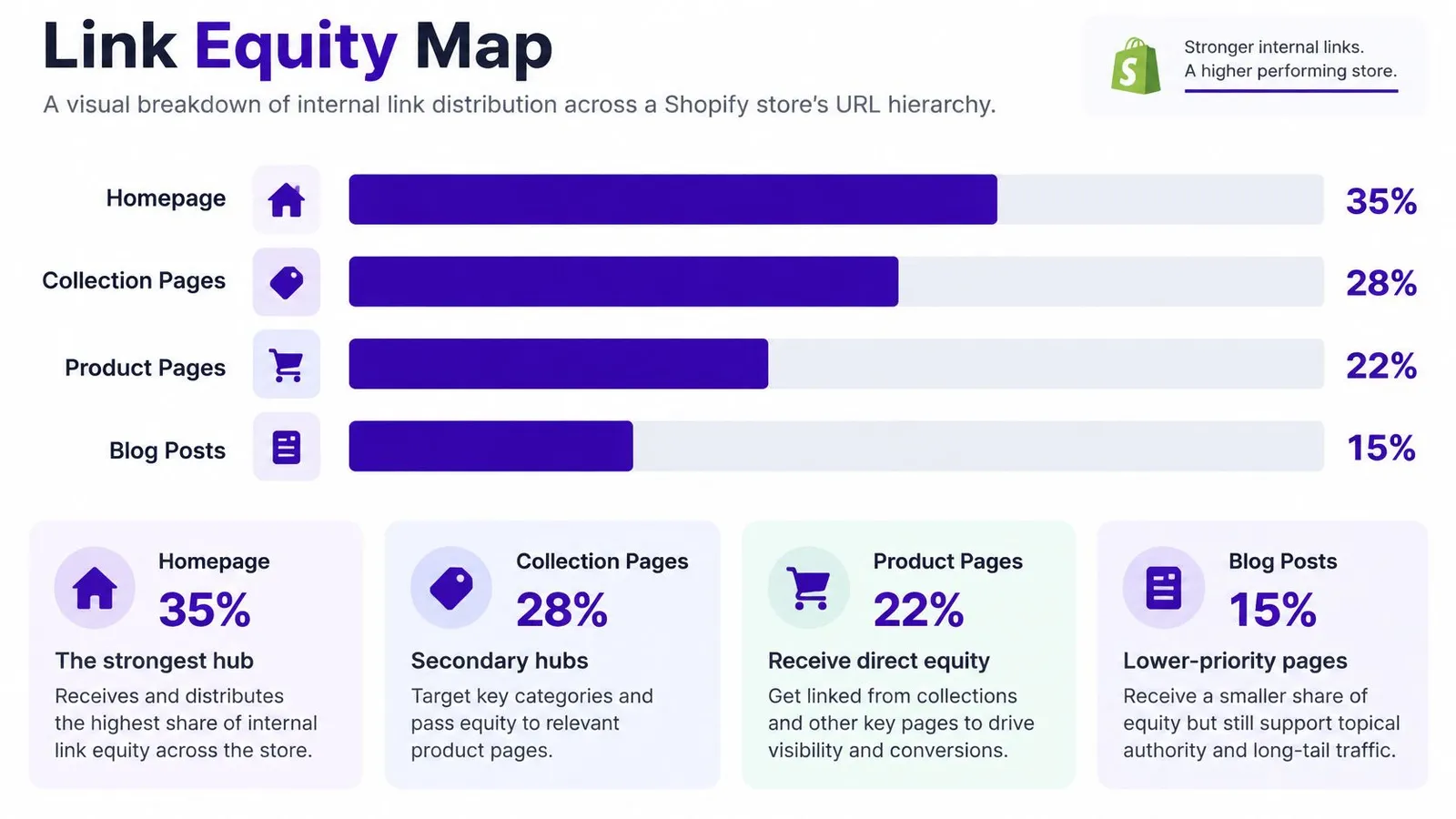
Four metrics do most of the diagnostic work. Incoming link distribution shows which URLs accumulate support and which templates starve. The share of pages with a single incoming dofollow link measures fragility, because one deleted menu slot or edited article can leave such a page close to orphaned. The share of broken or redirected internal links reveals wasted equity. Anchor text concentration shows whether a destination receives varied, descriptive anchors or the same phrase repeated everywhere.
The Single Lifeline Problem
Fragility turns out to be the norm rather than the exception. An Ahrefs Site Audit study covering more than 1 million domains found that 66.2% of sites had at least one page with only a single dofollow incoming internal link, according to a summary of internal linking statistics. On Shopify stores, that single lifeline is often a product card inside one collection. Remove the product from that collection during a seasonal cleanup, and the page loses its only internal route overnight.
Template structure makes the numbers lie in the other direction too. The same product card can appear across many collection and search pages, inflating apparent link counts for products that sit in popular grids. A product may show dozens of incoming links and still have zero contextual links from articles or hub pages. That's why template location from the export matters so much. Merchants who want the broader structural picture can compare their map against a web page architecture guide to see how hierarchy decisions shape these distributions.
Healthy stores concentrate equity deliberately, with hubs feeding priority pages. Fragile stores concentrate it accidentally, wherever the theme happens to repeat a link.
Prioritizing Fixes by Revenue, Not by Count
Finding issues is the easy half. A mid sized catalog can produce hundreds of orphans, deep pages, and thin anchors in one crawl. Fixing them in spreadsheet order wastes the first week on filter URLs and discontinued variants while a best selling collection waits. Prioritization needs a scoring model that blends structural signals with commercial ones.
Scoring Signals That Belong in One Sheet
Each URL gets scored on the same set of inputs so rankings stay comparable.
- Unique inlinks and crawl depth: Structural support and distance from the homepage.
- Indexability: Whether the page can appear in search at all, which disqualifies some candidates immediately.
- Organic impressions: Evidence that search demand already exists for the page or its topic.
- Conversion value and inventory status: Whether the page sells, and whether the product is available.
- Search intent: Whether the page answers an informational, comparison, or purchase ready query.
Role classification then converts scores into actions. A blog post with strong impressions but weak sales still matters, though its job is to feed a collection rather than rank alone. A product with modest search demand may deserve top priority because it converts reliably. Reading performance through a visibility lens, similar to tracking share of voice in SEO reporting, helps merchants weigh demand against revenue instead of chasing raw traffic.
URL Role and Recommended Link Action
| URL Role | Audit Signal | Recommended Action |
|---|---|---|
| Blog post | High impressions, no outbound product links | Add contextual links to the relevant collection and one priority product |
| Collection | Deep click depth, few unique inlinks | Link from supporting articles and a higher level hub page |
| Product | Single incoming link, in stock, converts well | Add links from its collection hub and related articles |
| Filter or locale URL | Orphaned but non indexable or duplicate | Leave alone, and keep equity pointed at the canonical page |
| Obsolete product | Out of stock with incoming links | Consolidate or redirect support toward the replacement product |
The scoring approach stays simple on purpose. Pages that combine demand, revenue, indexability, and weak current support rise to the top. Pages that can't be indexed or can't be sold fall to the bottom, no matter how broken they look in a crawl.
Common Fixes That Quietly Make Things Worse
The most common response to a thin link profile is to add links everywhere. That instinct creates a second audit problem six months later. More internal links aren't automatically better, and several popular fixes dilute relevance while improving the counts on paper.
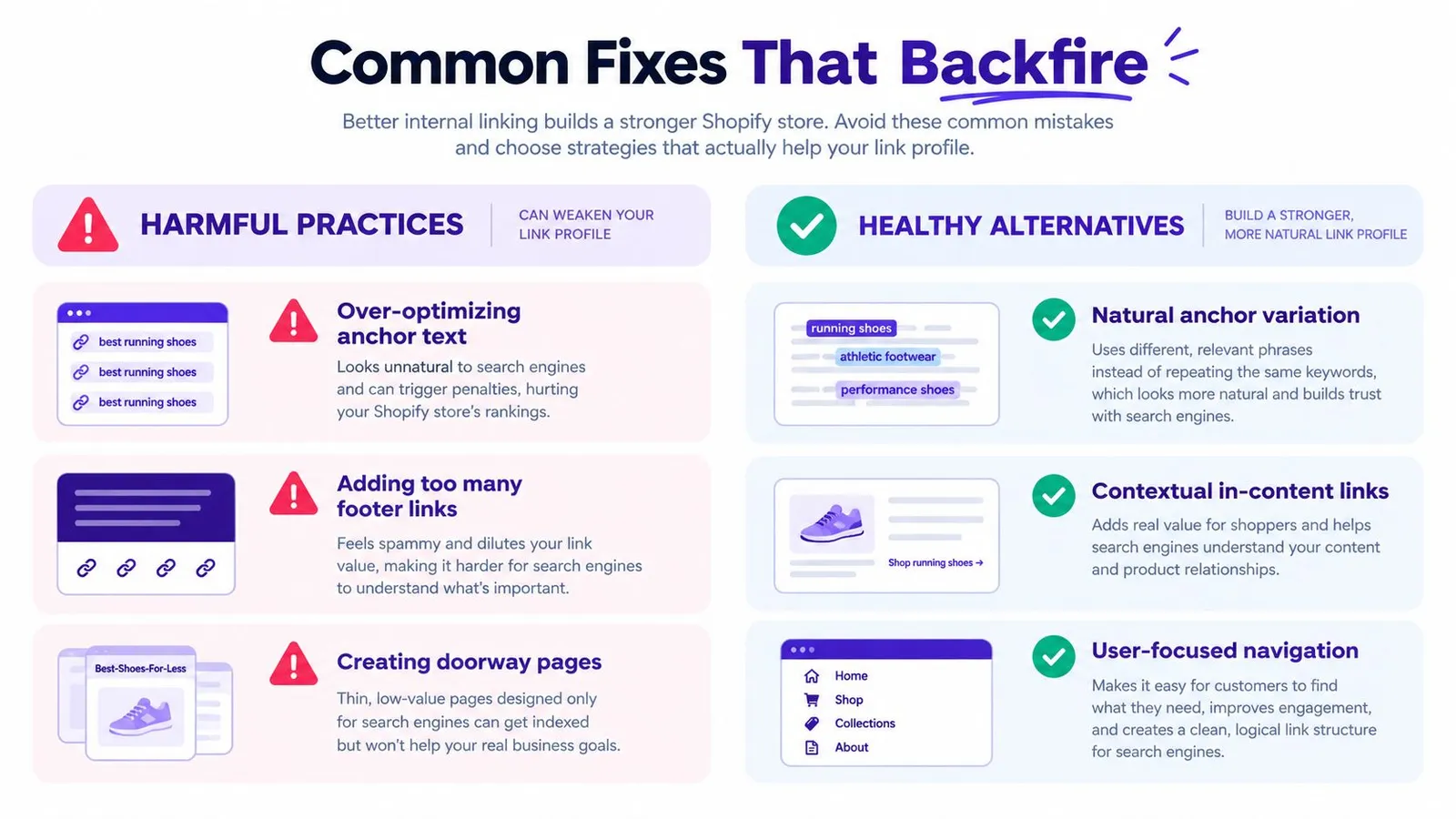
The comparison below separates the habits that damage a link profile from the ones that strengthen it.
Anchor Repetition and Count Chasing
Identical keyword rich anchors repeated across templates are the clearest warning sign. When every article, sidebar, and product card points to a collection with the exact same phrase, the anchor distribution stops describing destinations and starts looking engineered. Google advises keeping anchors concise, descriptive, and relevant, and avoiding repeated anchor text. Merchants should read their own anchor concentration data from the equity map and ask a simple question. Would a shopper understand each destination from its anchor, and does the phrasing vary the way natural writing varies?
Links inserted purely to raise counts cause a quieter problem. A paragraph forced to mention an unrelated product doesn't help the reader, and it weakens the topical signal of both pages. Contextual relevance is the filter that separates a fix from filler. Supporting articles should link to a category or collection hub, hubs should link to commercially important products, and each link should sit where the topic connects.
Boilerplate Placement and Dead Destinations
Footer and sidebar blocks tempt merchants because one edit creates sitewide links. Google can still count those links, but visitors rarely use them, and sitewide repetition blurs which pages matter. A contextual link inside a relevant article carries clearer intent than fifty identical footer entries.
Destination quality matters just as much. Links to redirected URLs waste a crawl step on every visit. Links to out of stock products send equity and shoppers toward pages that can't convert. Both problems are cheap to fix once the export exposes them, and both outrank adding brand new links. Automated tools enter the picture here as one option among others. Rankira, for instance, adds internal links from generated Shopify articles to relevant products, collections, and pages, which can reduce orphaned destinations, though relevance and destination checks still decide whether those links help.
Quality test: A link earns its place through relevance, placement, anchor variety, and a destination worth visiting. Count alone proves nothing.
A Realistic Before-and-After From a Shopify Audit
The dashboard view below reflects where a representative audit began, with link data gathered across the full store before any edits.
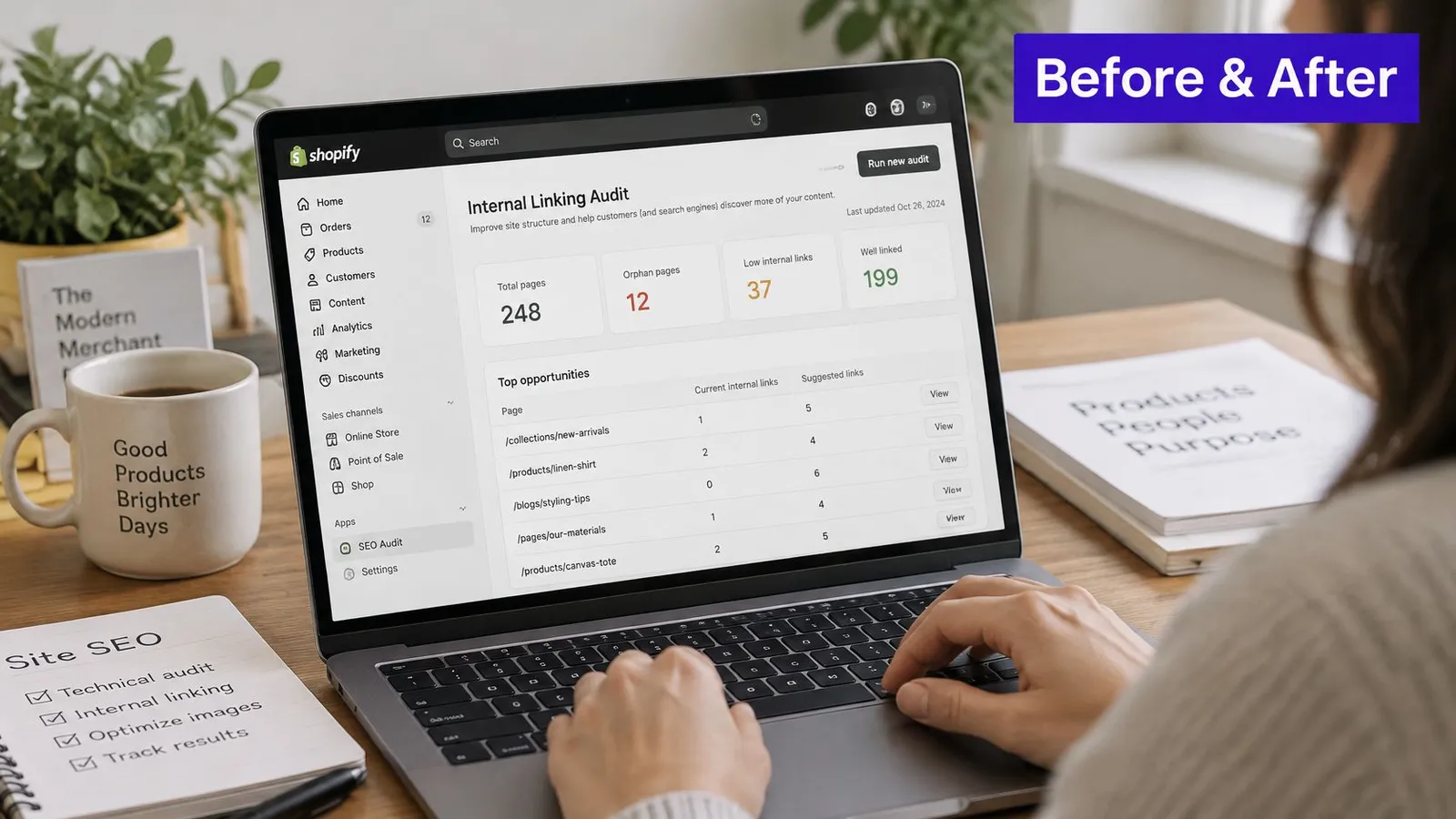
Consider a mid sized store with a productive blog, slow collections, and a catalog that kept growing without structural support. The initial crawl showed articles ranking briefly, then slipping, while priority products depended on single collection grid placements. Before changing anything, the merchant recorded organic clicks, impressions, average position, indexed status, crawl depth, and inlinks for every URL slated for edits. That benchmark made later claims testable.
The fix bundle stayed narrow. High impression articles received contextual links to matching collections. Those collections linked onward to priority products already in stock. Obsolete variants were consolidated instead of rescued, and anchors that had drifted into identical repetition were rewritten to describe each destination plainly. Broader context on store level optimization sits in the Shopify SEO category archive for readers comparing approaches.
The walkthrough below shows how an audit moves from crawl data to applied fixes.
After sufficient recrawling, changed URLs were compared against similar untouched pages rather than against storewide traffic. That comparison is the honest part of the process. Movement on edited pages means little if untouched pages moved the same way, since traffic change alone can't prove causation.
Your Internal Linking Audit Checklist and Benchmark
An audit becomes a habit when the closing steps are written down and repeated. The checklist below condenses the full method into a repeatable pass.
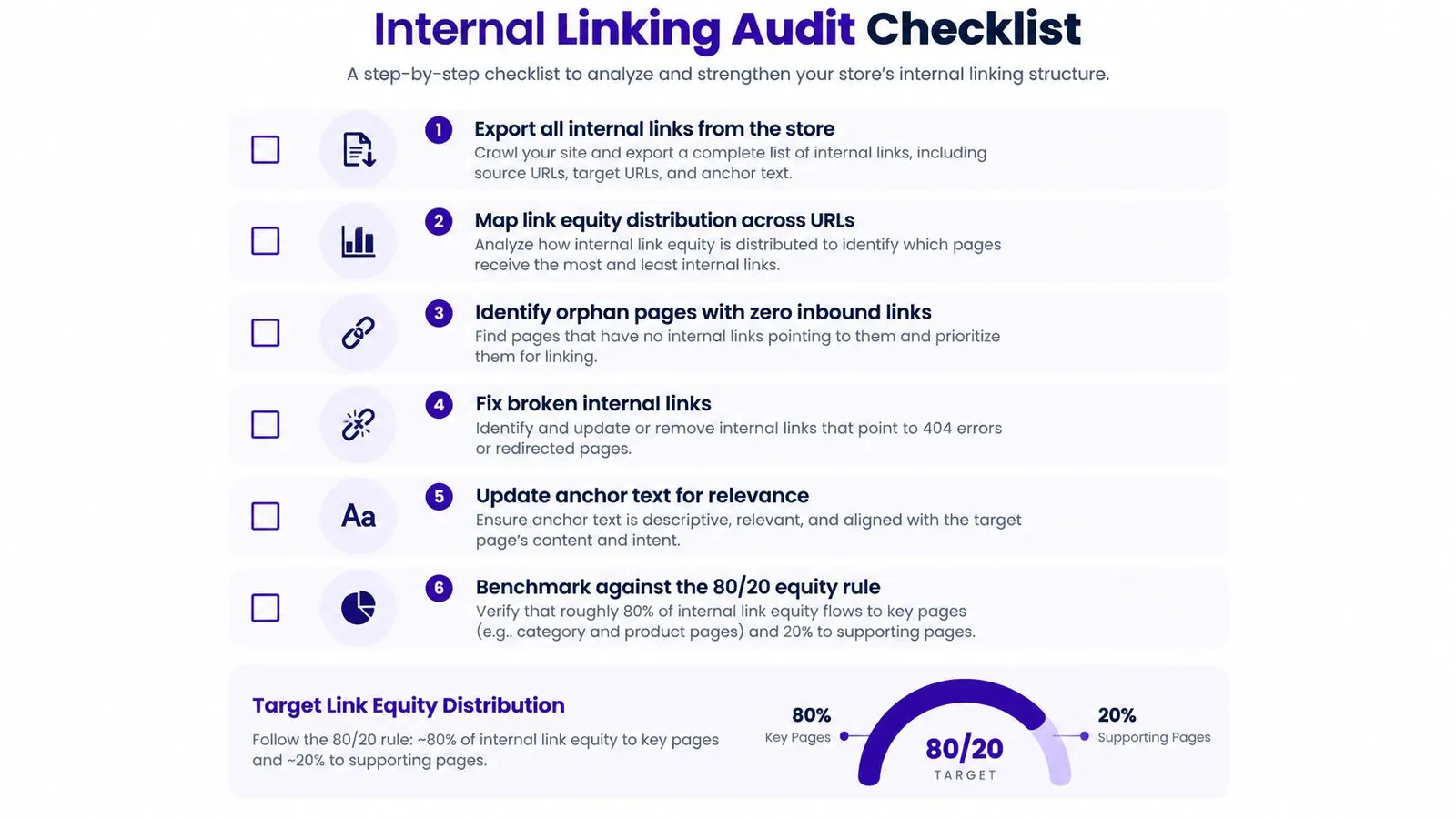
- Export every internal link: Capture source, destination, anchor, status, follow attribute, template location, and depth.
- Map equity by page type: Flag single inlink pages, redirected targets, and anchor concentration.
- Score before fixing: Rank URLs by demand, conversion value, inventory, and indexability.
- Apply contextual fixes: Link articles to hubs and hubs to priority products with descriptive, varied anchors.
- Record the benchmark first: Save clicks, impressions, average position, indexed status, crawl depth, and inlinks for affected URLs.
- Compare against untouched pages: Judge results only after recrawling, against similar pages that received no edits.
Merchants building a wider review routine can pair this process with a checklist for improving site visibility so link structure gets checked alongside other technical basics. The benchmark discipline is what turns each pass into evidence rather than memory.
Merchants who'd rather not rebuild internal links by hand after every publish can look at what Rankira offers inside Shopify, including keyword research, scheduled article generation, and automatic links from posts to relevant products, collections, and pages. That combination keeps new content connected to the catalog from day one, so the next audit starts from a stronger structure instead of another cleanup.
Keep reading
All articles
Shopify SEO
Share of Voice SEO: A Practical Measurement Guide
Learn how share of voice SEO works, how to calculate it, and how to use intent-based metrics to assess search visibility and business impact.
12 min read
Put your Shopify blog on autopilot
Rankira researches keywords, writes SEO articles, adds internal links, and publishes them to your store — every week. Start with a 7-day free trial.