Alt Attribute SEO: Writing Alt Text That Ranks
Learn how alt attribute SEO works, why accessibility comes first, and how to write alt text that helps images rank, with examples for Shopify stores.
Published 11 min read
In this article
A Shopify merchant finishes uploading product photos, checks the prices, and prepares to publish. Then there's the small alt-text field beside each image. Should it contain the product name, a search keyword, a description, or nothing at all?
Alt attribute SEO becomes easier to manage when that field stops being treated as spare advertising space. Each image has a purpose for shoppers, and its alternative text should preserve that purpose for assistive technology while giving search engines accurate context.
Table of Contents
- What the Alt Attribute Actually Does
- How Alt Text Affects Image SEO
- Why Alt Attributes Matter for Accessibility
- How to Write Alt Text That Works
- Alt Text Mistakes That Hurt Your SEO
- Managing Alt Text Across a Shopify Store
- Putting Alt Attribute SEO Into Practice
What the Alt Attribute Actually Does
The alt attribute is part of an image's HTML markup. Its value is the text alternative associated with that image, such as alt="black leather crossbody bag with adjustable strap".
In an image element, written as <img ... alt="black leather crossbody bag with adjustable strap">, the description sits inside the alt attribute. The surrounding element identifies the image; the attribute supplies its alternative text. Although merchants often encounter the phrase “alt tag,” alt attribute is the more precise term.
A description that survives a missing picture
A useful analogy is a caption that remains available when the picture can't be seen. Unlike an ordinary visible caption, however, alternative text belongs in the image's markup and should communicate the image's relevant information or function.
That distinction matters on a product page. A caption might promote a bag as suitable for everyday outings, while the alternative text identifies the visible bag and its distinguishing features. The alt field isn't another place for the full sales pitch.
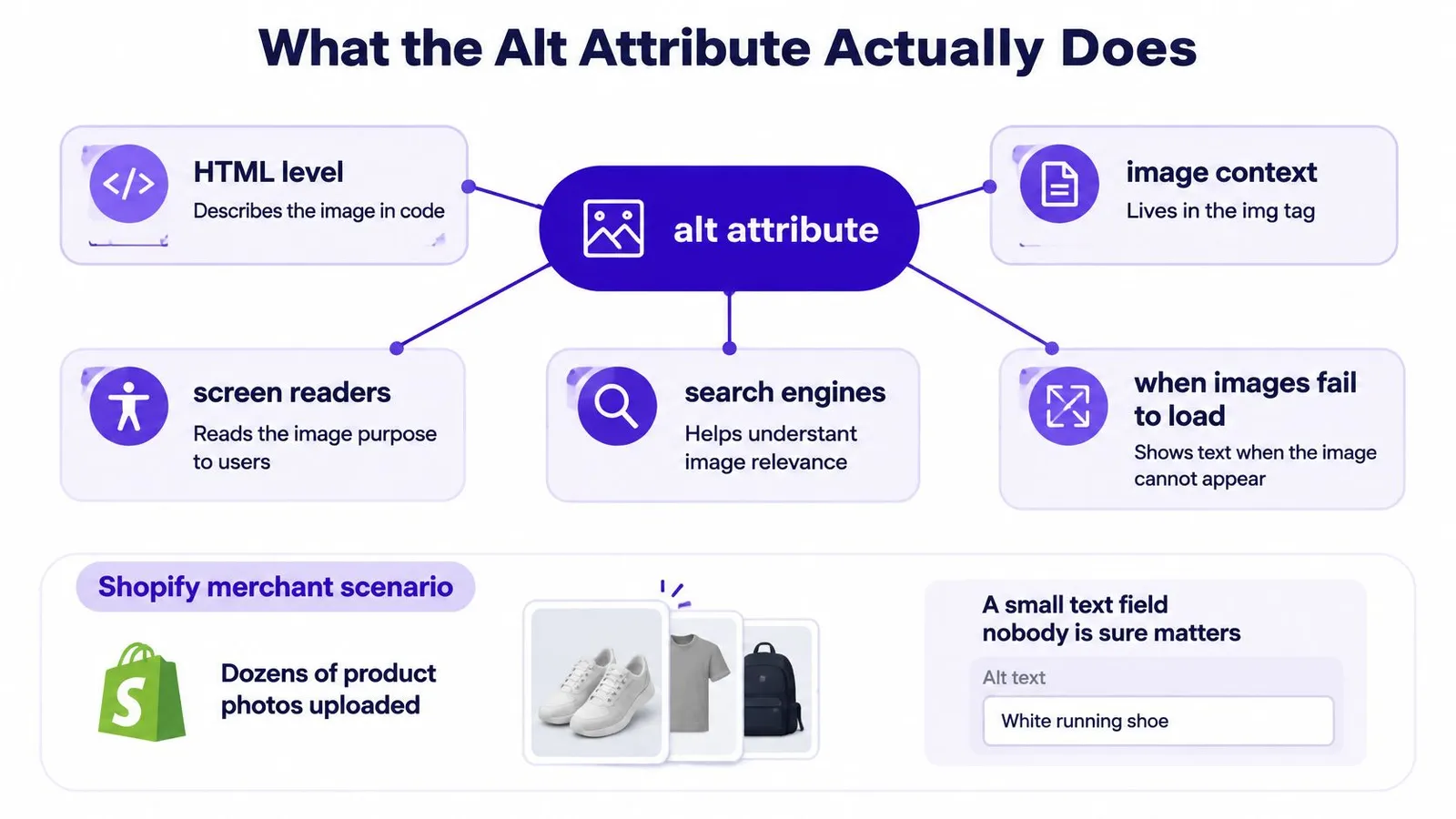
The diagram connects the markup with the situations in which that text matters.
Different readers, shared meaning
The attribute serves different readers in different circumstances:
- Screen-reader users: Alternative text communicates the image's information or purpose without requiring someone to see it.
- Search engines: The description provides context for understanding the image alongside the page's other information.
- Visitors encountering unavailable images: The alternative can preserve useful meaning when the picture doesn't load.
Those aren't separate writing assignments. A merchant doesn't need an accessibility description followed by an SEO description. The aim is a single useful alternative that accurately represents the image in its particular location.
Practical rule: Describe what would be missing if the picture disappeared, not every detail that happens to be visible.
For a product photograph, the missing information might be color, shape, or a visible fastening. For a clickable collection image, it might be the destination. Choosing between those purposes comes before choosing words.
How Alt Text Affects Image SEO
Alt text is contextual metadata, not a keyword field. Google identifies it as its most important image-metadata attribute and uses it alongside computer-vision systems and surrounding page content to understand an image's subject. Its Google Images guidance also addresses descriptive filenames, relevant page context, linked-image anchor text, and the risks of keyword stuffing.
Consider a product page for a black leather crossbody bag. The photograph shows the bag, the heading names that product, and the description discusses its adjustable strap. Alternative text describing those same visible characteristics gives Google consistent information rather than introducing a different subject.
Relevance depends on agreement
The strongest implementation is coherent across the image and its location. The filename, nearby copy, page topic, and destination should support the same interpretation.
| Element | A coherent example |
|---|---|
| Page subject | A black leather crossbody bag |
| Visible photograph | The bag with its adjustable strap |
| Nearby copy | Details about the strap and carrying style |
| Alt text | A concise description of those visible features |
This doesn't mean every field should repeat an identical sentence. Each element has a different job, but none should contradict the others. A photograph of a bag shouldn't acquire unrelated terms merely because those terms appear in a keyword plan.
A step-by-step keyword research process can help merchants choose page topics and understand search intent. The image itself still determines which descriptive terms belong in its alternative text.
Linked images carry another responsibility
When an image acts as a link, Google can use its alt text as anchor text. That makes the destination important: a collection tile leading to crossbody bags needs a useful collection label, not merely a description of its background styling.
The accessibility purpose and the search purpose align here. Both benefit when the text communicates where the link leads.
Better image understanding is a reasonable objective. A guaranteed ranking increase isn't.
Alt text can improve the likelihood that Google understands an image for relevant queries, but it isn't an independent promise of visibility. Adding a sought-after phrase doesn't make an unrelated photograph relevant.
Google also explicitly warns that keyword stuffing creates a poor user experience and may cause a site to be treated as spam. Accurate description is the safer editorial standard, not maximum keyword coverage.
Why Alt Attributes Matter for Accessibility
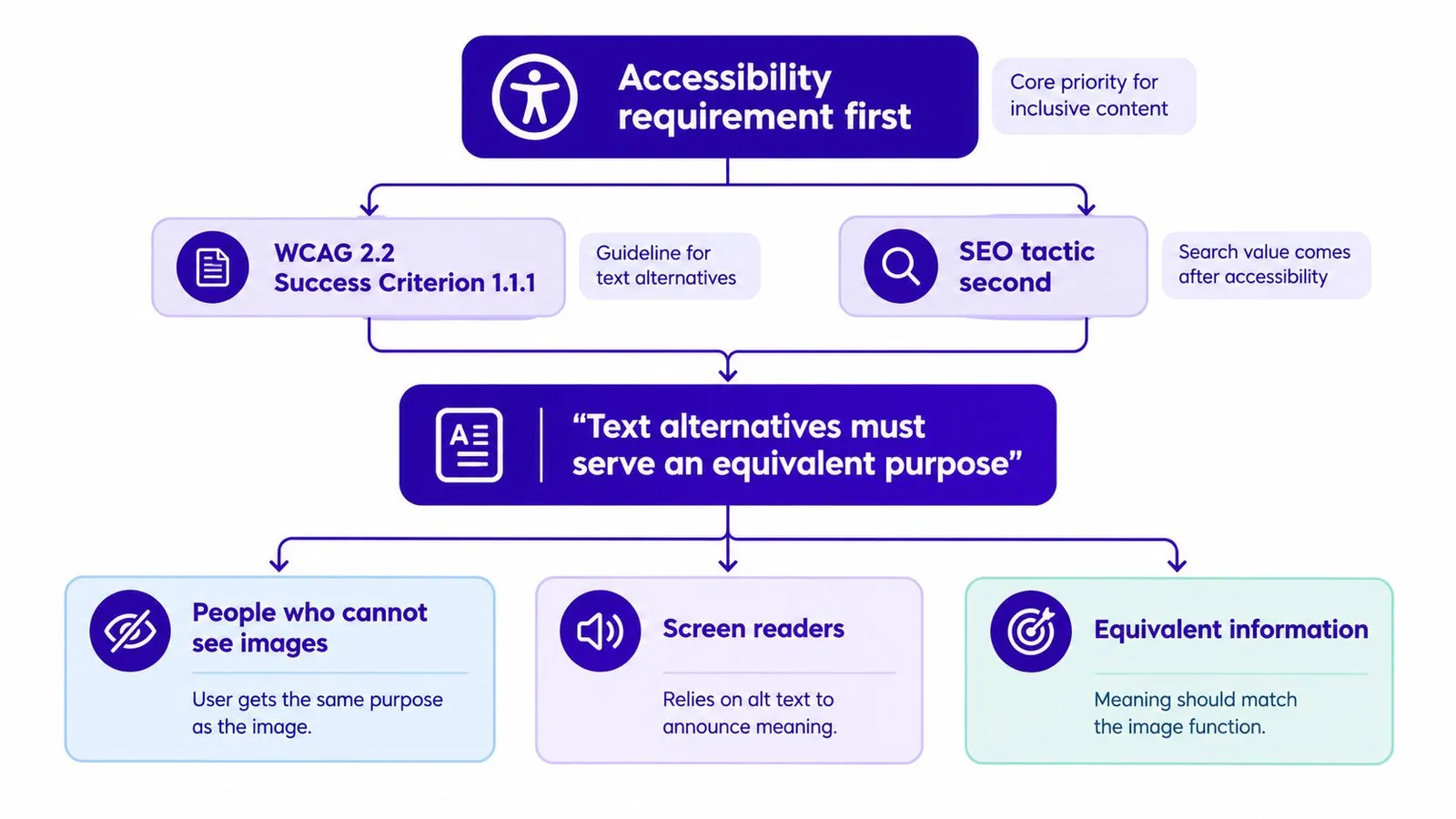
Accessibility determines what kind of alternative an image needs. Under WCAG 2.2 Success Criterion 1.1.1, non-text content requires a text alternative serving an equivalent purpose, while decorative content can be implemented so assistive technology ignores it.
The following diagram places that requirement ahead of search optimization.
Classify the image before describing it
Informative images communicate something relevant. A close-up of a bag's interior may show compartments that shoppers can't see in the main photograph. Its alternative should capture that information, such as Interior compartments of black crossbody bag, provided that description matches the photograph.
A functional image requires a different decision. When an image is a link or control, the important information is the action or destination. A standalone image linking to a tote collection might use Shop canvas tote bags, rather than describing the model's clothing.
Decorative images add visual styling without contributing information or a necessary action. They should use an empty attribute, alt="". Empty alternative text is intentional in this case; fabricated promotional copy would add an interruption rather than useful meaning.
| Image role | Question for the merchant | Appropriate treatment |
|---|---|---|
| Informative | What information does the image contribute? | Describe that information |
| Functional | What happens when it's activated? | Describe the action or destination |
| Decorative | Would its removal change the meaning? | Preserve an empty alt attribute |
The same asset can require different treatment in different locations. A product photograph in a gallery provides information; used as a standalone navigation link, it also needs to communicate the destination. Classification belongs to the image in context, not just the image file.
Complex information needs room
A chart or diagram may communicate relationships that a short attribute can't adequately express. A brief alt label plus a longer adjacent explanation gives that information room, rather than squeezing the entire visual into a difficult sentence.
For merchants reviewing accessibility beyond images, Wistec's resource on improving accessibility in web design offers a related place to continue that broader review. Good alternative text is part of accessible implementation, not proof that an entire store conforms to WCAG.
The embedded video offers another format for exploring image accessibility.
How to Write Alt Text That Works
A useful draft starts with the visible subject, then adds the detail that matters in that location. For an informative product photograph, product type, visible color, and a distinguishing feature often provide a sensible starting point.
Take the suggested description black leather crossbody bag with adjustable strap. It works only when the photograph and product information support those details. If the material is unknown or the strap isn't shown, the draft needs revision rather than confident invention.
Move from a label to useful information
A filename-style value such as IMG_bag identifies an asset but doesn't explain it. Replacing it with product photo removes the filename problem without solving the information problem.
The useful rewrite identifies what the shopper would learn from the photograph. A front view might describe the bag and strap, while a detail photograph might focus on a buckle or interior pocket. Different wording should follow different information, not an arbitrary demand for unique text.
Weak vs Strong Alt Text for Shopify Images
| Image Context | Weak Alt Text | Strong Alt Text |
|---|---|---|
| Main bag photograph | product photo | Black leather crossbody bag with adjustable strap |
| Bag detail photograph | bag bag leather bag | Adjustable buckle on black crossbody bag strap |
| Shoe side view | shoe file final | White sneakers with green heel panels |
| Standalone linked collection tile | bags image | Shop canvas tote bags |
| Informative blog photograph | coffee guide | Ceramic dripper resting on a glass coffee server |
| Decorative background flourish | Beautiful luxury shopping design | alt="" |
These are illustrative drafts, not universal templates. The merchant should verify the visible features and intended function before using any example.
Edit for accuracy, then brevity
A practical editing pass can follow a short checklist:
- Remove unsupported claims: Terms such as “premium,” “sustainable,” or “most comfortable” don't belong merely because the sales copy uses them.
- Keep meaningful distinctions: Preserve a visible feature that separates this photograph from another view.
- Match the location: Blog imagery should fit the surrounding explanation, while functional collection imagery should identify its destination.
- Stop when the purpose is clear: Concise doesn't mean vague, and complete doesn't mean exhaustive.
There's no need to turn every descriptive noun into a commercial phrase. A coffee-brewing photograph in an instructional article can describe the equipment and arrangement without adding “buy coffee accessories online.”
For stores moving from individual edits to repeated catalog work, RankEngine's resource on batch workflows for image alt text is a relevant companion topic. Batch processing should follow an established writing standard, rather than distribute an untested template.
Editing test: An accurate description should still make sense without the merchant's target keyword list beside it.
Alt Text Mistakes That Hurt Your SEO
A filled-in alt field isn't necessarily a useful alt field. Merchants can replace missing descriptions with text that's equally unhelpful, especially when a bulk rule inserts keywords without considering each image.
The earlier Google guidance makes the keyword-stuffing risk explicit. Other mistakes are better understood as failures of meaning or accessibility, not automatic ranking penalties.
Diagnose the text, not just its presence
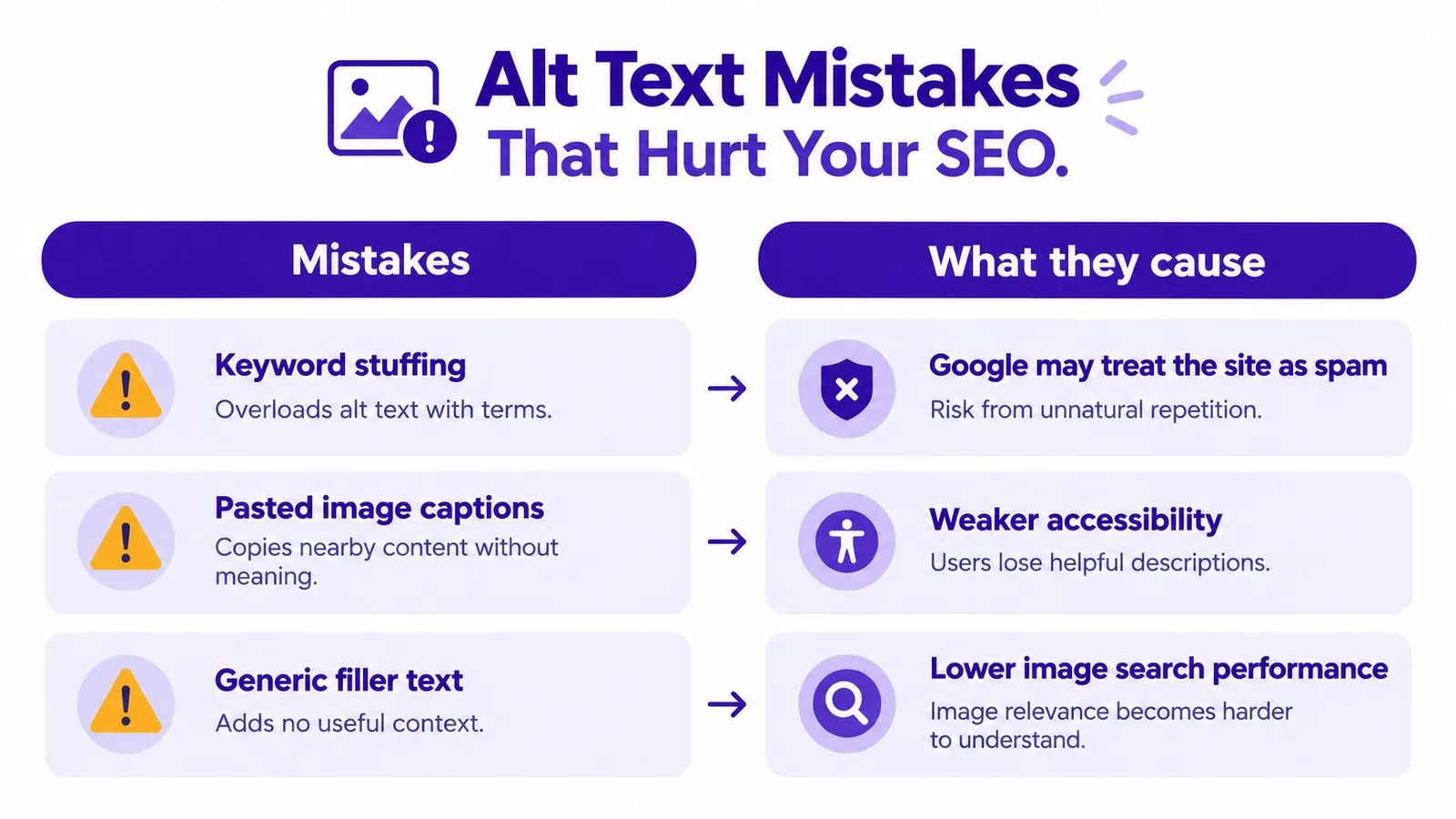
- Keyword stuffing: A string such as
leather bag buy bag best bagdoesn't describe a photograph. Fix: Replace the list with an accurate subject and relevant visible detail. - Filename or SKU values: An internal identifier may help staff locate a product without explaining the image. Fix: Write the information a shopper needs.
- Repeated descriptions across different views: Identical text can conceal the purpose of detail photographs. Fix: Describe the distinctive information, without inventing differences where none exist.
- Unnecessary introductory wording: “Image of” often delays the useful description. Fix: Start with the subject unless the image's format itself matters.
- SEO copy on decorative assets: Promotional text can make assistive technology announce irrelevant imagery repeatedly. Fix: Restore the empty attribute where decoration is the image's only role.
- Appearance-only text on functional images: A description of colors can obscure a clickable image's purpose. Fix: Identify the action or destination.
The visual contrasts common habits with the problems they can create.
Fix templates as well as individual values
A recurring defect deserves a workflow-level correction. If every collection tile receives generic filler, editing isolated tiles won't prevent the next upload from repeating the problem.
For a wider technical review, Shugert's an engineering playbook for ecommerce teams is a relevant resource to include alongside image checks. The practical handoff should specify whether the defect belongs in stored content, generated text, or the template that renders it.
A useful audit therefore records both what's wrong and where the correction belongs. That keeps an editorial problem from being mistaken for a theme problem, or the reverse.
Managing Alt Text Across a Shopify Store
The catalog-scale problem isn't knowing how to describe a bag. It's maintaining an accurate standard as staff add photographs, replace collection artwork, and publish blog posts.
Manual editing and assisted generation are workable options with different review costs. Neither removes the need to identify an image's purpose.
| Approach | Useful for | Main review responsibility |
|---|---|---|
| Manual editing in Shopify admin | Small batches and unusual images | Consistency across editors and uploads |
| Automated drafting with human review | Repetitive descriptions and recurring publishing | Accuracy, context, and exceptions |
| A mixed workflow | Catalogs with routine and complex assets | Clear ownership of approval |
Treat generated descriptions as drafts
Manual work gives an editor direct control over each value, but requires attention every time an image changes. Assisted generation can reduce repetitive drafting, provided the system uses actual product attributes and article context rather than inserting the same target phrase everywhere.
Rankira is one option for Shopify merchants using automated image and article workflows alongside human review. Its alt-text workflow should remain grounded in the associated product information and article context, with merchant editing before publication; generated articles can also be held as drafts for approval.
The approval step matters because product data alone may describe features that a particular photograph doesn't show. An editor should compare the draft with the asset, not merely confirm that the words exist somewhere in the catalog.
Validate purpose as well as completion
A useful automated workflow should apply these checks:
- Missing alternatives: Flag informative images without an
altattribute. - Unhelpful values: Reject keyword-only text and copied filenames.
- Functional meaning: Require text that communicates the action or destination for linked images.
- Decorative exceptions: Preserve intentional
alt=""values instead of automatically filling them. - Context changes: Request review when an image or its role changes.
These checks belong in the same publishing routine as other Shopify SEO maintenance. Treating them as a separate cleanup project makes it easier for new uploads to bypass the standard.
The useful measure of completion isn't whether every field contains words. It's whether each rendered image has the appropriate alternative for its job.
Putting Alt Attribute SEO Into Practice
A practical starting point is the store's highest-traffic product and collection pages. Those pages provide a manageable place to inspect images that customers already encounter, without requiring an immediate catalog-wide rewrite.
The audit should record the image's location, role, current alternative, and required change. That small amount of context helps an editor avoid replacing an intentional empty attribute with unnecessary copy.
Start with a focused review
- Choose a page group: Begin with prominent products and collections rather than unrelated assets scattered across the store.
- Assign an image role: Use the informative, functional, and decorative distinction before editing.
- Check the actual photograph: Confirm every feature in the draft against the image and reliable product information.
- Review the destination: For linked imagery, make sure the alternative fits the page reached by the click.
- Inspect the published result: Confirm that the intended value reaches the rendered image markup.
For linked collection tiles and product imagery, an internal linking audit can sit alongside this review. The destination and the alternative should be considered together, not maintained as unrelated fields.
Make the review repeatable
After the initial cleanup, assign responsibility for new uploads. A product editor might approve gallery descriptions, while the person publishing articles checks editorial imagery and complex visuals.
The same review should apply whether a description was typed manually or generated from store data. Automation changes how the draft appears, not the standard it must meet.
The next action is concrete: select a high-traffic product page, review its gallery, and correct each image according to its purpose. Then apply that approved pattern to the next group of images, keeping exceptions visible rather than forcing every asset into the same template.
Rankira offers Shopify-focused content generation, image workflows, and draft review that merchants can use alongside an alt-text approval process. Merchants seeking an assisted publishing workflow can visit Rankira and assess how its product-context drafting fits their store's image-review routine.
Keep reading
All articles
Shopify SEO
SEO Content Writing Principles for Readers and Search
Learn the principles of SEO content writing that balance search relevance, clear structure, and real reader value, with examples for online stores.
10 min read
Shopify SEO
Internal Linking Audit That Actually Improves Rankings
Run a practical internal linking audit to find orphan pages, fix broken links, and prioritize fixes that move revenue on your Shopify store.
10 min read
Shopify SEO
Share of Voice SEO: A Practical Measurement Guide
Learn how share of voice SEO works, how to calculate it, and how to use intent-based metrics to assess search visibility and business impact.
12 min read
Put your Shopify blog on autopilot
Rankira researches keywords, writes SEO articles, adds internal links, and publishes them to your store — every week. Start with a 7-day free trial.