How to Check Ranking on Google Without Guessing
Check ranking on Google with a repeatable method. Read average position, clicks, and AI Overviews so ranking moves are easier to trust.
Published 11 min read
In this article
Searching a Shopify store on Google and treating the result as its official rank is popular advice, but it's a shaky way to measure search performance. The result on a store owner's screen can differ from what a customer sees, and a position by itself can't show whether the right people clicked or bought.
A useful check separates three signals: a controlled search-result snapshot, Google Search Console data on impressions and clicks, and business outcomes such as product views or revenue. Each answers a different question. Together, they help a merchant distinguish a real SEO change from ordinary variation.
Table of Contents
- Why Your Google Ranking Is Not One Number
- How to Check Ranking on Google Reliably
- How to Read Search Console Position Data
- What Clicks Reveal Beyond a High Rank
- How AI Overviews Change Ranking Checks
- Tips for Monitoring Rankings Over Time
- Choose a Workflow and Start Checking
Why Your Google Ranking Is Not One Number
A search for “organic cotton sheets” can show a store's buying guide at what looks like position four on the owner's laptop. A shopper in another country might not see that page in the same place, or might see a different result altogether. Neither screen is a universal score for the page.
Google's results can vary with country, city, device, language, search history, and query intent. A customer looking for sheets to buy may get a different mix of product pages and shopping results than someone researching fabric care. A laptop search from the merchant's own city is only one observation, not a dependable account of every shopper's experience.
Search Console adds another useful signal, but its query list isn't complete in every case. Google says some low-volume or sensitive queries may be omitted, and storage and privacy limits can prevent every query from appearing in reports (Google's explanation of Performance report data). A missing query isn't, by itself, proof that a page lost its ranking.
Three signals, three different questions
A controlled rank check records what appeared under consistent search conditions. Search Console shows impressions, clicks, click-through rate, and average position for a verified site. Store analytics and commerce reporting help show whether search visits lead to useful actions, such as product views or purchases.
Those signals shouldn't be collapsed into one verdict. A buying guide can appear lower in a particular check and still bring qualified visitors. A flattering position for an informational query can mean little if those searchers have no interest in the store's products.
Merchants planning content around real catalog topics can start with a step-by-step keyword research process. The purpose isn't to collect trophy rankings. It's to understand whether the store is visible for relevant searches, whether that visibility brings clicks, and whether those visits support the business.
How to Check Ranking on Google Reliably
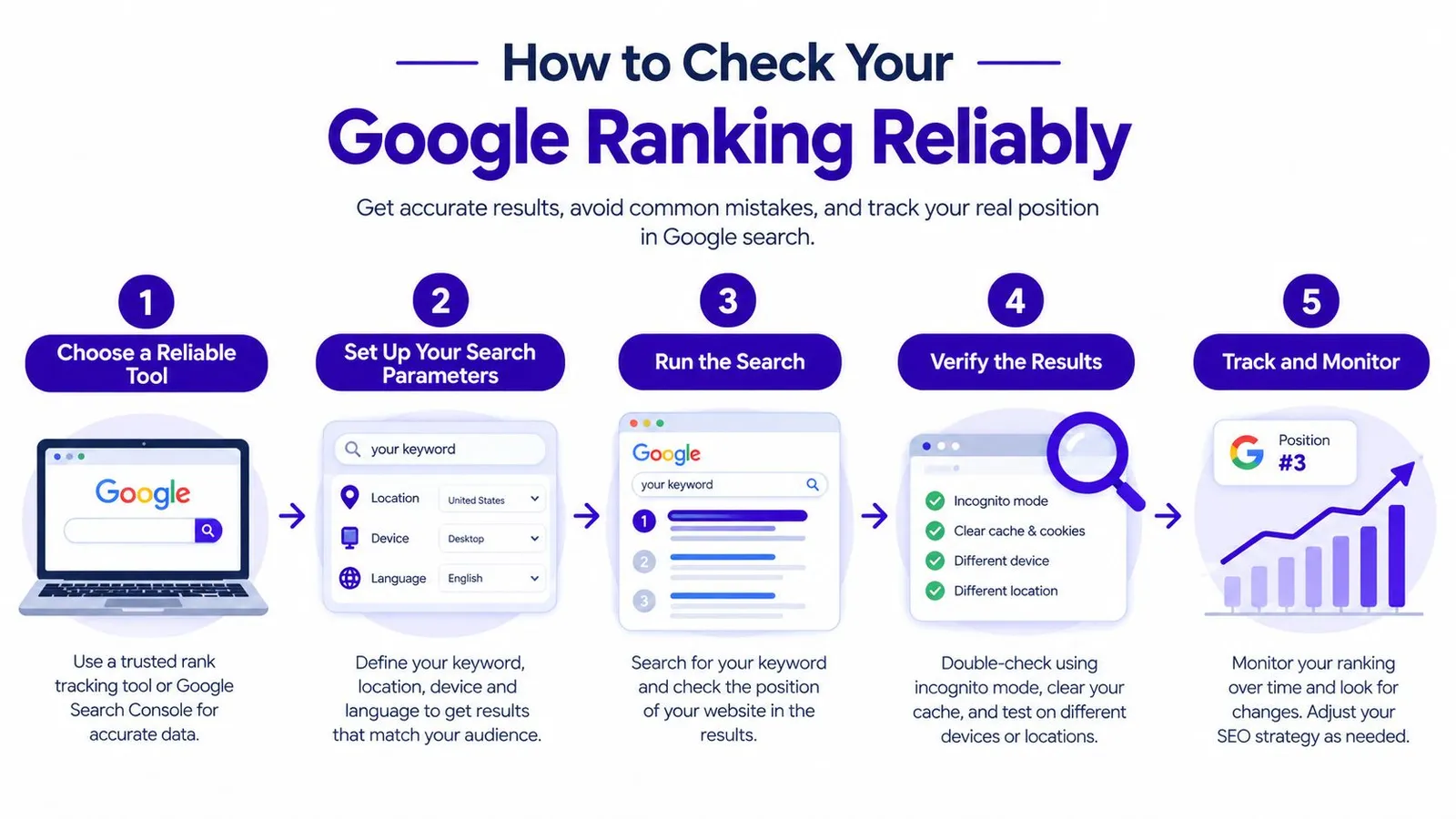
A useful manual check is a repeatable snapshot, not a quick search followed by a guess. The merchant chooses one query and one target page, holds the search conditions steady, and records what appeared. That makes later comparisons more meaningful.
Start with a query tied to a specific product, collection, or article, then name the URL that should answer it. For a candle shop, that might be the query “soy candle burn time” and a care-guide page. Fix the country and language, and check mobile and desktop separately. A clean browser session helps reduce the influence of personal search history.
Record the result, not just the position
For every check, note the date, query, location setting, language, device, URL that appeared, and its organic position. Also record the features around the result: ads, shopping units, local packs, videos, or AI summaries. These details help explain why two searches for the same phrase can produce different experiences.
The candle shop might find its care guide in a different spot on a US mobile result than on desktop. Both observations can be valid, as long as the device is recorded and the comparison uses the same conditions. If the merchant scrolls until the store appears and calls that the rank, the log may overstate visibility: many customers won't scroll that far.
A simple log could look like this:
| Date | Query | Country and language | Device | Target URL found | Organic position | SERP features |
|---|---|---|---|---|---|---|
| Recorded at each check | Exact phrase | Fixed settings | Mobile or desktop | Page that appeared | Observed position | Ads, shopping, video, AI summary |
The snapshot is a lead, not a verdict. Before rewriting a page, compare the observation with Search Console and check whether its impressions or clicks changed. For broader site promotion work, merchants can also review backlink basics and planning, while keeping link activity separate from ranking measurement.
How to Read Search Console Position Data
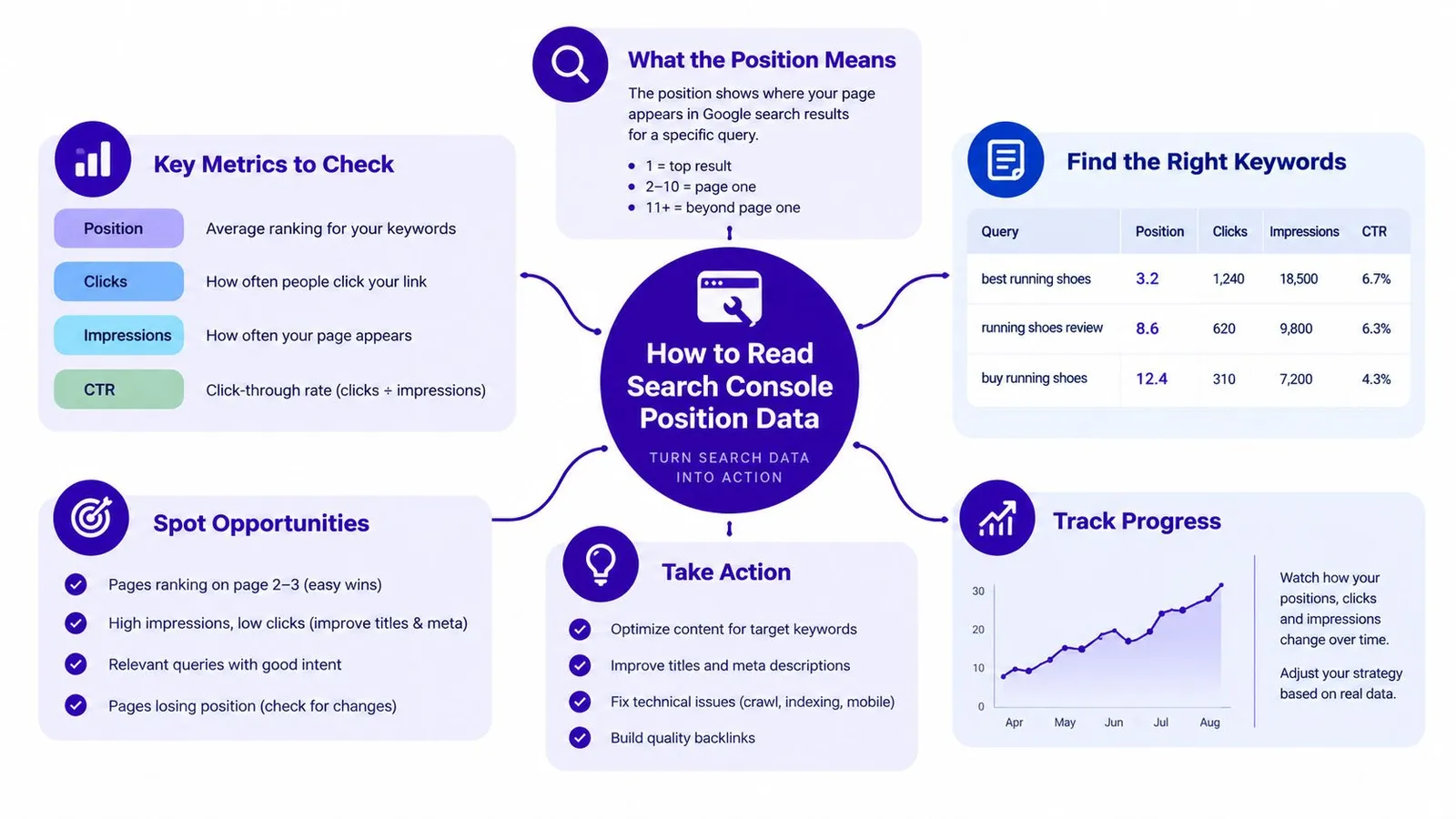
Google Search Console should be the primary source for a Shopify merchant's search-performance review. In the Performance report, segment data by query, page, country, and device. Export clicks, impressions, click-through rate, and position for a consistent period of 28 to 90 days, then compare the same dates year over year when seasonal demand matters, such as holiday gifting. Google describes the report's metrics and aggregation in its Performance report documentation.
The central point is that average position isn't a fixed daily keyword rank. Suppose a property appears at positions 2, 4, and 6 for a search. Search Console records the topmost position, 2, for that impression. That average doesn't mean every user saw the page at position 2.
Position depends on impressions and aggregation
Google records position only when a result receives an impression. If a page appears lower down but a searcher doesn't reach the result, that appearance isn't counted as an impression. As a result, the reported average doesn't include every possible place the page might have appeared.
Property-level and page-level views also answer different questions. Property aggregation counts the site's topmost result for a search, while page aggregation evaluates each URL separately. If a collection page and a blog post both appear for “linen duvet cover,” the property may look steady even as the article the merchant is watching loses visibility. Mixing the two views can make a gain or decline appear where the selected page's data doesn't support one.
For a useful explanation of how search data can inform broader marketing decisions, merchants can explore B2B search insights from Machine Marketing. The practical habit is simpler: read a query's position alongside its impressions, clicks, and CTR, and keep site-level results distinct from a single URL's performance.
A video walkthrough can provide another way to follow the reporting interface:
What Clicks Reveal Beyond a High Rank
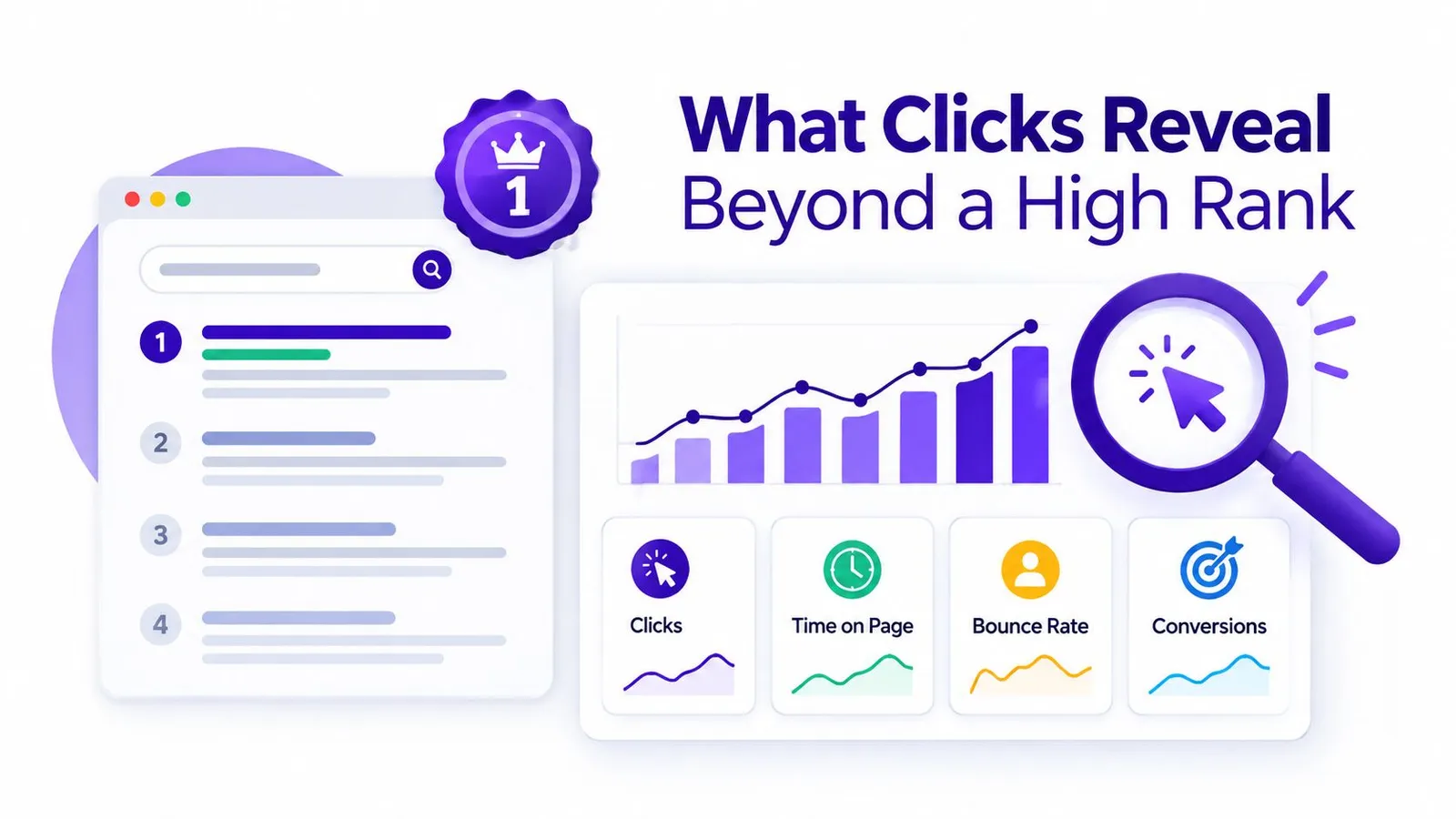
A strong position doesn't guarantee a strong share of clicks. In a 2024 analysis of Google results without maps, videos, images, or shopping elements, the first organic result had a 39.8% click-through rate, compared with 18.7% for the second and 10.2% for the third. Results below the third received less than 10% in that analysis (the reported click-through-rate analysis).
The numbers show why small position changes can matter under those conditions. Moving from position two to one can potentially more than double a result's share of clicks. But those figures don't describe every search page. The same analysis reported a 27.4% CTR for the second result when snippets appeared and 15.1% when a local pack was present. Search-result features change the space and attention available to organic listings.
Read position in its search-result context
Consider a care guide that holds a good organic position for a product-related query. Shopping ads or product listings may appear above it, while a video or other result feature draws attention nearby. The guide's position can stay steady while fewer searchers notice or click it.
That's why a merchant should compare position, impressions, clicks, and CTR for queries tied to products and collections. Impressions show whether the result appeared; clicks show whether searchers visited; CTR connects the two. None of those measures alone proves that the page is driving sales, so store outcomes still matter.
A steady rank with a falling click-through rate is a visibility problem to investigate, not proof that nothing changed.
A broader SEO share-of-voice perspective can help merchants think beyond a single blue link. The key is to note what surrounds the result before deciding that a page's ranking number tells the whole story.
How AI Overviews Change Ranking Checks
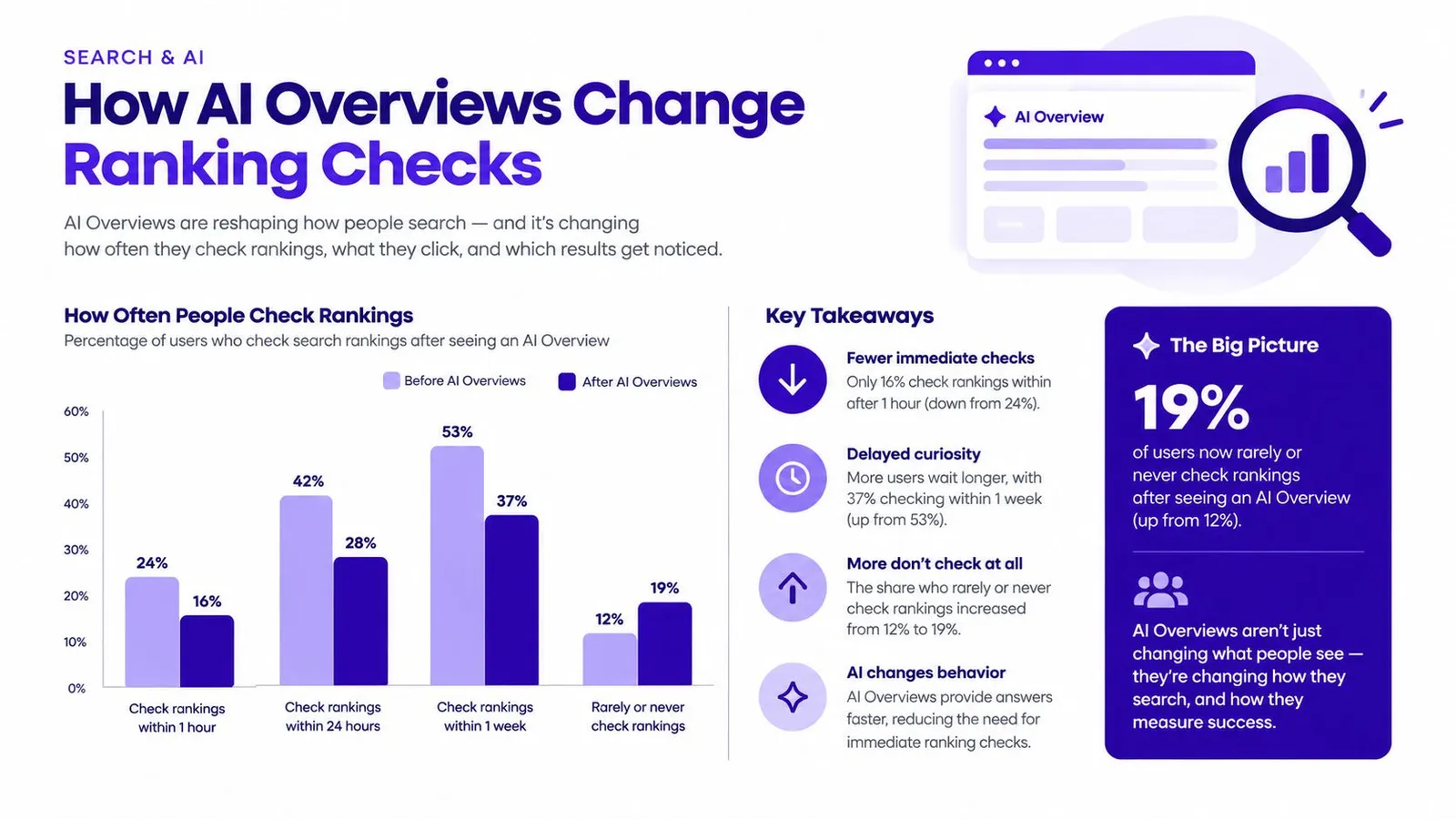
AI Overviews add another reason a conventional blue-link position can be an incomplete measure of visibility. A 2025 Semrush analysis of more than 10 million keywords found that AI Overviews appeared for 6.49% of queries in January, peaked at nearly 25% in July, and fell to 15.69% in November, according to Search Engine Land's reporting on the analysis. The figures show how much prevalence can move; they aren't a forecast for any one Shopify store.
Clicks can also change when a summary appears. Independent reporting on Pew Research Center data found that users clicked a traditional result in 8% of visits when an AI summary appeared, compared with 15% when it didn't, and users more often ended their browsing session when a summary was present. A result may still be visible in ordinary organic reporting even when the searcher gets an answer without visiting the site.
Note AI visibility separately
Search Console doesn't provide a separate AI Overview metric. AI Overview activity is blended into organic reporting, which makes it difficult to identify whether a CTR or traffic decline came from a changed blue-link position, a different results page, or an answer shown directly on Google.
Merchants can add a visibility note to their monitoring log: record the traditional rank, whether the store is cited in an AI summary, the cited source, impressions, clicks, and assisted sales where that data is available. These observations won't create a perfect measurement, but they can stop a merchant from diagnosing every missing click as a lost organic position.
The practical point is to keep the signals distinct. A traditional rank describes one kind of result; an AI citation describes another form of presence; clicks and sales show whether that presence sends useful visitors to the store.
Tips for Monitoring Rankings Over Time
A ranking works like a scale that gives a slightly different reading each time you step on it. One discouraging search is a reason to check the conditions, not a reason to rewrite the page. Compare the same query, URL, country, and device each time, and when a manual result looks worrying, look for a pattern across roughly 28 days before touching the content. That window smooths out the daily noise and gives a steadier basis for judging whether a movement is real.
Watch impressions and clicks beside position. A small position wobble with steady clicks rarely needs urgent action. A page can also rank well for a query that attracts readers who never intended to buy, so judge performance by qualified visits, product views, and revenue rather than by how impressive a rank looks.
Let the evidence set the pace
Google rebranded Webmaster Tools as Google Search Console on May 20, 2015, extending the product beyond technical webmasters and centering site-level search measures such as queries, impressions, clicks, CTR, and average position (Google's announcement of the rebrand). For merchants, that wider view beats a single position captured in one search.
Here is where confusion usually shows up. An agency watches a gift guide appear to slip from about position 3 to 6 on mobile in one city, while desktop clicks hold. The right response is to confirm that exact segment in Search Console and compare its impressions and clicks before editing the article. Running an internal linking audit is also worthwhile, since a page can lose ground because supporting links to it were removed, not because the content weakened. If the decline stays limited to one location or device, a broad rewrite could damage parts of the page that still perform.
For businesses that need to tie organic activity to actual customer outcomes, this guide shows how to connect SEO results to booked jobs rather than stopping at rankings. The same discipline applies to a store: ask whether the query attracts potential buyers and whether those visitors reach relevant products.
Decision rule: Act when a meaningful pattern appears in comparable data and affects qualified traffic. Keep watching when the signals are mixed. Ignore a scary screenshot until the conditions and supporting metrics have been checked.
Choose a Workflow and Start Checking
Different methods suit different jobs. A controlled manual search is useful for checking what a customer might encounter under defined conditions. Search Console is the main source for a verified site's actual impressions, clicks, CTR, and average position. A third-party rank tracker typically samples selected keywords from a set location and device, making it useful for repeatable keyword monitoring but not a substitute for Search Console's site-performance data.
| Method | Best for | What it shows | Main limitation |
|---|---|---|---|
| Controlled manual search | A merchant checking a specific query and result page | The result and features visible under recorded conditions | It's one snapshot, not a universal rank |
| Google Search Console | Measuring a verified store's search performance | Queries, pages, countries, devices, impressions, clicks, CTR, and average position | Position is an average based on impressions, not a fixed daily rank |
| Third-party rank tracker | Agencies monitoring selected terms across set locations and devices | Sampled keyword positions under defined settings | It samples selected searches and may not reflect every customer's results |
| Shopify-admin content workflow | Merchants who want planning, publishing, and reporting together | Content work and search reporting in the store's admin | It still requires sensible interpretation of search metrics |
Pick the setup that fits the store
Manual checks plus Search Console are enough for a merchant learning how ranking measurements work. A tracker fits an agency that needs to monitor many chosen keywords across locations and devices. Merchants who'd rather keep topic planning, content production, publishing, and measurement in Shopify can consider a store-admin workflow such as getting started with Rankira.
Rankira runs inside Shopify administration rather than requiring a separate login. It uses store information, competitor analysis, and Search Console data for keyword research, and reports clicks, impressions, search positions, and Ahrefs Domain Rating. Articles publish as ordinary Shopify blog posts with links to relevant products, collections, and pages.
The Standard subscription costs USD 39 monthly, includes the listed features, and starts with a seven-day trial. Charges appear on the Shopify invoice, and the app doesn't request customer, order, or payment data. That setup may suit merchants without a content team who want publishing and reporting near their store operations, while a simpler manual-and-Search-Console routine may be enough for others.
Start by verifying the store in Search Console, choosing five queries tied to products or collections, and logging a controlled check this week. Review the same queries after 28 days under comparable conditions, then decide whether the evidence supports a content change.
Rankira brings Shopify-focused keyword research, article publishing, internal linking, scheduling, and search performance reporting into the store admin. If that workflow would make ranking checks and content follow-up easier to maintain, visit Rankira to explore it.
Keep reading
All articles
Shopify SEO
Search Engine Positioning SEO Explained for Organic Growth
Search engine positioning SEO explained: learn how rankings and SERP visibility are measured, plus practical ways to improve and monitor organic positions.
11 min read
Shopify SEO
SEO New Website Guide: From Launch to First Rankings
SEO new website plan that actually works: indexing, site structure, keyword targeting, content, Core Web Vitals, and tracking from launch to growth.
13 min read

Shopify SEO
SEO Content Writing Principles for Readers and Search
Learn the principles of SEO content writing that balance search relevance, clear structure, and real reader value, with examples for online stores.
10 min read
Put your Shopify blog on autopilot
Rankira researches keywords, writes SEO articles, adds internal links, and publishes them to your store — every week. Start with a 7-day free trial.