Meta Description Check: How to Audit and Fix Yours
Run a meta description check in page source or an SEO editor, judge length and query fit, and rewrite only the descriptions that mislead or repeat across pages.
Published 10 min read

In this article
A meta description check is the audit that tells you whether the saved draft is worth using, and why the version on the results page differs when it isn't. That means reading the tag in source, scoring it against the page, and testing it against real queries before any copy gets rewritten. Run the sequence below in order.
Table of Contents
- Find the Meta Description on Any Page
- Score Length, Uniqueness and Query Fit
- Diagnose Why Google Rewrote Your Snippet
- Common Problems and How to Fix Them
- Rewrite Descriptions That Fail the Check
- Decide Which Pages to Recheck This Month
Find the Meta Description on Any Page
Confirm the tag exists before touching a word. In 2025, 32.3% of desktop pages had no meta description, a share calculated from HTTP Archive's crawl data by StatisticsGlobal. A missing tag is the cheapest problem in this whole process, and it's usually sitting on a page you assumed was finished.
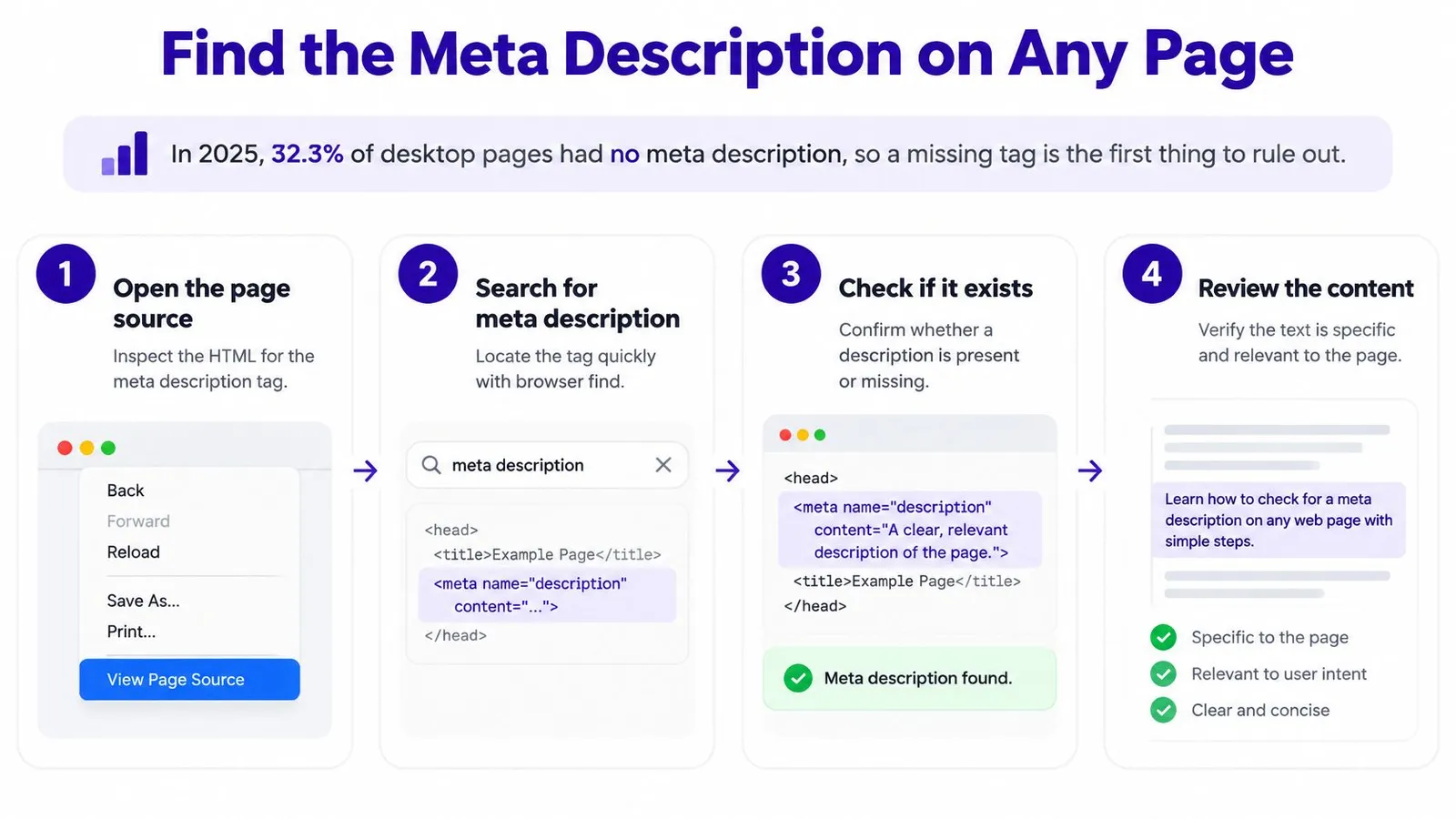
The check takes about ninety seconds per page once the routine is fixed:
Open the live URL in a browser, not the theme editor preview. The preview renders markup the crawler never receives.
View the page source. Right-click and choose View Page Source, or press Ctrl+U on Windows (Cmd+Option+U on a Mac).
Search the source for the word description. Browser find jumps straight to
<meta name="description" content="...">inside the head section.Read the content value and count the characters. Note an empty value, a placeholder, or the same tag appearing twice, which happens when an app and a theme both write one.
Open the matching SEO field in your editor (product, collection or page SEO in Shopify admin) and compare it with the source text. The two should be identical.
Log the URL, the tag text and the character count in a sheet. Ten rows is enough to expose a pattern across a template.
That last step is the one people skip, and the one that pays. On-page optimization is far easier to judge with five product pages side by side than one page opened in isolation.
There's a specific tell that something else is in charge: the SEO field holds a sentence you wrote, but the source shows different text, or nothing at all. A theme setting, a structured-data app or a hardcoded tag in the template is winning. Fix the override before rewriting, because new copy typed into an overridden field never reaches the page.
Score Length, Uniqueness and Query Fit
An existing tag proves nothing. The next pass scores what's inside it, and six rows cover the failures that cost clicks.
| Check | Pass signal | Red flag | Fix |
|---|---|---|---|
| Presence | Tag exists in the head with text | Tag missing or empty | Write one from the page's opening paragraph |
| Length | About 120 to 160 characters | Key term falls past the mobile cut-off | Trim or expand, then check mobile truncation |
| Front-loaded meaning | First 60 characters state the page's answer | Opening words are filler such as "welcome to" | Move the core answer to the start |
| Uniqueness | Different from every other page | Identical text on several product or collection pages | Add a product-specific detail such as material or size |
| Query fit | Names the topic and a reason to click | Generic phrases with no subject | Use the core terms from the query |
| Accuracy | Every claim appears on the page | Promises missing from the page content | Remove the claim or add it to the page |
Presence is binary. An empty content value fails even though the tag itself renders, because Google sees nothing usable.
Length is a diagnostic. Google's snippet documentation states there is no maximum length for a meta description and that the displayed snippet is truncated to fit the width of the user's device, which makes 155 or 160 a usability convention rather than a rule. Treat 120 to 160 characters as a working range for the sentence that carries the message, and read the meta description length trade-offs before trimming. The opening 60 characters matter most, because those are the words most likely to survive a phone-width cut.
Front-loaded meaning catches the most common waste. "Welcome to our shop" spends the visible line on a phrase that tells a searcher nothing and pushes the useful detail past the cutoff.
Uniqueness fails on stores built from one template. Compare a description against five others in the same template; if six collection pages share a sentence, none of them stands for anything.
Query fit needs the topic the searcher typed plus a reason to click. If the page hasn't been pinned to a query yet, pin it first, and the method for selecting keywords for Reddit campaigns transfers directly, since both start from intent rather than volume.
Accuracy is essential. Free shipping, a 30-day return window, made in Portugal: each claim has to exist on the page itself, or Google may prefer the page's own text and drop the tag.
A pass looks like a 14 oz waxed canvas tote, 38 x 42 cm, with a leather strap, sold in three colours and shipped from Portugal within two days. A fail reads: "Welcome to our shop, find great quality bags at great prices." One names a product and a promise; the other could sit under any result on the page.
Length is a diagnostic, not a target. The character count tells you where the truncation risk sits, not whether the words are worth reading.
A description can fail one row and still be worth keeping if the others are strong, so score the whole row set before rewriting. Google has treated the tag as a snippet input since its September 28, 2007 Search Central post, and current guidance keeps that conditional model: snippets are generated automatically from page content, with the description used when it explains the page more accurately. This table validates the tag. It can't promise the tag will be displayed.
Diagnose Why Google Rewrote Your Snippet
A replacement snippet isn't an error report. It's an opinion about which text on the page describes it best for that query, and the gap between your saved copy and the displayed copy is the thing being audited.
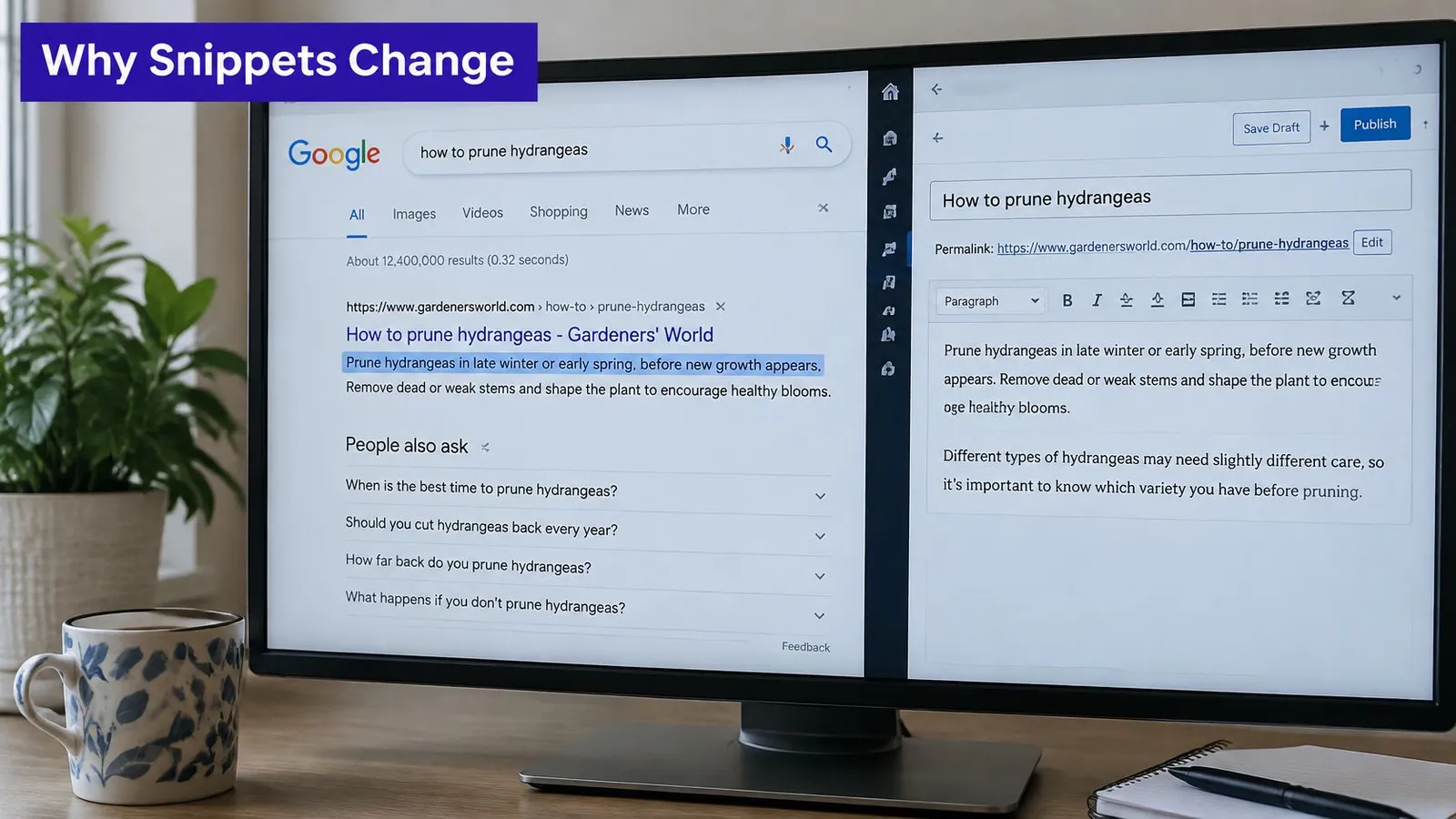
Search Console won't show you the snippet text, so the diagnosis starts with manual observation:
List the top five queries for the page in the Search Console performance report.
Search each query in a private browser window and copy the snippet shown under your result.
Compare each snippet with the saved description, marking whether it's your text, a page paragraph or a blend of both.
Read the page's first 150 words and its headings. If Google borrowed that text, it's already answering the query better than the tag does.
Check vocabulary overlap between the query wording and your description. A description built from "handcrafted leather goods" won't match a search for "crossbody bag dimensions".
The pattern in those five comparisons decides the fix. When Google keeps pulling a paragraph, the page's opening is clearer than the tag, and rewriting the tag to match the paragraph usually earns the display back. When it shows a generic line, the saved description is too vague to compete with any page text.
Decision rule: if Google consistently pulls the same paragraph across several queries, that paragraph is the better description. Rewrite the tag to match it instead of fighting it.
One result is not a trend. Google varies snippets by query, device and layout, so repeat the check across several days before concluding anything about a page. Titles matter in the same diagnosis, since a title that restates the query changes which part of the result catches attention, and these title tags SEO patterns are worth reviewing alongside the description.
For a walkthrough of the same comparison inside the interface, this covers the sequence:
Common Problems and How to Fix Them
Two symptoms account for most wasted hours: a snippet that reads identically across a dozen product pages, and a field that looks filled in the editor while the source shows an empty tag. Both trace back to the template deciding the description before the page content gets a say.
| Symptom | Likely cause | Fix |
|---|---|---|
| Google shows a paragraph from the page | Description is generic or missing | Rewrite with a specific answer in the first sentence |
| Snippet cuts off mid-thought on mobile | Long opening sentence hides the key term | Move the key term into the first 60 characters and cut the opener |
| Same snippet on many product pages | Template writes one description to every item | Add a product name, material or size to each page |
| Tag blank in source though the field has text | Theme or app overrides the field | Check the theme output and fix the template |
| Snippet promises something absent from the page | Copy written before the page changed | Update the description or add the claim to the page |
| Different snippets for each query | Description doesn't use the query's terms | Align wording with the top queries from Search Console |
Template inheritance is the expensive one. The theme writes a fallback line into every item, and the fallback wins whenever the per-product field is empty, so ten different products return one identical result. Fix it in priority order: bestsellers first, then the collections that get impressions. Add a single detail per page, meaning the material, the size, the pack count or the delivery window, and a hundred pages no longer sound like a hundred copies of one.
Overrides need a habit rather than a project. After every change, confirm the tag in source. A five-second Ctrl+U catches a silent override before an afternoon disappears into copy that never renders.
Truncation almost always comes from a long opening clause rather than a long total. Move the key term into the first few words instead of cutting the whole text, because a shorter version of a vague sentence is still vague.
Fix the template once, then every page it feeds gets better without a second edit.
Timing separates the fixes as much as effort does. Correcting a blank field takes a minute and shows once Google recrawls. Rewriting every page inside a template is a few weeks of work followed by a few weeks of waiting, so fix the blanks first, then the highest-impression pages, and stop comparing the two as if they cost the same.
Rewrite Descriptions That Fail the Check
A rewrite should answer the searcher's question in the first sentence, backed by one concrete detail pulled from the page. Everything else is secondary.
A collection page shows the difference clearly. Before: "Great deals on our bags, shop now and save." After: "Leather crossbody bags from 45 to 120 euros, in four sizes, with a 30-day return policy, shop the range." The rewrite names the collection, states the price range and gives a reason to choose it, all inside the visible line.
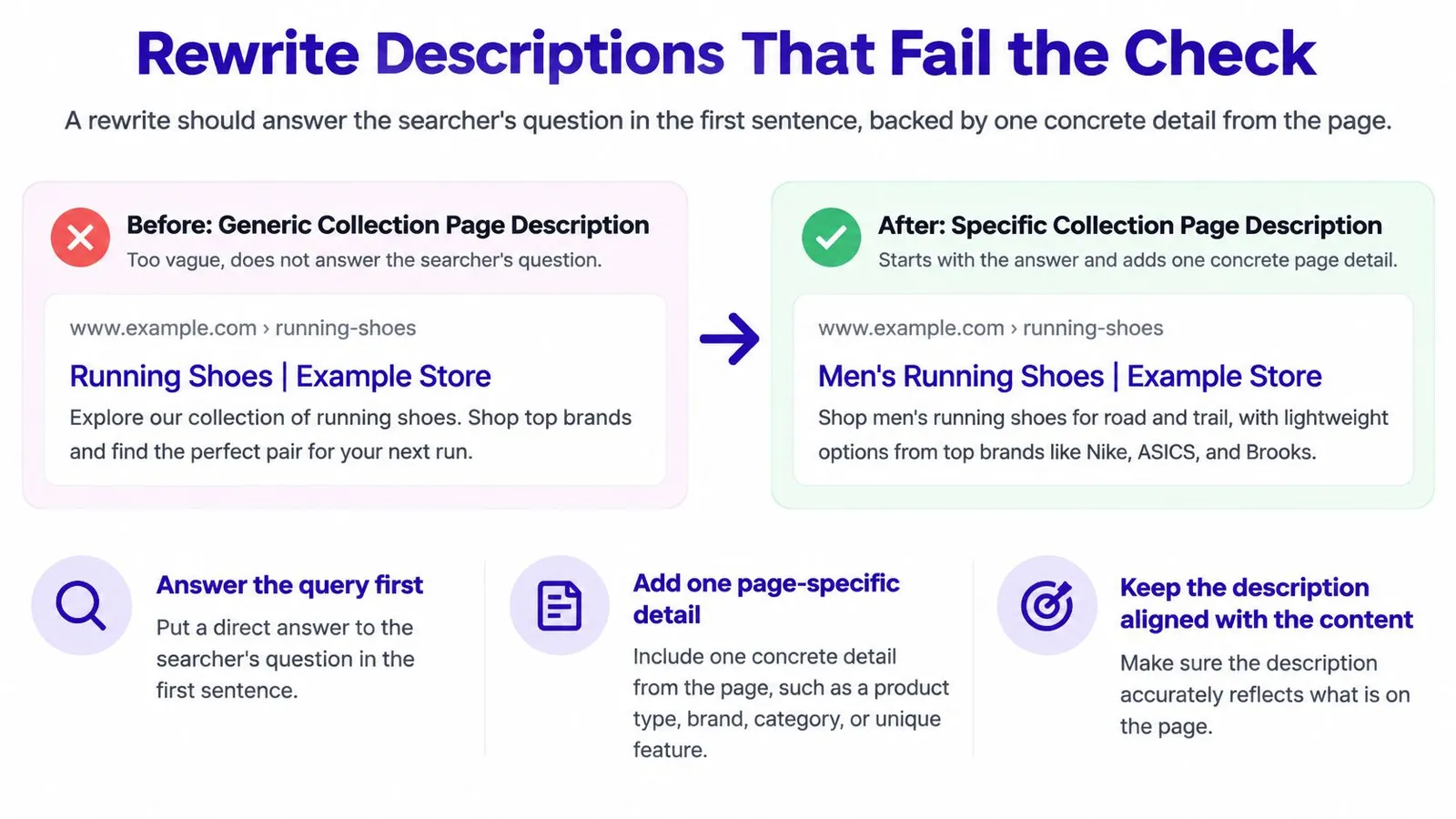
Three rules cover the ground the scoring table doesn't:
Use only details the page can prove. Materials, sizes, delivery regions and return windows belong in the text. Assurances about quality belong nowhere.
Say the main term once. A term repeated three times reads as keyword stuffing and pushes the useful detail toward the cutoff. Search engines highlight matched words in results already, so one clean mention does the work.
Drop the store name when it costs a detail. The brand adds little to a searcher deciding between five similar results, and eleven characters spent on it often push the price or the size past the cut.
Calls to action behave differently by page type. "Shop the range" suits a collection page, where the reader is already close to buying. On an article, a plain call to action adds nothing, and the space is better spent on what the piece answers.
Wording work feeds directly into descriptions, since the terms that earn the display are the terms the page targets, and these SEO keyword optimization principles keep the tag, the title and the first paragraph pointed at the same query.
A description should be true, specific to its page, and readable in the first line.
Decide Which Pages to Recheck This Month
Rank before rewriting. The Search Console performance report sorts pages by impressions and clicks, and the pages worth a meta description check this month sit where the first number is high and the second is low. Strong impressions mean Google already considers the page relevant; a weak click share means the two lines it shows aren't persuading anyone.
Work in this order: pages with an obvious impression-to-click gap, then product and collection templates that share one description, then articles. Anything published long ago gets the same treatment, and editing a published article is a safe operation. Changing the title, body, images or meta description doesn't touch the URL; only the handle sets the URL, so leave the handle alone and the page keeps its history.
For each page, open the SEO description field, confirm the tag in source matches it, and log the URL, the saved text and the date. Rankira saves its generated meta description to Shopify's SEO meta description field and the Excerpt when it publishes an article, which gives that log a complete starting row instead of a blank column.
After each batch, wait two to four weeks, then repeat both the manual query search and the source check, recording whether the snippet now matches the intent behind the top queries. Track the change against the wider search engine optimization metrics you already watch, so a click improvement can be attributed to something.
If the snippet still differs after a fair test, the description isn't the problem. The page's opening content is the next place to change, because that's the text Google keeps choosing instead.
Rankira writes each article with a meta description saved to Shopify's SEO meta description field and its Excerpt, so the draft and the tag start out as the same text. It also reports clicks, impressions and positions inside Shopify, which makes the impression-to-click gap easy to spot before you rewrite anything. Visit Rankira to see how the keyword plan, article generation and performance reporting fit together for your store.
Keep reading
All articles
Shopify SEO
10 Proven Ways to Increase Traffic Site in 2026
Discover 10 proven ways to increase traffic site visits through search, content, and email, with practical steps for Shopify stores.
15 min read
Shopify SEO
Title Tags SEO: How to Write Titles That Earn Clicks
Title Tags SEO explained: what a title tag is, how Google picks the title shown in results, and how to write titles that earn clicks.
10 min read

Shopify SEO
10 Best Blog Topics Shopify Stores Should Publish
Discover the 10 best blog topics for Shopify stores, from buying guides to FAQ articles, with practical tips to turn readers into customers.
16 min read
Put your Shopify blog on autopilot
Rankira researches keywords, writes SEO articles, adds internal links, and publishes them to your store — every week. Start with a 7-day free trial.