SEO Keyword Optimization: A Step-by-Step Guide for 2026
Learn SEO keyword optimization step by step: match search intent, prioritize by business value, fix on-page elements, link internally and track results.
Updated 11 min read
In this article
- Table of Contents
- How Rankings Translate Into Clicks
- How to Match Each Keyword to Search Intent
- How to Prioritize Keywords by Business Value
- On-Page Changes That Lift Clicks Without Stuffing
- Internal Links That Connect Articles to Products
- Performance Checks and When to Re-Optimize
- Start Your First Keyword Round This Week
A page sitting in first place earns an average organic click-through rate of 27.6%, against 15.8% for second place. That is a 74.7% relative difference, from a large analysis of about 4 million Google results published by Lumar.
That gap is why seo keyword optimization is a ranking and click problem, not a volume problem. A store doesn't win traffic by collecting the biggest phrases. It wins by moving the queries it can reach into the positions that still send visitors, then connecting those visits to products someone can buy.
Table of Contents
- How Rankings Translate Into Clicks
- How to Match Each Keyword to Search Intent
- How to Prioritize Keywords by Business Value
- On-Page Changes That Lift Clicks Without Stuffing
- Internal Links That Connect Articles to Products
- Performance Checks and When to Re-Optimize
- Start Your First Keyword Round This Week
How Rankings Translate Into Clicks
Page one is a weak target by itself. The same page-one listing can send a stream of buyers or almost nothing, depending on where it sits and what Google shows around it.
| Search position | Average organic CTR | Practical reading |
|---|---|---|
| 1 | 27.6% | The top result takes the largest share of clicks |
| 2 | 15.8% | A one-place slip near the top can cut visits sharply |
| 10 | A small fraction of position 1 | Bottom of page one is still visible, but rarely chosen |
The useful forecast is not volume times a generic CTR. Start with the curve above, then discount it for the results that absorb the click: shopping units, ads, featured snippets, AI summaries, map packs, and brand queries where the searcher already knows the destination. A comparison query close to purchase can outearn a bigger informational phrase because the click is still available and the visitor is nearer to a product page.
Those percentages are benchmarks, not a forecast for the next collection page. Click-through rate shifts with intent, device, brand familiarity, and SERP features. A branded product query and a generic how-to will not share the same curve.
Organic CTR is clicks divided by impressions. Average position is where the URLs appeared for the queries in the report. Read both in Search Console before calling a keyword a success. A phrase in the title that never earns clicks is not optimized.
Practical rule: spend the next round on queries where a realistic move into the top three is possible. Chasing a head term parked around position 40 burns the same writing time for a smaller click gain.
If current positions are unclear, check where the store already ranks before picking new targets. Keyword inclusion alone does not show whether a page is close enough to matter.
How to Match Each Keyword to Search Intent
Volume chasing fails before the writing starts. An Ahrefs analysis reports that 94.74% of keywords receive 10 or fewer monthly searches, while only 0.0008% exceed 100,000. Most of a "high volume" export is noise. Classify intent first, then decide which page type should own the cluster.
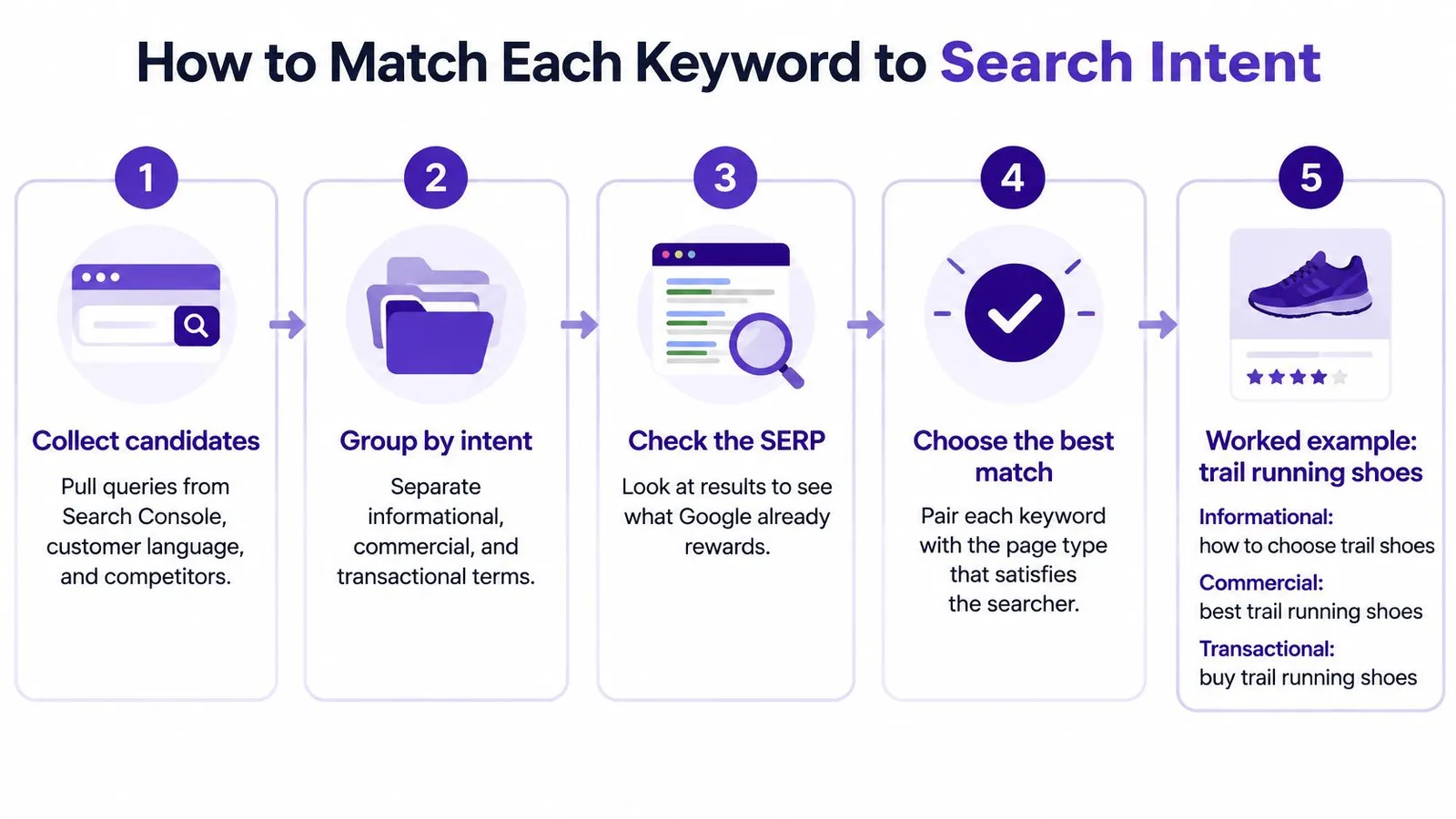
Say the catalog is trail running shoes. Work through the queries in this order.
- Collect candidates from three places. Pull Search Console queries that already earn impressions, product and category terms from the catalog, and phrases competitors rank for. Skip anything with no path back to a shoe, a fit problem, or a buying decision.
- Group close variants that share one task. "Trail shoes for wide feet" and "best wide trail runners" belong in one cluster. They describe the same job even when the wording differs. Separate clusters only when the task changes, such as lacing technique versus a width comparison.
- Label the cluster. Informational means the searcher is learning. Commercial means they are comparing before they buy. Transactional means they are ready to purchase. One primary label per cluster keeps later pages from competing with each other.
- Open the live results. Note the dominant content type, the subtopics that repeat, how fresh the top pages look, and the exact wording in titles and headings. If Google is showing product grids, a 2,000-word essay will not match what that query is rewarding.
- Assign the page type. Give each planned article one primary intent. Map transactional clusters to a product or collection page. A query like "buy wide trail running shoes" belongs on the wide-fit collection, not on a blog post that links out and hopes. Use informational clusters for supporting articles that can link into that collection.
- Check for cannibalization. If two drafts would satisfy the same intent, merge them. If one page teaches how to measure foot width and another sells the wide-fit line, keep both even when a few words overlap. Splitting one intent across two URLs divides internal links and relevance.
Google recommends people-first content and treats excessive repetition as keyword stuffing. The keywords meta tag isn't used for ranking, so filling it doesn't move a collection.
If the top results are product lists and the draft is a long guide, the intent is wrong. Change the page type before you change the prose.
Measure the published URL with impressions, average position, clicks, CTR, indexed status, and conversions by query. Re-optimize only after enough impressions have accumulated to read a pattern.
How to Prioritize Keywords by Business Value
Volume still misleads once the results page answers the question itself. In US product-query samples covered by Aleyda Solís, zero-click rates rose year over year from 67.1% to 69.6% for laptops and from 67.9% to 69.2% for jeans. Headphones saw a 4.63% increase. A busy query can send almost nobody to the store.
The pattern isn't limited to those three categories. SparkToro and Datos figures put nearly 60% of Google searches in the European Union, and more than 58% in the United States, as ending without a click in 2024. Long queries are even more exposed to summaries. SE Ranking found that keywords of four or more words triggered Google AI Overviews 60.85% of the time in its November 2024 US and UK analysis. Check SERP click potential on long-tail product phrases before a cluster earns a slot.
Score every cluster on the same four dimensions.
| Dimension | Question to ask | High signal vs low signal |
|---|---|---|
| Qualified demand | Do searchers look for what this store sells? | High: exact product terms with buyer language. Low: broad curiosity with no product link |
| Purchase proximity | How close is the query to buying? | High: comparison or buy-now wording. Low: general learning questions |
| SERP click potential | Does the results page still send clicks out? | High: lists and forums with few answer boxes. Low: direct answers, shopping panels or AI summaries |
| Catalog fit | Is there a product or collection that fully satisfies this query? | High: a matching product page exists. Low: no relevant merchandise to link to |
Informational clusters still earn a place when they introduce a category, solve a specific pre-purchase problem, or create a link path into merchandise. They don't earn a place just because the monthly number looks bigger.
"Waterproof jacket for winter cycling" with matching jackets in the catalog can beat "how to stay warm on a bike" even when the second phrase has more searches. The first query is close to a purchase and has a page that can satisfy it. The second is often answered on the results page, and the store has nothing specific to sell against "stay warm."
Classify clusters as discovery, evaluation, or transaction, then keep a short list of the top ten for the next month. Judge informational URLs by assisted product-page visits and conversions, not by sessions alone. Low-competition keywords only help when that score is high on purchase proximity and catalog fit as well.
On-Page Changes That Lift Clicks Without Stuffing
Put the primary topic where a shopper and a crawler see it first. Repeating it in every heading doesn't raise the click rate, and it makes the page harder to read.

A large analysis of 4 million Google results, reported by Backlinko, found that titles between 40 and 60 characters had 33.3% higher CTR than titles outside that range. URLs containing terms similar to the query had 45% higher CTR than URLs without them. Treat both as observational benchmarks. They shift with brand, device, SERP features, intent, and market. They are not a guaranteed lift for the next publish.
A page checklist that stays readable
- Title: Carry the main topic in a line someone would click, and stay near that 40 to 60 character band when the wording still makes sense. Don't stack three synonyms to "cover variants."
- URL: Use a short handle that includes terms similar to the query. Don't rebuild a live handle later just to squeeze in another word. Existing links depend on the current address.
- Meta description: Promise only what the page delivers, in language a shopper would recognize. Length and tone are covered in this meta description length guide. Overpromising a discount or a "best of" list the page doesn't contain trains people to bounce.
- First screen: The main heading and the opening should answer the query before the reader scrolls. If the first screen is a brand story, the intent match fails even when the title is perfect.
- Subheadings and links: Use related terms in H2s where they make the page more complete. Add schema only when the page is eligible. Link to the products and collections that satisfy the query.
- Mobile and index: Confirm the layout on a phone and that the URL can be indexed. A strong title on a page Google can't fetch produces zero clicks.
The same Backlinko study is a reminder that position still dominates the click math, so snippet work supports a page that can rank. It doesn't replace one.
Four failure modes show up on store blogs over and over. Stuffing variants into every heading. Publishing a thin page for a term almost nobody searches. Copying the same product description into several articles. Writing a snippet so aggressive that the page can't keep the promise. Google's guidance asks for readable, unique, current, helpful content, and it names excessive repetition as keyword stuffing. If a sentence only exists to repeat the target phrase, cut it.
Internal Links That Connect Articles to Products
Internal links do two jobs at once. They tell search engines which URL should own a topic, and they give a reader a route from an article to something they can buy. A buying guide with no path into the catalog is a dead end, even when it ranks.
| Article type | Link target | Anchor pattern |
|---|---|---|
| Buying guide | Matching collection page | 'running shoes for flat feet' |
| Comparison post | The two product pages being compared | 'the lightweight trail runner' |
| Sizing or fit guide | Relevant product line collection | 'men's trail running range' |
| How-to or care article | Product page for the item the care applies to | 'waterproof trail jacket' |
| Discovery article | Category page for the broader topic | 'trail running gear' |
Four habits that keep the links useful
Describe the destination in the anchor. "Running shoes for flat feet" tells both the reader and the index what the next page is. "Click here" and "learn more" waste that signal. A trail-shoe sizing guide should point at the men's trail collection with an anchor that names that range. A buying guide should point at the two product pages it compares, each with its own specific anchor.
Link from pages that already earn impressions first. Those URLs already have attention. A new link from them moves more people, and more relevance, than a link from a post nobody sees. Build the new article's links outward only after the high-impression pages are connected.
Don't point the same anchor at two different URLs. If "wide trail runners" links to the collection in one article and to a single product in another, the signal splits. Pick the page that best satisfies that phrase and reuse the anchor only for that destination.
Fix orphans as you publish. An article with no inbound internal links is hard for both shoppers and crawlers to reach. When a post goes live, add links to it from older related posts the same day. Keep the set to links a reader would use. A dump of ten URLs at the bottom doesn't help navigation or relevance.
A fuller internal linking strategy is worth setting before the catalog grows past a handful of collections. Once the mapping above is consistent, each new article has an obvious target instead of a fresh debate.
Performance Checks and When to Re-Optimize
Give a store two to three months of consistent publishing before judging the round. Rankira recommends that window because SEO compounds slowly, and new URLs need time to be indexed and to start ranking. A week of flat charts isn't a verdict.
Read the Search Console combinations together, by query and by page.
| Metric | Where to check | What a problem looks like |
|---|---|---|
| Impressions | Performance report by query and page | Flat for several weeks suggests a targeting or indexing gap |
| Average position | Performance report by query | Stuck between 11 and 20 calls for on-page and internal-link work |
| CTR | Clicks divided by impressions, by query | Good position with low CTR points to the title and meta description |
| Clicks | Performance report by page | Rising clicks with no product-page visits suggests weak catalog links |
| Indexed status | Page indexing report | Not indexed blocks every other metric for that URL |
A strong average position with a weak CTR is a snippet problem, not a "write another article" problem. Impressions that stay flat point back to the query choice or to a URL that isn't indexed. Position parked between 11 and 20 is close enough that title clarity, first-screen answers, and internal links are the right next edit.
Act only after a page has enough impressions to read. Rewriting on a handful of impressions just resets a test that hadn't started. Keep pages that serve distinct intents even when their keywords overlap. Merging a fit guide into a collection page throws away a query the collection can't answer.
Each month, build three lists before writing anything new.
- Pages whose position moved most, in either direction. Rising pages may only need a stronger product link. Falling pages need a fresh look at the live results.
- Pages with the widest gap between position and CTR. Those are title and description edits, not new drafts.
- New pages that aren't indexed yet. Nothing else on that URL can improve until it is.
Bring the lists into the next cycle, and track movement with keyword and SERP tracking so the review isn't a memory of last month's rankings.
Start Your First Keyword Round This Week
A full program isn't required to start. One pass through existing data is enough for the next month of work.
- Connect Google Search Console. Connecting it improves keyword research and fills the charts on the Home page. Skip it only if the account isn't available, and connect it later from settings.
- Export queries and pages for the last 90 days. List the ones with impressions and weak positions. Those are closer to a click gain than any phrase the store has never appeared for.
- Build ten clusters from those queries plus catalog terms, and label each as informational, commercial, or transactional.
- Score each cluster on qualified demand, purchase proximity, SERP click potential, and catalog fit. Keep the top three.
- Optimize existing pages for those three before writing anything new. Check the title, the URL handle only if it was never shared, the first screen, and the internal links into products.
- Write the next article only where no current page covers that intent. A second post on the same job splits the links you just built.
- Put a review date two to three months out. Use the three lists from the performance check, not a feeling about whether "SEO is working."
Rankira, a Shopify app, can run research from the store's products, competitors, and Search Console data, then handle scheduling, internal linking, and performance reporting inside Shopify admin. A merchant without an in-house content team can follow the same seven steps with less manual exporting. The scoring still belongs to the person who knows which products are in stock.
Rankira researches keywords around a Shopify catalog, writes the articles, and publishes them to the store blog with links into products and collections. That is the same routine as a manual keyword round, with Search Console data feeding what gets queued next. Visit Rankira to connect the store and start the first cluster from queries that already earn impressions.
Keep reading
All articles
Shopify SEO
Search Engine Optimization Plan for Shopify: 2026 Guide
Build a search engine optimization plan for your Shopify store: set a baseline, pick keywords, publish in batches and measure results.
11 min read
Shopify SEO
10 SEO Software Platform Options for Shopify Stores
Compare 10 SEO software platform options by capabilities, use cases, and Shopify fit, from keyword research to publishing and reporting.
11 min read
Shopify SEO
Keyword Density SEO: How to Calculate and Use It
Keyword density SEO is a percentage, not a ranking target. See the formula, sample counts, and how to place phrases without stuffing.
12 min read
Put your Shopify blog on autopilot
Rankira researches keywords, writes SEO articles, adds internal links, and publishes them to your store — every week. Start with a 7-day free trial.