Internal Linking Strategy: How to Build One That Works
Learn how to build an internal linking strategy that improves crawlability, spreads authority, and guides Shopify shoppers from blog posts to products.
Published 14 min read

In this article
- Table of Contents
- Why Internal Links Decide What Google Finds
- How Internal Links Shape Your Site Architecture
- Core Principles of a Strong Internal Linking Strategy
- Building a Repeatable Internal Linking Workflow
- Internal Linking Examples for a Shopify Store
- Choosing Tools for Internal Linking at Scale
- Putting Your Internal Linking Strategy into Action
A Shopify merchant has polished product pages, useful buying guides, and a blog that keeps growing. Yet an important collection barely appears in search, and recently published articles attract little attention. Before commissioning more content, the merchant has a practical question to investigate: do the pages already in the store connect?
An internal linking strategy starts with those connections. Rather than assigning every article a link quota, it treats the store as something that needs coverage and ongoing maintenance, especially as products, collections, and editorial priorities change.
Table of Contents
- Why Internal Links Decide What Google Finds
- How Internal Links Shape Your Site Architecture
- Core Principles of a Strong Internal Linking Strategy
- Building a Repeatable Internal Linking Workflow
- Internal Linking Examples for a Shopify Store
- Choosing Tools for Internal Linking at Scale
- Putting Your Internal Linking Strategy into Action
Why Internal Links Decide What Google Finds
Google's crawler discovers pages by following links from pages it already knows. Its documentation treats those links as the main route to new content, which means an important page that nothing links to may never be crawled, let alone indexed. For a Shopify store, that reframes internal linking as a coverage question. Which pages have a route leading to them, and which ones sit outside the paths a crawler can follow?
A coffee equipment store makes this concrete. Its blog explains brewing methods, its catalog includes grinders and kettles, and its collections group products by use. Opened one by one, each page looks fine. The gaps appear in the connections between them. An article about pour-over preparation mentions a kettle without linking to the product. A grinder comparison ends without pointing readers toward the grinder collection. A newly published cleaning guide has no older article that references it, so the crawler has little reason to reach it anytime soon.
Publishing a page and connecting a page are two different jobs. A merchant can finish the first while overlooking the second, and the second is the one that determines what Google finds.
Start With the Missing Route
An internal linking strategy decides which pages connect, what the clickable wording says, and why a reader would follow that route. For the coffee store, that means linking an explanation of grind consistency to the grinder collection it supports, rather than scattering product links wherever a paragraph has room.
When auditing the store, three situations are worth separating:
- An isolated article: A useful resource exists, but related established pages don't point toward it.
- An unsupported collection: Relevant guides discuss the category without connecting readers to the shopping destination.
- An unclear destination: A link exists, but its wording doesn't tell someone what they'll find after clicking.
Each of these is an architecture question a merchant can inspect and fix. None of them requires publishing anything new.
Practical rule: Before adding another article to a topic, check whether the existing articles connect to the pages they're supposed to support.
Keep the Promise Realistic
Internal linking has limits worth stating plainly. A contextual link can't make an irrelevant collection the right destination, and adding links doesn't guarantee indexing, rankings, or sales. Links are infrastructure, not a substitute for content worth reading or products worth buying.
What linking does give a merchant is control over the routes inside the store. That makes it a natural companion to SEO content marketing: editorial planning decides which subjects deserve coverage, and linking decisions wire those subjects into the rest of the business.
The question worth asking about any page is a simple one. Can a visitor, or a crawler, follow a sensible route from it to the next relevant page?
How Internal Links Shape Your Site Architecture
A physical shop can stock excellent merchandise while making it hard to find. Aisles, department signs, and shelf placement decide whether shoppers reach the products that interest them. A store's website needs a comparable arrangement, except its pathways run between pages rather than shelves.
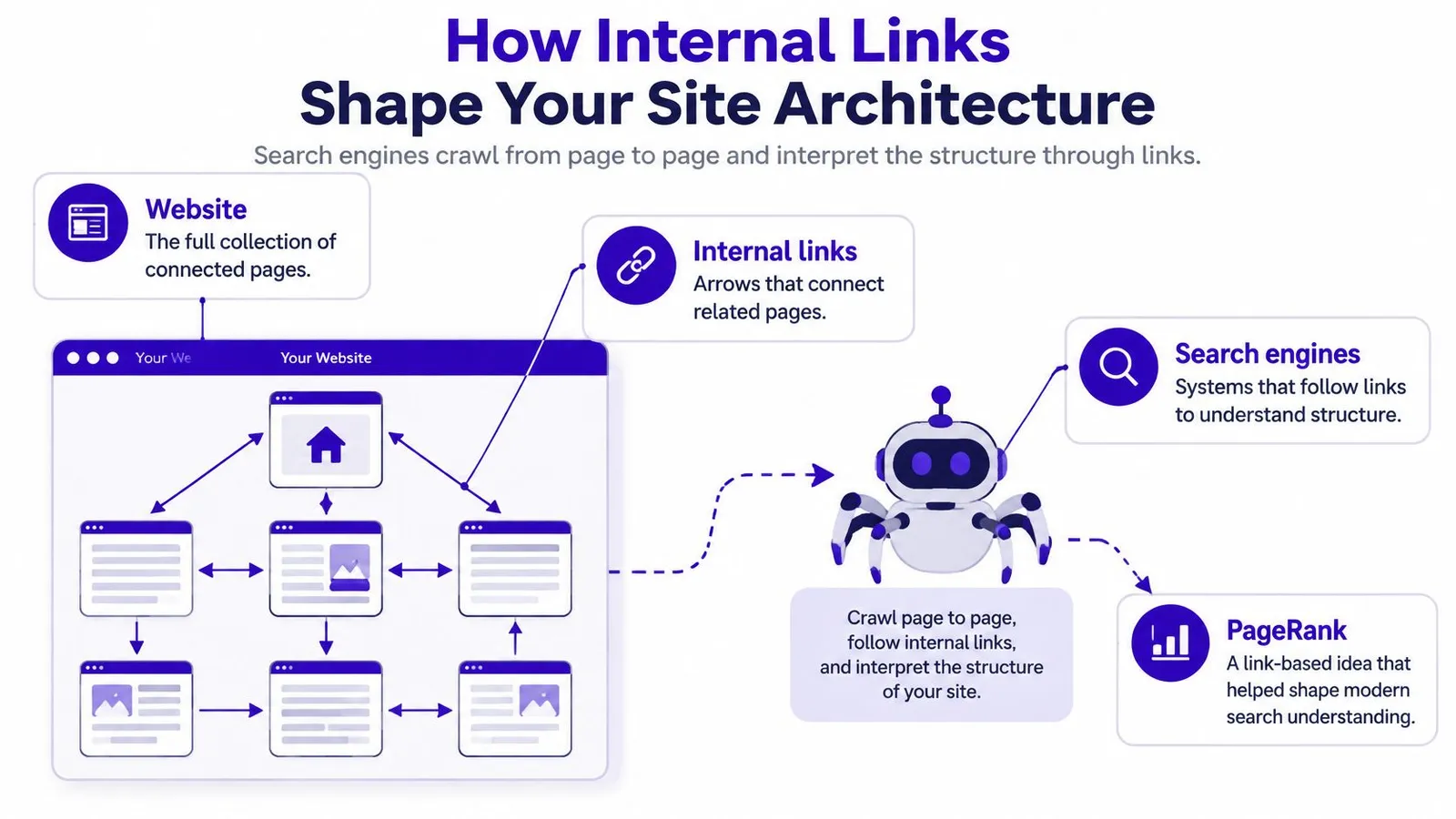
Search engines model those pathways as a directed network. Each page is a node. Each link points one way, from a source page to a destination. Direction matters here: an article linking to a product builds a route toward that product, and the product gains a route back only when it links in return.
The following concept map illustrates those relationships.
Why Link Structure Matters
Larry Page and Sergey Brin developed PageRank at Stanford between 1996 and 1998, modeling the web as a directed network in which links from important pages contributed to the importance of their destinations, as described in this history of the PageRank algorithm.
That model explains why links do real structural work. They give crawlers discovery pathways and describe relationships among documents. Google's ranking systems have moved well beyond the original model, so a merchant can't use it as a formula for predicting positions.
For store planning, the practical distinction sits between page quality and placement within the network. A polished product page still depends on other pages to be found, and each of those properties deserves its own attention.
Compare Connected and Isolated Products
Take two otherwise identical kettle product pages in hypothetical versions of the same store.
| Page arrangement | Available routes |
|---|---|
| Connected product | A relevant collection, buying guide, and preparation article point toward the kettle |
| Isolated product | The product exists, but no other store page links to it |
The connected version gives visitors and crawlers several explicit ways in. Its surrounding content also clarifies the relationship between the kettle and pour-over preparation. The isolated version carries none of that context, however polished its description looks.
Adding links in every direction would only create noise. A link from a coffee-storage guide to an unrelated kettle offers little editorial value. A sensible architecture groups related needs, explanations, and shopping destinations so each route earns its place.
A merchant weighing how to increase blog traffic should inspect more than individual articles. A useful guide that links nowhere relevant leaves its value stranded, and the arrangement of supporting pages decides whether each new piece strengthens the store or sits at a dead end.
Core Principles of a Strong Internal Linking Strategy
A Shopify catalog never sits still. Products sell out, collections get renamed, seasonal articles rotate in and out. Internal linking in that environment works like shelf stocking in a physical shop: the job is making sure every item that matters keeps a reachable spot on the floor, week after week.
Coverage comes before link volume. The first audit question is whether important pages have incoming internal links, not whether each article reaches a preferred total.
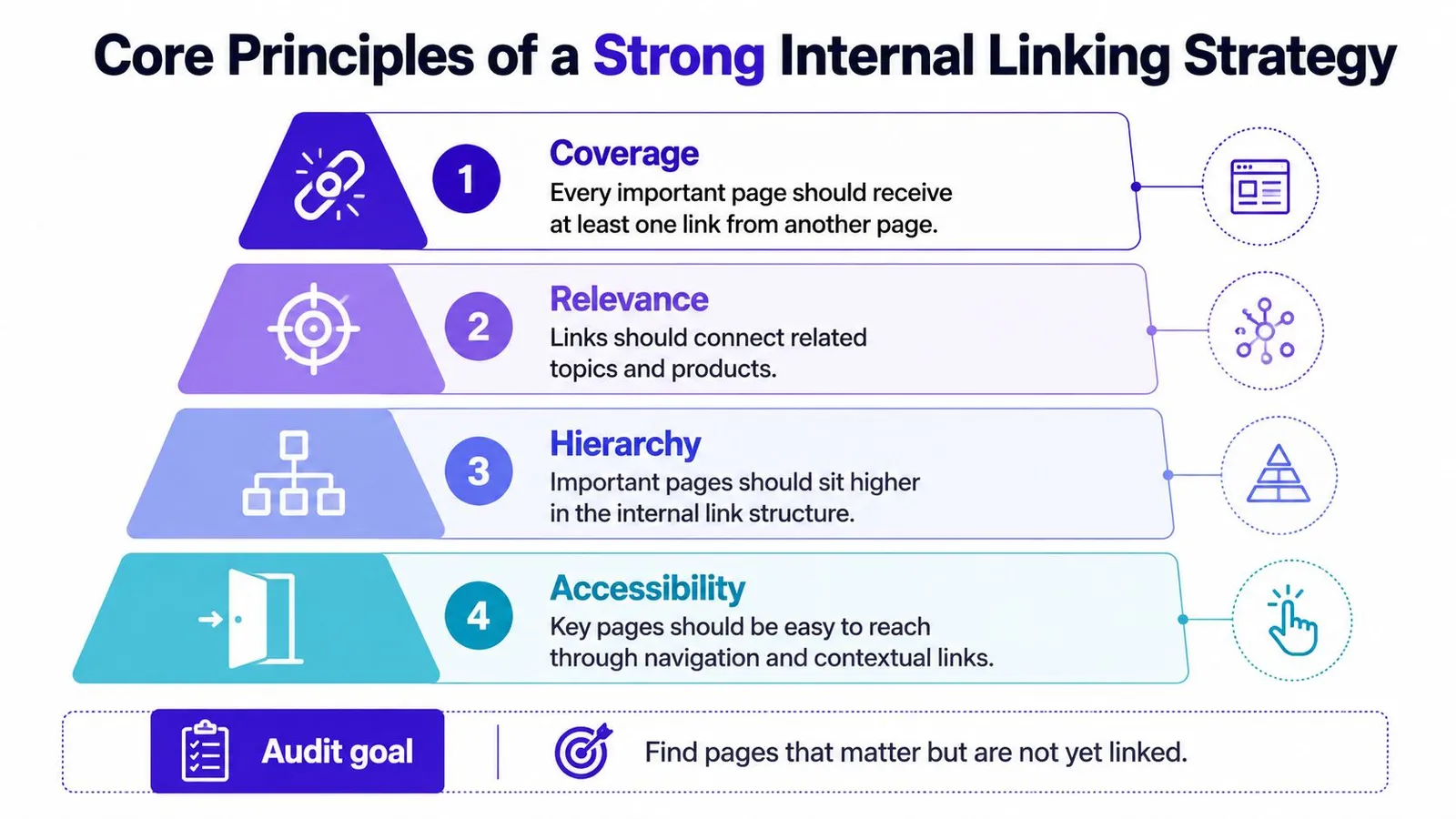
Google's crawlable-link guidance sets the baseline: every important page should receive a link from at least one other page on the site, links are most reliably recognized as HTML anchor elements with an href attribute, and anchor text should be concise and relevant. The guidance prescribes no universal internal-link count per page. A product with fifty links gains nothing if a second product has zero.
The hierarchy below translates that baseline into practical audit priorities.
Audit Coverage and Accessibility Separately
Coverage asks whether a priority destination has an incoming link. Keep a working list of important products, collections, and articles, then record which existing pages point toward each one. When a product launches or a collection gets reorganized, the list gets updated and the same question gets asked again. That repeating habit is what keeps a changing catalog covered.
This framing avoids a common distraction: polishing already well-connected articles while a commercially important collection sits unsupported. One incoming link clears the minimum. It says nothing about whether the page has all the support it needs.
Crawlable markup asks whether the route uses a recognizable link. A custom product selector or clickable banner is not automatically equivalent to an ordinary HTML anchor. Where a theme or app handles navigation through script-driven interactions, ask a developer to verify how the destination is exposed.
These checks answer different questions:
- Coverage check: Does another relevant page point toward the destination?
- Markup check: Is that connection implemented as a crawlable link?
- Destination check: Does following it reach the intended live page?
A menu can contribute legitimate coverage. Contextual links add a second route where an article or collection description gives a reason to visit the destination.
Make the Destination Understandable
Anchor text is the clickable wording. In a kettle buying guide, “go here” tells the reader nothing, while “variable-temperature kettles” identifies the destination before the click.
The wording should match the page. An anchor promising a comparison should not land on a plain product page. A broad category phrase should not lead to a narrow single-product page either.
Step-by-step keyword research can reveal the wording shoppers use, though anchors still need editorial judgment. A concise, accurate description beats an awkward search phrase repeated verbatim.
A useful anchor sets an expectation that the destination can fulfill.
For a visual explanation alongside the audit, the following video provides an additional viewing option.
A practical approval test: could a new staff member predict the destination from the anchor and its surrounding sentence before clicking? If yes, the link passes. If they have to guess, rewrite the wording. Because catalogs change, the test is worth repeating whenever collections are renamed or products retired, since an accurate anchor can become misleading.
Building a Repeatable Internal Linking Workflow
A merchant publishes a gift guide on Monday, sells out of a featured grinder on Wednesday, and merges two collections on Friday. That is a normal week for a Shopify catalog, and every change can age the links around it. Internal linking is a coverage and maintenance problem rather than a link-count problem. The question is whether every page that matters can still be reached.
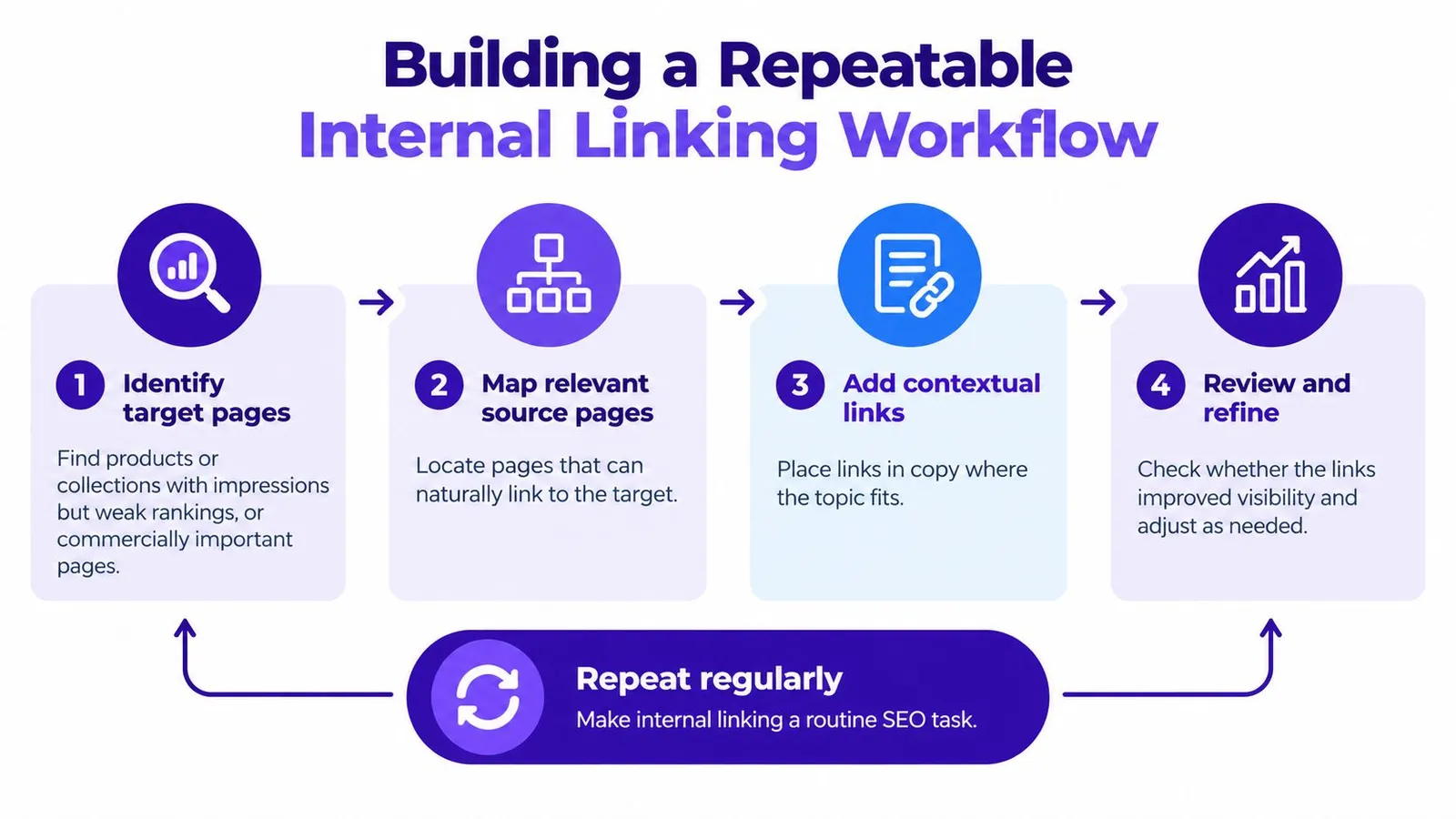
A repeatable workflow starts with a target, not an open article and an instruction to add links. Otherwise the easiest destinations receive attention while less visible priority pages stay overlooked.
Keep the working document modest: a spreadsheet with columns for the target page, candidate source page, proposed anchor, placement, and review status. Its purpose is to make decisions traceable, not to create another reporting burden.
Select Targets Before Searching for Opportunities
Google's baseline is simple: every important page should have at least one crawlable internal link pointing to it. Start there. Sort your catalog and content pages by incoming internal links, and flag anything important sitting at zero before optimizing anything else.
Beyond that floor, good candidates include commercially important collections, products earning search impressions but holding weak rankings, and useful articles with limited internal support. Treat these as review priorities. Thin internal coverage can sit alongside weak performance without one causing the other.
For a hypothetical coffee store, a merchant might select a manual-grinder collection because it supports a current merchandising priority. The next task is to find existing explanations that lead readers toward it.
Find Sources, Then Judge the Context
Ahrefs' documented Site Audit method takes the top 10 traffic-driving keywords for each crawled target page and searches other crawled pages for mentions of those terms to surface potential internal links.
That supplies candidates. Editorial approval is still yours. An article might mention a grinder only to explain a cleaning problem, and whether it should link to the grinder collection depends on the surrounding passage and the reader's likely next need.
A practical review sequence:
- Check topic fit. Confirm the source passage discusses the destination's subject meaningfully rather than mentioning a matching word in passing.
- Consider source strength. Among relevant candidates, favor established pages already attracting organic traffic or backlinks.
- Place the link at the decision point. Add it where a reader would naturally look for the product, collection, or deeper explanation.
- Reread the edited sentence. Cut wording that exists only to make room for an anchor.
For the manual-grinder collection, an article comparing hand grinding with electric grinding is a plausible source. A sentence about who might prefer a hand grinder creates a natural transition. A product link appended to an unrelated conclusion does not.
Make Publication a Linking Event
Every new article needs two reviews. The outward review identifies useful existing destinations the piece should point to. The incoming review finds older relevant pages that should point toward the new resource. Skipping the second half is how new guides end up published but unreachable, which puts them straight onto the zero-coverage list you just cleaned up.
Expect links to follow reader needs rather than symmetry. An older buying guide might point to a new cleaning tutorial, while that tutorial links to a suitable accessory collection. Neither owes the other a return link.
Fold the habit into a publishing checklist:
- Before publication: confirm the existing destinations and approve anchors in the new article.
- At publication: update relevant established content so the new article joins the existing network.
- After catalog changes: revisit affected links when products sell out, collections merge, or recommendations age out.
This routine belongs inside content strategy development, alongside topic selection and editorial review. Assign a named owner to the incoming review specifically. Without one, that is the step most likely to go unfinished.
Internal Linking Examples for a Shopify Store
A store selling daypacks, waterproof jackets, and care products shows the pattern clearly. The catalog changes often, so the goal is coverage: every important product, collection, and guide has at least one crawlable route in, and each link sits where a reader would naturally ask for it.
The store works like a trail map. A product page is a destination, a collection is a junction, and a guide is a signpost. A signpost helps only when it points to the next decision the shopper is already considering.
A Buying Guide Points to a Product
A guide about selecting a commuting backpack recommends a particular roll-top model. Place the link where the article explains that recommendation, so the visitor can inspect the exact item while the reasoning is still fresh.
- Weak anchor: “See this product.”
- Stronger anchor: “The commuter roll-top backpack.”
- Direction and purpose: Buying guide to product, moving from selection advice to the item under discussion.
The stronger wording needs to identify the destination without overstating what the item offers. If the roll-top later sells out or moves to a different collection, update the anchor and destination during the same edit that changes the recommendation.
A Collection Points to Pre-Purchase Advice
A waterproof-jacket collection can offer a route to a guide explaining jacket construction. A shopper who is still learning the category may need that explanation before comparing products.
| Placement | Weak wording | Clearer wording |
|---|---|---|
| Jacket collection introduction | “Learn more” | “How to choose a waterproof jacket” |
| Care paragraph in a jacket guide | “Other tips” | “How to clean a waterproof jacket” |
The first route runs from a commercial page to educational content. That path is valid when the shopper still needs construction basics before comparing products. A suitable passage in the guide can then direct readers toward the relevant collection, with each direction serving a distinct decision.
Related Articles Answer Different Questions
An article about packing a daypack might refer to a separate guide on adjusting backpack straps. The source answers what belongs inside the bag; the destination answers how the loaded bag should fit.
“Adjusting backpack straps” is clearer than “another useful post” because it describes the next task. The packing article can stay focused on load order while still giving the reader a route to fit advice.
Editorial test: A contextual link should resolve a plausible next question and leave the current answer intact.
Across these examples, educational content supports commercial pages without turning every paragraph into a sales prompt. The same approach fits broader Shopify SEO work: connect advice to merchandise where relevant, preserve room for genuine explanation, and recheck the routes as the catalog changes.
Choosing Tools for Internal Linking at Scale
A merchant who cannot tell which pages lack support needs a different tool from an editor who knows the targets but lacks hours to place links. Tool selection should follow the specific gap in the workflow, because buying for a task that already works leaves the neglected task neglected.
The useful comparison separates discovery, implementation, and ongoing review. No purchase removes those responsibilities from the team.
Internal Linking Approaches Compared
| Approach | How It Works | Best For | Main Trade-off |
|---|---|---|---|
| Manual review | An editor reads pages, maps relationships, and inserts links | A manageable catalog with close editorial oversight | Research and updates require staff time |
| Crawler-based opportunities | A tool identifies candidate source-to-target relationships for review | Existing stores needing a broader opportunity inventory | Detection doesn't complete the editorial work |
| In-platform automation | The publishing application inserts relevant destinations during article creation | Stores producing catalog-related content routinely | Generated placements still need quality checks |
Manual work offers direct control over nuance. An editor can recognize that an article mentioning waterproof jackets is discussing repairs rather than shopping, and reject an unsuitable collection link. The constraint is the volume of content one person can reliably review.
Crawler-based discovery, such as the Ahrefs method described earlier, helps organize candidate relationships across existing pages. The merchant should still confirm whether the detected opportunities require separate editing and how completed work will be tracked.
Match Automation to the Actual Task
Rankira is an in-platform option that runs inside Shopify admin, uses product, collection, and page information as context, and inserts links from generated articles to relevant catalog destinations. According to the publisher's product information, generated posts remain in the store after uninstalling.
That covers article production and outgoing connections. Two jobs sit outside it: reviewing older content for missing support, and checking whether new articles receive suitable incoming links after publication. Automatic insertion during generation shouldn't be assumed to mean a complete retrospective audit of the store.
A practical evaluation should include:
- Relevance review: Do proposed destinations fit the sentence and the reader's need?
- Editorial control: Can staff inspect generated content before publication?
- Maintenance ownership: Who handles older posts and later catalog changes?
The strongest operational choice closes the merchant's actual gap. Automating a task that's already reliable won't fix the task nobody owns.
Putting Your Internal Linking Strategy into Action
A useful first deliverable is a short, inspectable list of priority pages and the routes that support them, rather than a target link count. Shopify catalogs change constantly. Products sell out, collections get renamed, seasonal pages appear and disappear. A plan built around a single cleanup pass will decay within weeks, so the goal is a process staff can repeat, not a one-time fix.
Start narrow. Pick the small set of pages carrying current revenue, often a handful of collections and best-selling products, and check whether each has at least one crawlable internal link pointing to it. That is Google's baseline for a page that matters. A limited scope lets someone verify every edit before the habit scales.
A Practical Starting Checklist
- Choose priority destinations. Identify the pages that matter to current merchandising and search goals.
- Inspect their support. Record relevant incoming routes and flag destinations that lack them.
- Repair genuine gaps. Edit appropriate established content, checking the destination, wording, and implementation.
- Assign the publishing review. Give a named person responsibility for both new-article links and updates to older content.
- Keep an edit record. Note what changed so later reviews can distinguish completed work from unresolved opportunities.
Search performance can be monitored after changes, but a shift in impressions or rankings shouldn't automatically be attributed to internal linking. Content edits, catalog changes, and other work often happen in the same period.
The first success criterion is a verified improvement in coverage, not a promised ranking increase.
For stores where the main gap is producing enough linked articles, the tooling covered earlier, including Rankira's in-admin article generation, addresses outgoing links from new posts. The incoming-link review still belongs in the publishing checklist, whichever tool creates the content.
A sensible task for the coming week is a coverage check of the store's priority pages, followed by repairs to the clearest gaps. After that, the same checks fold into normal publishing and catalog maintenance. Internal linking strategy is ongoing coverage work, and it never stays finished on its own.
Keep reading
All articles
Shopify SEO
SEO Content Writing Principles for Readers and Search
Learn the principles of SEO content writing that balance search relevance, clear structure, and real reader value, with examples for online stores.
10 min read
Shopify SEO
Internal Linking Audit That Actually Improves Rankings
Run a practical internal linking audit to find orphan pages, fix broken links, and prioritize fixes that move revenue on your Shopify store.
10 min read
Shopify SEO
Share of Voice SEO: A Practical Measurement Guide
Learn how share of voice SEO works, how to calculate it, and how to use intent-based metrics to assess search visibility and business impact.
12 min read
Put your Shopify blog on autopilot
Rankira researches keywords, writes SEO articles, adds internal links, and publishes them to your store — every week. Start with a 7-day free trial.