Search Engine Optimization Plan for Shopify: 2026 Guide
Build a search engine optimization plan for your Shopify store: set a baseline, pick keywords, publish in batches and measure results.
Published 11 min read
In this article
- Table of Contents
- Five Stages Every SEO Plan Needs
- Record a Search Console Baseline First
- Match Keywords to Buyer Intent and Catalog
- Rank Topics by Click Value Not Position Alone
- Check Speed and Markup Before Scaling Output
- Publish Batches and Link Each Article to Store Pages
- Measure, Prune and Repeat Each Quarter
A Shopify store can publish useful articles consistently and still struggle to earn search traffic. Some pages may not be indexed, others may attract the wrong searches, and a ranking improvement may not translate into clicks or sales. A practical search engine optimization plan makes those gaps visible by measuring performance for each URL, then using the results to decide what to fix, publish, or retire.
The work isn't a one-time keyword list. It's a monthly cycle: record a dated baseline, match search terms to the right products and pages, publish a controlled batch, and compare results over time. The same cycle can track whether the store appears in AI-generated answers and whether its content fits each target market.
Table of Contents
- Five Stages Every SEO Plan Needs
- Record a Search Console Baseline First
- Match Keywords to Buyer Intent and Catalog
- Rank Topics by Click Value Not Position Alone
- Check Speed and Markup Before Scaling Output
- Publish Batches and Link Each Article to Store Pages
- Measure, Prune and Repeat Each Quarter
Five Stages Every SEO Plan Needs
A product page can be easy to find in a Shopify catalog yet remain invisible in search. Search engines need to discover a URL, understand its content, and decide whether it fits a query. Google describes this process as crawling, indexing, and serving results. Its guide to crawling and indexing explains how Googlebot discovers URLs through links, sitemaps, and redirects. Internal links support discovery, while a sitemap does not guarantee that a page will be indexed or rank.
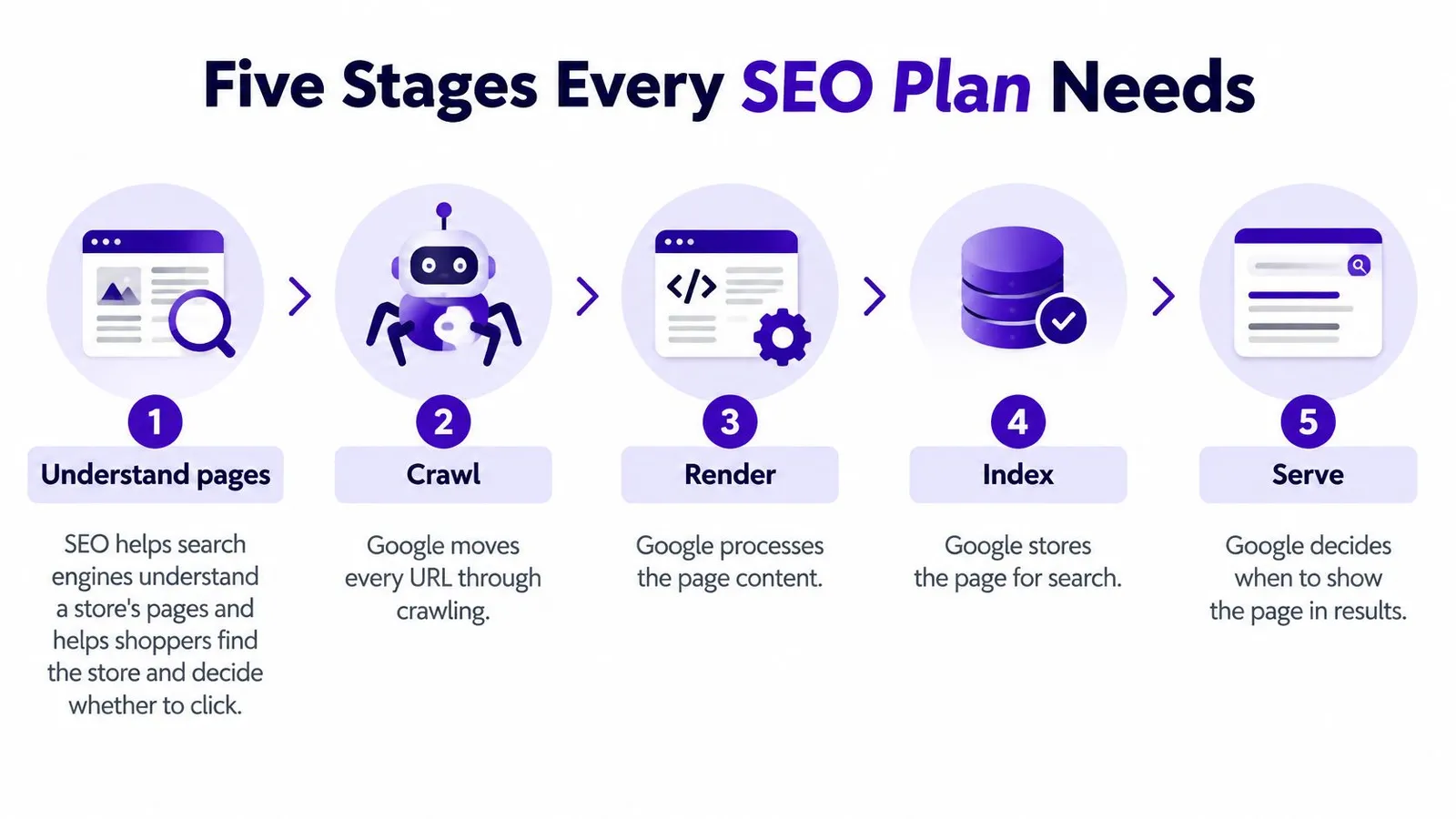
A practical plan connects that technical foundation to business priorities through five stages:
- Baseline: Record dated search performance for each URL.
- Segment: Group URLs by search intent and commercial value.
- Prioritize: Choose topics that fit the store's products, collections, or expertise.
- Publish a batch: Create a controlled group of articles, each with a defined target URL.
- Compare: Review URL-level results over time and use them to choose what to improve or publish next.
The stages form a monthly loop, not a one-way checklist. An article earning impressions but few clicks may need a better title or closer alignment with its target query. A page with no visibility may need a different topic, stronger internal links, or an indexing check. Publishing more articles before examining those signals can add pages without improving useful search coverage.
For Shopify merchants, the store-specific version starts with its own catalog and URL-level performance. A revenue-focused playbook for SaaS teams offers a perspective on connecting search work to business outcomes.
Record a Search Console Baseline First
A dated Search Console baseline makes later changes easier to assess fairly. Record clicks, impressions, queries, average position, and indexed URLs before making changes, then compare them over time. Keep the date range consistent: a short period after publishing is difficult to compare with a longer baseline, and seasonal shifts can skew the result.
Build the snapshot
In Google Search Console, open the Performance report and set the date range to the last three months. Export queries with impressions and average positions, then list each product, collection, and page URL with its clicks and impressions. Check the Pages report for indexed status and date the snapshot.
| Metric | Where to find it | What it tells you |
|---|---|---|
| Clicks | Performance report, last three months | Whether organic visits reach the store |
| Impressions | Performance report | How often pages appear in search results |
| Average position | Performance report, per URL | Where a page appears for its queries |
| Top queries | Queries tab, exported | The words shoppers use to find products |
| Indexed pages | Pages report | Which URLs Google has stored |
| Zero-impression URLs | Performance report, filtered by page | Which URLs received no impressions in the selected period |
Each metric answers a different question. Clicks show whether search is bringing visits; impressions show visibility before a click. Average position adds context to a URL's search appearances, while queries reveal language shoppers may use instead of the store's product names.
A zero-impression URL is a diagnostic clue, not an automatic failure. It may not match a searched need, may lack useful internal links, or may not be indexed. Keep it in the sheet for follow-up, and use this guide to check a website's keywords when reviewing competitor query visibility.
The finished baseline should be a dated sheet with one row per URL. Use comparable date ranges in later reviews so changes in clicks, impressions, and visibility are easier to interpret.
Match Keywords to Buyer Intent and Catalog
A keyword belongs on the page that best answers the searcher's need and supports the store's catalog. Google's Search Essentials emphasize helpful, reliable content, the language people use in titles and main headings, and crawlable links. That combination makes keyword planning more than phrase placement: the page must suit the search, and the store must give visitors a relevant next step.
Candidate phrases usually come from three places: Search Console queries, competitor pages, and the store's own product names, materials, and customer questions. A ceramic planter store might find that shoppers ask how to choose a planter, compare materials, look for a particular size, or search to buy a planter directly. Those queries call for different destinations.
| Intent | Example query pattern | Best page type | Store destination |
|---|---|---|---|
| Learning | how to pick, what is, how long does | Blog guide | Link to the matching collection |
| Comparing | best X for, X vs Y | Buying guide or roundup | Link to three to five products |
| Product specifics | size chart, material, care | Product page FAQ or short article | The product page |
| Buying now | buy X online, X near me | Existing collection page | No new article, improve the collection |
| Brand or store | store name plus product type | Homepage or collection | Brand and collection pages |
Consider the difference between “how to choose a ceramic planter for a balcony” and “buy ceramic planters online.” The first is a learning query, so a guide can explain drainage, size, and material, then link to the matching collection. The second signals purchase intent. A collection page with clear products, filters, and useful buying information is usually a better fit than another blog post.
The same principle applies to product specifics. A question about how to clean a particular glaze may belong in that product's FAQ or a short care article that links directly to it. A running-shoe query about wide sizing should point to a product page or sizing guide, not a generic article that leaves the shopper searching again.
Assign one target URL to each keyword or closely related query group. When two articles chase the same intent, they can compete for the same searches and split internal links instead of strengthening one useful destination. For a deeper approach to aligning landing pages with searcher needs, focus on what the visitor expects to do after the click. Before scoring any topic, label each candidate with one intent segment and one target URL. A structured SEO keyword analysis can help keep that mapping clear.
Rank Topics by Click Value Not Position Alone
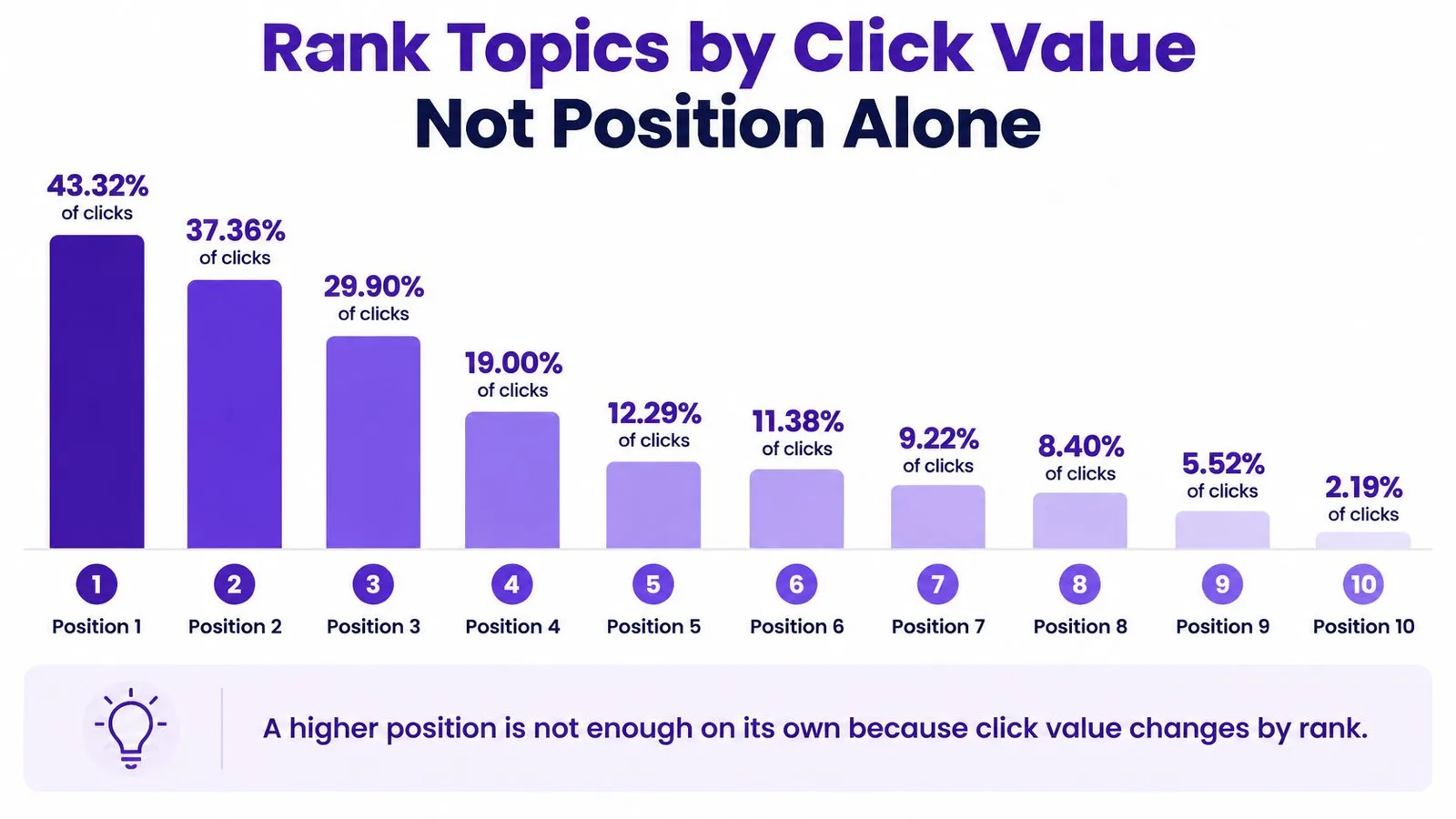
A position change matters only if it can bring useful visits. The top organic result usually earns a much larger share of clicks than lower results, but position alone does not tell you whether a topic is worth pursuing. Compare each opportunity against a dated Search Console baseline for its target URL, then judge the likely click value alongside intent fit and competition.
Use a simple prioritization score:
- Export monthly impressions for each candidate URL from Search Console.
- Score intent fit from one to three, giving the highest score to topics closely matched to the store's products and customer needs.
- Score difficulty from one to three, with a higher score for a more competitive topic.
- Calculate impressions × intent fit ÷ difficulty.
- Start with the highest scores, then confirm the page type and target URL fit the query.
For example, a ceramic planter guide with 1,200 monthly impressions, an intent-fit score of 3, and a difficulty score of 2 scores 1,800. A running-shoe roundup with 400 monthly impressions, fit 2, and difficulty 1 scores 800. The planter guide ranks higher because its estimated demand and catalog fit outweigh its greater difficulty.
| Position band | Click pattern | Planning decision |
|---|---|---|
| Position 1 | Usually captures a much larger share of clicks than lower results | Assess whether the page can serve the query and lead readers to relevant products |
| Positions 2–3 | Strong visibility, with click potential shaped by the query and result presentation | Improve the title and introduction if impressions are not turning into clicks |
| Positions 4–7 | Some visibility, but typically less click share than top positions | Check whether the page needs stronger coverage or clearer internal links |
| Positions 8–10 | Generally receive a smaller share of clicks than higher results | Improve the page only when the topic has a clear catalog fit and realistic path to better visibility |
Review results by URL and market, and include visibility in AI-generated answers as a separate check rather than treating it as a substitute for organic clicks. Watch for duplicate articles competing for one intent, generic titles that earn impressions without clicks, and pages with no inbound links. When impressions rise but clicks do not, revise the title and meta description before creating another article. A share-of-voice SEO analysis can show how the store appears across relevant searches.
Check Speed and Markup Before Scaling Output
A good topic can still waste impressions if the page template loads slowly or shifts while a shopper tries to read. Google's good Core Web Vitals thresholds are Largest Contentful Paint within 2.5 seconds, Interaction to Next Paint below 200 milliseconds, and Cumulative Layout Shift below 0.1, as outlined in its Core Web Vitals documentation. These checks belong to the template, not just the article: one heavy image, app script, or embedded element can affect every post built on the same layout.
| Check | Good threshold | How to check it |
|---|---|---|
| Largest Contentful Paint | Within 2.5 seconds | Field data in Search Console and a speed test on an article template |
| Interaction to Next Paint | Below 200 milliseconds | Field data in Search Console after adding or removing apps |
| Cumulative Layout Shift | Below 0.1 | Image sizes and embeds on article pages |
| Article structured data | Valid JSON-LD matching visible text | URL Inspection after each template change |
| Shopify app scripts | Fewer scripts than the article needs | Audit app overhead on the template and remove any script the article does not need |
Before scaling content, inspect the article template, featured-image dimensions, third-party scripts, and Shopify app overhead. Use field data in Search Console to judge real page experience rather than relying on one lab test. If the article is slow, compress oversized images, remove scripts the page doesn't need, and check whether embeds reserve enough space to prevent layout shifts.
Structured data can make a page eligible for enhanced search features, but it doesn't replace useful content. Use valid JSON-LD where it applies, and make sure the markup matches visible page content. A missing required property can prevent eligibility, so test changes on a stable, sufficiently popular page first, validate them with URL Inspection, then compare Search Console performance afterwards.
A practical on-page optimization checklist can help keep the content and template checks together. The operating rule is simple: fix the template before adding the next batch. A recurring template problem multiplies across every article that uses it.
Publish Batches and Link Each Article to Store Pages
A publishing rhythm gives each article time to be discovered and measured. A post with no inbound links can remain hard to find, even when the writing is strong. A calendar helps connect the topic, target URL, publication date, and store destination before the draft goes live.
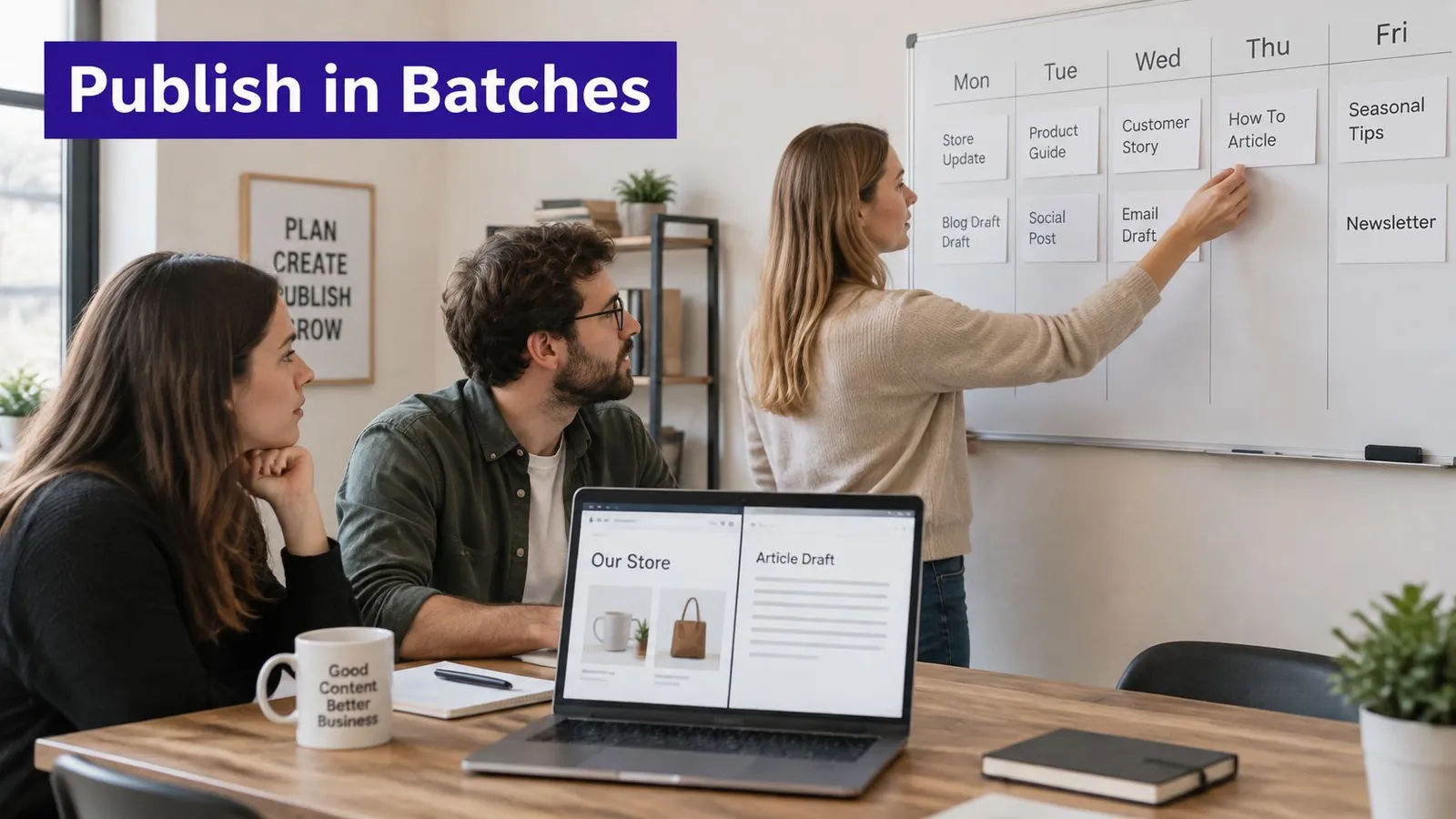
Use this publishing routine:
- Assign a date: Give each keyword a fixed publication day so the store can compare batches and keep work moving.
- Add relevant links: Link each article to two or three useful products, collections, or pages, not unrelated catalog items.
- Set the URL before publishing: Choose a short, descriptive address that reflects the page topic.
- Create a link back: Make sure a collection page or related article links to the new post.
- Wait for indexing: Schedule the next batch only after the previous one appears as indexed.
Treat a live URL as permanent. Changing it can send existing links to a page that no longer exists and discard the ranking strength those links were passing. Keep the URL readable from the start, and only change it when there's a clear reason and a proper redirect can be handled.
A link plan should serve shoppers first. An article about choosing a ceramic planter could link to the right collection and a few relevant products, while a collection page could link back to the guide for shoppers who need help choosing. A clear internal linking strategy makes those connections easier to manage as the store adds content.
For international stores, a translated article alone doesn't prove that the page fits a market. Build separate keyword sets for each country and language, have a native speaker check the search intent, and confirm that prices, delivery promises, and returns wording match across the page, product feed, and translation. Google's generative-search guidance for ecommerce also highlights accurate product information and Merchant Center feeds as part of search visibility. The team should validate localized terminology and product details before extending a batch into another market.
Start with three articles a month, each serving a different intent segment. Increase that pace only when the previous batch is indexed and its clicks are stable in the Performance report.
To see how the routine fits together, this video offers additional context on Shopify SEO publishing:
Measure, Prune and Repeat Each Quarter
Set a dated baseline for each article URL before judging its performance. SEO compounds slowly, so Rankira recommends publishing consistently for two to three months before assessing results. Compare equivalent periods and weigh visibility, clicks, and the page's commercial role, not just how recently it went live.
Review four signals together:
- Search performance: Compare queries, clicks, impressions, and positions by URL in Search Console.
- AI-answer visibility: Check the same set of product and category questions each month. Record whether your store or a competitor appears in the answers.
- Brand demand: Track branded searches to see whether more shoppers are searching for the store by name.
- Commercial outcomes: Compare analytics sessions, assisted conversions, and sales for products linked from the content.
Google's guidance on AI features in Search says AI features use the same foundational SEO practices and that their traffic is included in Search Console totals. That makes AI-specific attribution difficult. Track citations separately, then compare them with clicks, sessions, and sales. More citations signal visibility, not necessarily more traffic or revenue.
AI Overviews are appearing across commercial and ecommerce searches, but coverage varies by query and market. Check a consistent set of questions in each target market. The sources cited in AI answers can differ, so treat citation growth as one visibility measure rather than a sales outcome.
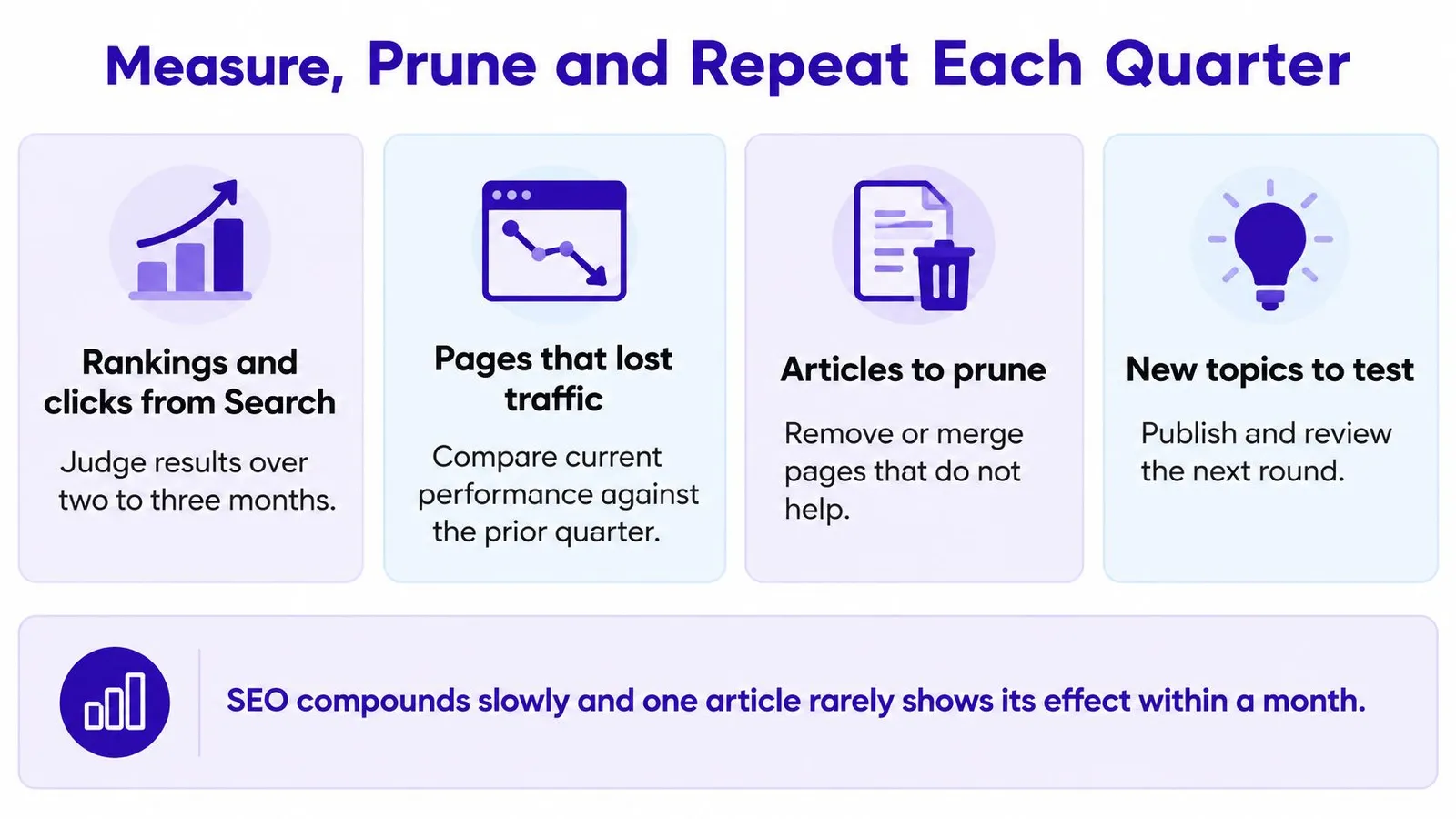
At each quarterly review, refresh titles and descriptions on pages gaining impressions but few clicks. Consolidate pages that target the same search intent. If a page still has no impressions after three months of publishing, retire it unless there is a clear reason to keep it. Build the next batch around topics with rising clicks, and record a new dated baseline for each URL.
Tie search visibility to store outcomes. Compare search activity with assisted sales and direct revenue; this guide to connecting DTC sales to profitability explains that commercial view. Rankira costs $39 per month and includes keyword research, unlimited scheduled article generation, auto-publishing, internal linking, a backlink exchange, AI images, and a Search Console dashboard.
Start with five candidate keywords, document each URL's baseline, and schedule the first batch. Rankira is a Shopify app for researching keywords, generating SEO articles, and publishing them to a store's blog automatically.
Keep reading
All articles
Shopify SEO
10 SEO Software Platform Options for Shopify Stores
Compare 10 SEO software platform options by capabilities, use cases, and Shopify fit, from keyword research to publishing and reporting.
11 min read
Shopify SEO
Keyword Density SEO: How to Calculate and Use It
Keyword density SEO is a percentage, not a ranking target. See the formula, sample counts, and how to place phrases without stuffing.
12 min read
Shopify SEO
10 Website SEO Software Tools Compared for Shopify in 2026
Compare the best website SEO software in 2026, from Shopify-native apps to full SEO suites. See pricing, free options, and which tool fits your store.
12 min read
Put your Shopify blog on autopilot
Rankira researches keywords, writes SEO articles, adds internal links, and publishes them to your store — every week. Start with a 7-day free trial.