SEO Keyword Analysis: How to Pick Keywords That Win Clicks
Learn SEO keyword analysis step by step: search intent, volume, difficulty, relevance and trend data, plus how to turn findings into a content plan.
Published 11 min read
In this article
- Table of Contents
- What SEO Keyword Analysis Actually Measures
- Search Intent Comes Before Every Number
- Search Volume and Why Averages Mislead
- Keyword Difficulty and Catalog Relevance Scoring
- Keyword Research Around AI Overviews and Shifting Results
- Reading Search Console to Test Your Keyword Picks
- Commit to a Shortlist and Review It in Three Months
The most popular keyword advice still says the same thing: sort the list by the biggest monthly volume and write toward the top. That habit wastes a store's publishing time. A large average can describe a question the catalog cannot answer, a results page owned by shopping listings, or a query Google already answers above the organic links. SEO keyword analysis works better when volume is the weakest signal, and intent fit, catalog relevance, and AI answer exposure decide the order.
A store owner does not reorder stock from one column on a sales report. Demand shows how many people ask. Competition shows how crowded the shelf is. Fit shows whether the store sells the answer. Read those together, or the biggest number keeps winning arguments it should lose.
Table of Contents
- What SEO Keyword Analysis Actually Measures
- Search Intent Comes Before Every Number
- Search Volume and Why Averages Mislead
- Keyword Difficulty and Catalog Relevance Scoring
- Keyword Research Around AI Overviews and Shifting Results
- Reading Search Console to Test Your Keyword Picks
- Commit to a Shortlist and Review It in Three Months
What SEO Keyword Analysis Actually Measures
SEO keyword analysis is the process of deciding which search queries a store should target, in what order, and why, by reading several signals together. Picture a shop manager checking a sales report before the next order. Demand shows how many people ask. Competition shows how hard the shelf space is. Fit shows whether the store sells the answer.
The practice is already standard, not optional. In 2024, 87.39% of more than 140 surveyed businesses reported using keyword research as part of their content marketing and SEO practices, according to Databox. Doing the research is the easy part. Reading the signals in a useful order is what separates a content plan from a spreadsheet of big numbers.
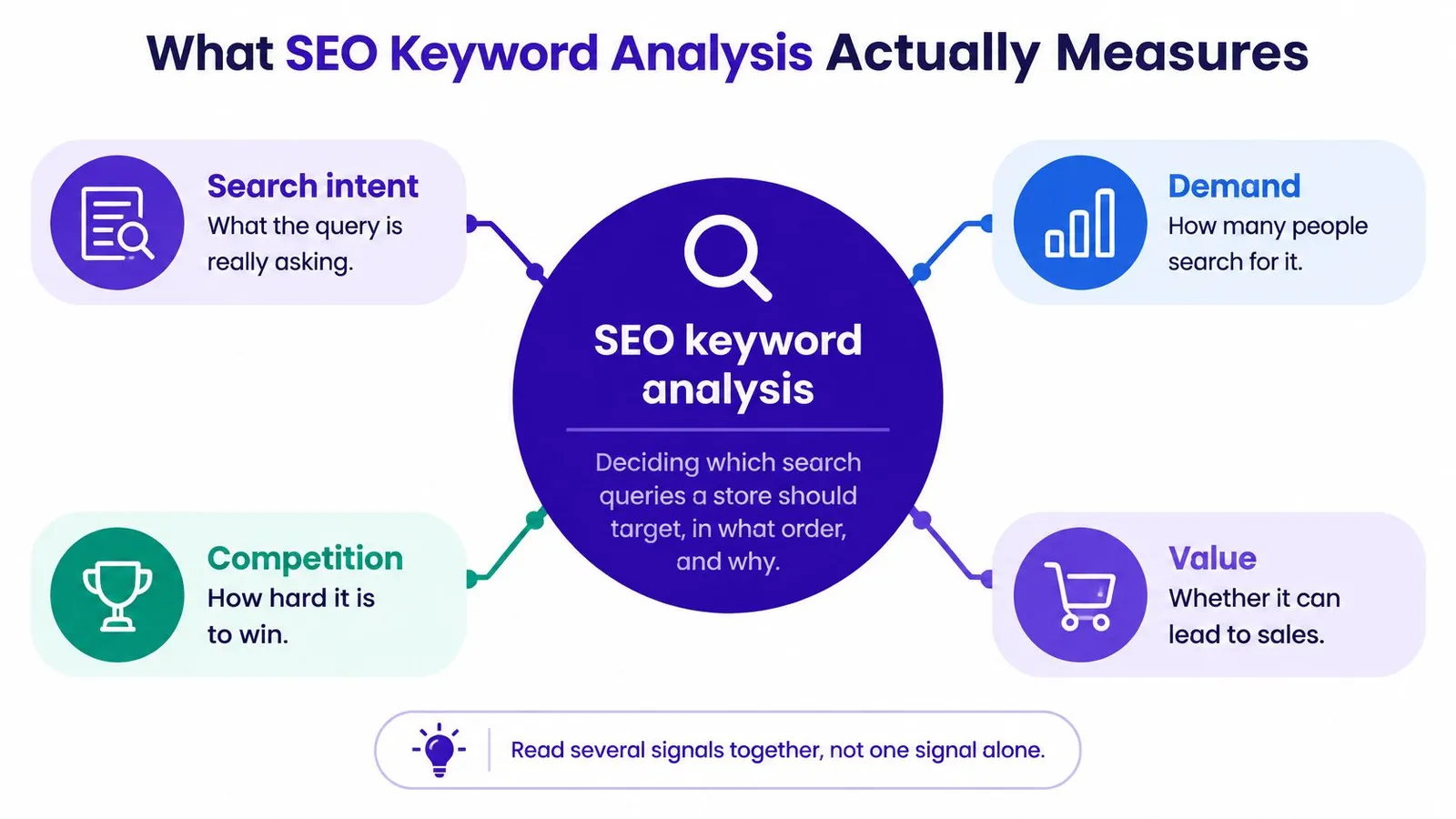
Six signals deserve a pass, and they are not equal. Check them in this order: intent, volume, difficulty, relevance, trend momentum, and click data.
| Signal | What it tells you | Where to read it | Typical reading |
|---|---|---|---|
| Search intent | What the searcher wants to do | Live search results | Informational, commercial, transactional or navigational |
| Search volume | Average monthly searches in a market | Google Keyword Planner | Monthly average over a default 12-month range |
| Keyword difficulty | How hard it is to reach page one | Keyword research tools | Score from 0 to 100 |
| Relevance | Whether a product or collection can honestly answer the query | Your own catalog | Score from 1 to 5 |
| Trend momentum | Whether interest is rising, flat or falling | Google Trends | Rising, flat or falling over time |
| Click data | Visits and impressions you actually earn | Google Search Console | Clicks, impressions, CTR and average position |
No single number decides a keyword. A term is worth publishing when the signals agree. Check intent first, then read the numbers.
Search Intent Comes Before Every Number
Intent decides which page type can win, so it comes before any volume or difficulty score. A product page and a buying guide answer different jobs. Publishing the wrong format against the live results is how a well-written page still fails to earn clicks.
Run three checks on the live results
Search the keyword in the target country, in a clean browser window, and read the top ten results.
- Page types. Are the top results articles, product pages, or brand homepages? Match the dominant type.
- First screen. Do those pages answer the question before the reader scrolls? If they do, a thin product description will not replace them.
- Mixed results. Does the page mix two types, such as roundups and product listings? Mixed intent can suit a comparison post that links into the catalog, not a single product URL forced to do both jobs.
Say the store sells candles. For bathroom scented candles, the results are mostly roundups and buying guides. A lone product page will struggle. A short guide with links to the matching products fits. For soy candle gift set, the results are shopping listings and product pages. The collection page is the right target, and a blog post will rarely push those listings aside.
A navigational query with someone else's brand name at the top is usually not worth targeting. Build for it only when the brand is yours.
| Intent | What the searcher wants | SERP pattern | Page format to build |
|---|---|---|---|
| Informational | Learn how something works | How-to articles, guides and answer boxes | Blog post linked to relevant collections |
| Commercial investigation | Compare options before buying | Reviews, roundups and comparison tables | Buying guide or product roundup post |
| Transactional | Buy now | Shopping results, product listings and prices | Product page or collection page |
| Navigational | Reach one specific brand or site | Brand homepage at the top | Usually not worth targeting unless it is your own brand |
Tag every candidate before you sort by volume. A mismatched page type cannot be rescued by a prettier title.
Search Volume and Why Averages Mislead
A big monthly number is not a big opportunity. Google's Keyword Planner historical metrics documentation reports the approximate number of searches, average monthly searches over a default 12-month period, advertiser competition, and top-of-page bid ranges. Historical metrics describe past search activity. Forecasts fold in bids, budgets, and seasonality. A keyword with strong past demand does not automatically produce matching future traffic or conversions.
What the average is actually averaging
Google defines average monthly searches as an average for the selected month range, location, language, and Search Network settings. The same phrase can look very different in the United States and in Germany. Set the target market before you read the cell. Monthly history in the planning API covers up to the previous four years, which is how you spot a gift term that peaks in November and looks weak in June. The competition index runs from 0 to 100, and the low and high top-of-page bids sit near the 20th and 80th percentiles. Those bid figures hint at commercial value for advertisers. They do not measure how hard the organic results are.
| Metric | What it reports | Caveat |
|---|---|---|
| Average monthly searches | Approximate searches per month over the default 12-month range | Averages the selected month range, location, language and network settings |
| Competition index | Advertiser competition on a scale from 0 to 100 | Measures paid auction pressure, not organic ranking difficulty |
| Top-of-page bid range | Low and high bids near the 20th and 80th percentiles | Signals commercial value, not the effort needed to rank |
| Monthly volume history | Monthly volumes for up to four prior years in the API | Use it to spot seasonality before judging the average |
Practical rule: A 40-search term that names a product you stock can beat a 5,000-search general question you cannot answer well.
Combine close variants, such as singular and plural, only when the live results show the same intent. Treat volume as a tiebreaker after intent and relevance, never as the first filter. Narrow phrases with a clear product match are covered in more detail in this guide to long-tailed keywords.
Keyword Difficulty and Catalog Relevance Scoring
A keyword has to pass two gates before it earns a place on the calendar. Relevance asks whether a product or collection can answer the query, scored from 1 to 5. A question about candle history scores 1 even when the volume looks attractive, because the store does not sell a history lesson. Difficulty is a tool's estimate of how hard page one is, on a 0 to 100 scale. The bands below follow common tool conventions, not an official Google threshold.
Google's guide to Google Trends recommends comparing up to five terms, reading the time series, checking rising related queries, and splitting results by country or language. Rising queries can surface a relevant topic before it becomes an obvious head term. A practical score raises the priority when relevance and trend momentum are strong, lowers it when difficulty is high, and lets volume break a tie. A modest term with upward momentum can be worth more later than a large term whose interest is sliding. Validate the trend against catalog fit before you publish.
A candle store, three keywords
Say a Shopify candle store compares three candidates.
- Soy candle gift set scores relevance 5, difficulty 35, and a rising trend. It goes first, on a collection page.
- Candle wax types scores relevance 3, difficulty 22, and a flat trend. It becomes the second piece, a short guide that links to the waxes you sell.
- Best candles scores relevance 4, difficulty 78, and a flat trend. It waits until the store has more topical strength. The page type might fit, but the results are usually held by established publishers.
| Difficulty band | Score range | What it means for a store | Publishing decision |
|---|---|---|---|
| Easy | 0-29 | Newer or smaller sites can reach page one within months | Publish early in the plan |
| Moderate | 30-49 | Needs a strong page and internal links from related content | Publish after easy terms |
| Hard | 50-79 | Usually dominated by established brands and large sites | Hold until topical authority grows |
| Very hard | 80-100 | Reserved for established authority sites in most cases | Skip unless the page type is unusually strong |
A difficulty score does not know your domain's strength, so treat it as a rough guide and confirm it on the live results. Terms in the easier bands are the ones worth queuing first, which is the point of hunting low competition keywords.
Keyword Research Around AI Overviews and Shifting Results
A keyword is not a fixed opportunity. The results page itself moves, and an AI answer can sit above the links you hoped to win.
A Semrush analysis of more than 10 million keywords found that Google AI Overviews appeared for 6.49% of queries in January 2025, peaked at 24.61% in July, and stood at 15.69% in November. The mix moved past purely informational searches. Commercial queries triggering AI Overviews rose from 8.15% to 18.57%, and transactional queries rose from 1.98% to 13.94%.
That last shift matters most for a store. When AI answers start appearing on commercial and transactional queries, volume alone cannot tell you whether the right asset is a blog post, a product or collection page, a comparison, or a page written so it can be cited. A term can carry healthy search volume and still send almost no clicks to the results underneath the summary.
What to record before you write
A narrow, product-linked query can beat a broad head term whose answer is already absorbed by the generated summary. Before you commit, note three things on the live page: whether an AI answer appears, which sources it cites, and how much of the click is left for organic results.
Coverage also shifts by date and by product category, especially around seasonal events. A moderate-volume term with stable organic results can be safer than a larger term whose AI visibility expands and contracts. Save a snapshot before you publish, and compare informational, evaluation, and transactional queries separately, because their exposure is not the same. Recheck priority terms on a set interval rather than assuming last quarter's page still looks the same.
Once those pages are live, the question changes from "what does the results page look like" to "where do I sit on it." A walkthrough of how to check ranking on Google covers that next step.
The short video below shows how an AI Overview changes what a searcher sees before any organic result.
Ask one question of every surviving keyword. Should it become a blog post, a product or collection page, a comparison, or content designed to be cited? If the summary already gives the full answer, change the angle to something the summary cannot replace, such as a product comparison tied to items you sell.
Reading Search Console to Test Your Keyword Picks
Tool estimates stop being the authority once a page is live. The Performance report in Search Console shows clicks, impressions, click-through rate, and average position, with breakdowns by query, page, and country. Google's Performance report guidance recommends watching trends in impressions and clicks rather than position alone. Average position is an aggregate of the topmost result from the site, and it can hide a change in visibility or in how the results are composed. An impression means a result was shown or potentially seen, and position is recorded only when an impression occurs, so position is not a separate measure of demand.
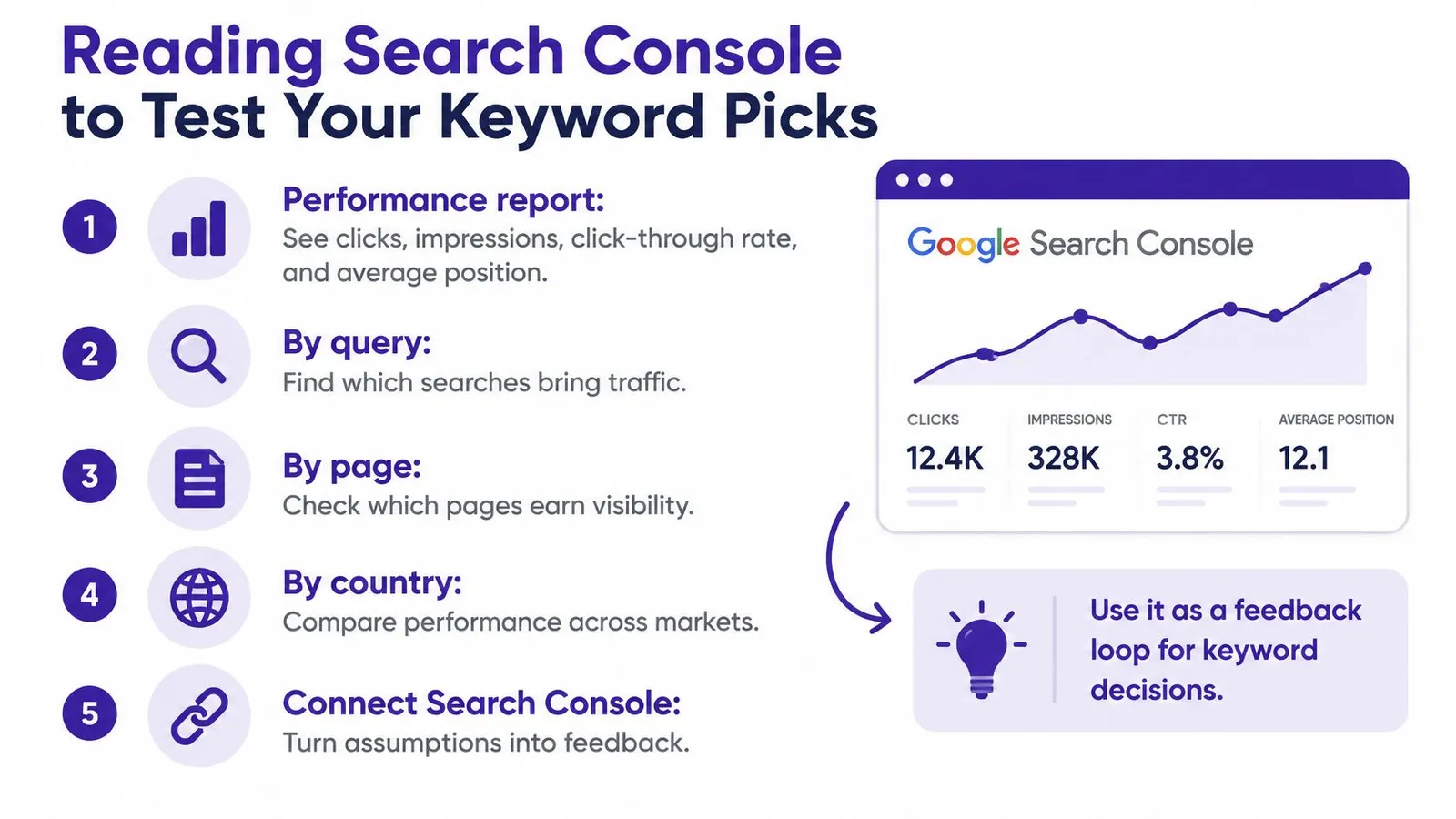
Connecting Google Search Console improves keyword research and fills the charts on the Home page. If the connection was skipped during setup, it can be added later from Settings. The link is read-only.
Clicks are the scarce part of the report. SparkToro's analysis of Datos clickstream data found that 58.5% of Google searches in the United States in 2024 ended without a click. Impressions without a click are a title problem, an intent problem, or a results-page problem. They are not proof that the keyword was a bad idea.
Sort query and page pairs into three cohorts
Export the pairs and sort them this week.
- High impressions, low CTR. The page is seen and skipped. Rewrite the title and meta description so they match the query's promise, and name the product or collection when that is what the searcher expects.
- Rising impressions, low clicks. Visibility is growing, but the visit is not. Recheck the live results. The page may be answering a different intent, or the result may be crowded by shopping units and an AI summary.
- Product-relevant queries that already earn clicks. These deserve stronger internal links from related posts into the product or collection, and often a dedicated page of their own.
Publish, measure query-level exposure, then revise titles, intent coverage, and links from the gaps you can see. A practical method for how to check keywords of a website starts from this same export, not from another volume sort.
Commit to a Shortlist and Review It in Three Months
Turn the signals into a short list you can publish. Ten to twenty targets is enough for a store without a content team. More than that usually means two pages will compete for the same query.
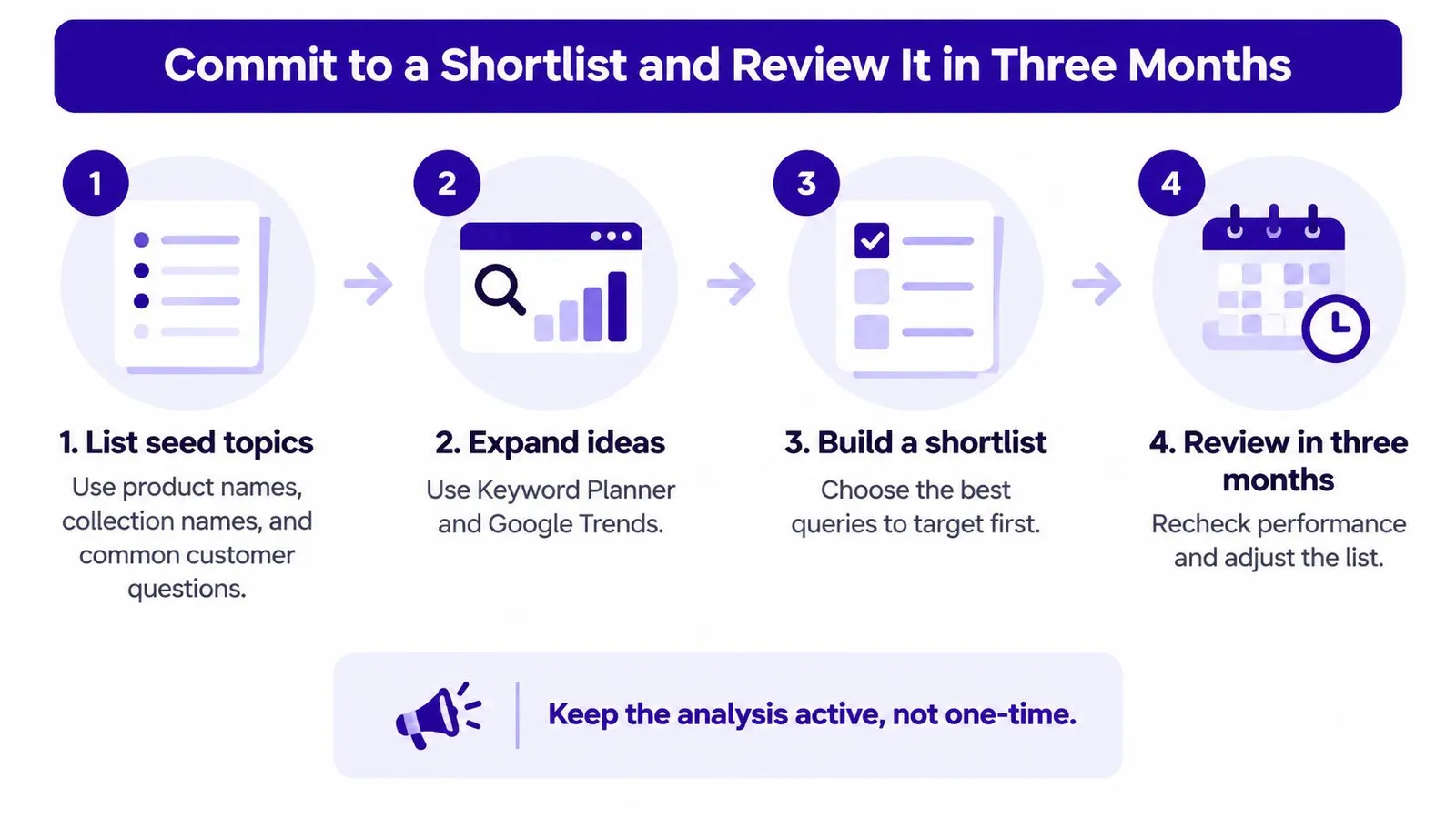
- List seed topics from product names, collection names, and the questions customers already ask in email and chat.
- Expand each seed in Keyword Planner and Google Trends, filtered to the target country and language.
- Check intent on the live results and tag each keyword as informational, commercial, or transactional.
- Score relevance from 1 to 5, note the difficulty band, and record whether interest is rising, flat, or falling. Drop anything that scores 1 or 2 on relevance.
- Map each survivor to one page type: blog post, buying guide, collection page, or product page.
- Group keywords that share intent into one cluster, and give each cluster one primary target so two articles do not fight over the same query.
- Keep a shortlist of ten to twenty targets and publish in score order, easiest relevant terms first.
- After publishing, record Search Console impressions and clicks for each target, and note whether an AI answer was present on the day you checked.
Rankira provides a calendar of researched keywords with volume and difficulty scores that you can drag, swap, or lock, or accept as prepared. Rankira recommends giving it two to three months of consistent publishing before judging results, because SEO compounds slowly. Set the review date on the calendar the day you publish the first piece, not when you feel like looking. There is one plan at $39 per month, which includes keyword research, unlimited article generation on your schedule, auto-publishing, internal linking, the backlink exchange, AI images, and the Search Console dashboard.
Keep the analysis active. A shortlist that never gets a second look turns back into a volume sort.
On the review date, drop targets whose results stayed unstable, promote clusters that earned clicks into related collections, and add the next batch of relevant terms. Keyword SERP tracking is the habit that keeps that review honest, because it records what the results page looked like, not only what the volume cell said.
Rankira researches keywords around a Shopify store's products, writes the matching articles, and publishes them to the Shopify blog, with Search Console data used to favor terms the store can realistically rank for. The calendar keeps volume and difficulty next to each keyword so you can reorder the plan instead of chasing the largest average. Visit Rankira to put the next three months of targets on a schedule.
Keep reading
All articles
Shopify SEO
Search Engine Optimization Plan for Shopify: 2026 Guide
Build a search engine optimization plan for your Shopify store: set a baseline, pick keywords, publish in batches and measure results.
11 min read
Shopify SEO
10 SEO Software Platform Options for Shopify Stores
Compare 10 SEO software platform options by capabilities, use cases, and Shopify fit, from keyword research to publishing and reporting.
11 min read
Shopify SEO
Keyword Density SEO: How to Calculate and Use It
Keyword density SEO is a percentage, not a ranking target. See the formula, sample counts, and how to place phrases without stuffing.
12 min read
Put your Shopify blog on autopilot
Rankira researches keywords, writes SEO articles, adds internal links, and publishes them to your store — every week. Start with a 7-day free trial.