On Page Optimization for Shopify: 2026 SEO Guide
Learn on page optimization for Shopify: content, titles, headings, links, page experience, Core Web Vitals, and practical checks to improve rankings.
Published 12 min read
In this article
- Table of Contents
- Why On Page Optimization Decides Whether Pages Get Found
- What On Page Optimization Actually Controls
- Match Content Titles and Headings to One Intent
- Strengthen Pages With Links Images and Clean Metadata
- Improve Page Experience With Core Web Vitals
- Apply It to Shopify and Choose a Workflow
- Run a Focused Audit and Take the Next Step
A Shopify merchant publishes a carefully written buying guide, adds a polished featured image, and connects it to a strong product range. Yet search visibility stays disappointing. On closer inspection, the search title promises a comparison, the visible heading sounds like a brand story, and the product links send readers somewhere unrelated.
That's a useful starting point for on page optimization: not another field to fill in, but a coordinated system. Each part of the page should help search engines understand its purpose and help shoppers complete the task that brought them there.
Table of Contents
- Why On Page Optimization Decides Whether Pages Get Found
- What On Page Optimization Actually Controls
- Match Content Titles and Headings to One Intent
- Strengthen Pages With Links Images and Clean Metadata
- Improve Page Experience With Core Web Vitals
- Apply It to Shopify and Choose a Workflow
- Run a Focused Audit and Take the Next Step
Why On Page Optimization Decides Whether Pages Get Found
Consider a hypothetical store selling travel bags. Its merchant publishes an article about choosing a carry-on backpack, but names it Ready for the Next Adventure. The copy contains practical advice, yet the headings focus on inspiration rather than capacity, access, fit, or luggage restrictions.
The article isn't necessarily missing effort. It's missing a clear, consistent promise.
Search intent means the task behind a search. Someone researching how to choose a carry-on backpack needs decision support. Someone searching for carry-on backpacks to buy needs a browsable selection. Treating those tasks as interchangeable makes both pages harder to organize.
A page needs a defined job
A useful editorial test is to complete this sentence before making changes: This page helps a shopper decide or understand… The answer should describe a concrete outcome, not merely name a product category.
For the hypothetical buying guide, that outcome might be choosing a backpack that fits the shopper's travel habits. The merchant can then evaluate every element against that purpose:
- Promise: Does the headline accurately describe the decision the article helps readers make?
- Coverage: Does the copy answer the questions needed to reach that decision?
- Next action: Do the product links follow naturally from the advice?
Practical rule: A page should make sense as a complete shopping conversation, not as a collection of SEO fields.
On-page work gives merchants a manageable place to start because they can review the published page directly. Many editorial improvements don't require a developer, although template and performance problems sometimes do.
Clearer pages still don't guarantee rankings. Google emphasizes that relevance and overall page experience matter alongside performance signals in its guidance on page experience. The practical objective is to remove avoidable ambiguity and friction, not to promise a particular search position.
What On Page Optimization Actually Controls
A useful analogy is a physical storefront. The sign identifies the shop, aisle labels organize the selection, product cards explain the merchandise, and staff directions help customers find the right shelf. Good lighting and an accessible entrance make that information usable.
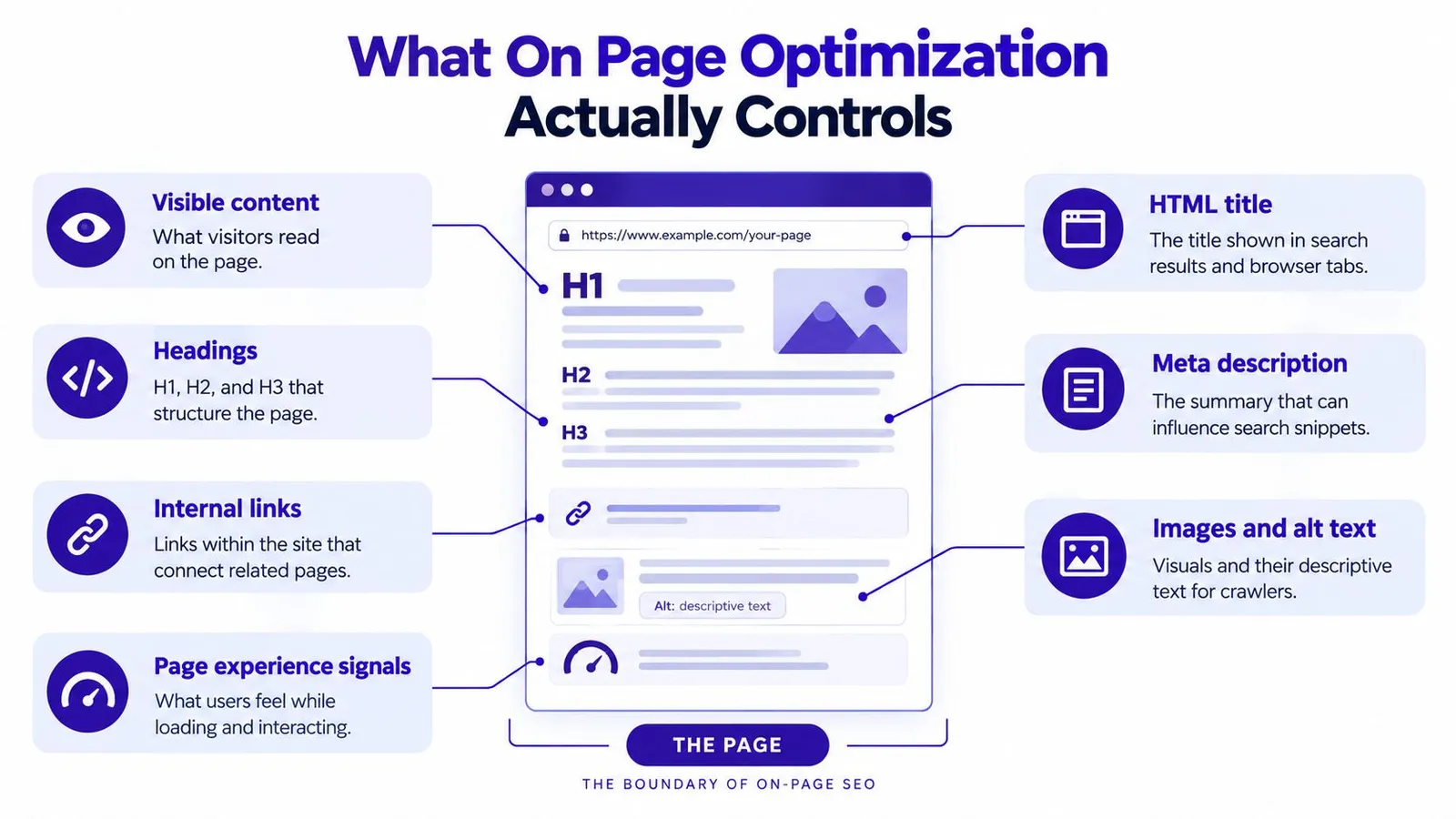
On a Shopify page, the title, headings, copy, images, links, and interaction experience serve comparable purposes. On-page SEO concerns how those elements work together within an individual URL.
The concept map below shows the page-level elements a merchant can inspect.
Separate the page from the wider SEO program
For practical planning, merchants can divide the work into distinct responsibilities:
- Page editing: Improve visible copy, headings, search metadata, image descriptions, and links.
- Technical investigation: Diagnose indexing restrictions, redirects, or site-wide template problems.
- Off-site promotion: Earn attention and references from other websites through outreach or digital PR.
These responsibilities overlap, but they aren't substitutes. Rewriting a headline won't resolve an indexing restriction. Publishing an informative article won't automatically earn external coverage.
A broader SEO content marketing approach helps connect individual page improvements to an ongoing publishing plan. The page remains the working unit, while the content program determines which customer questions deserve coverage.
Mobile completeness is the baseline
Google began rolling out mobile-first indexing on March 26, 2018, after approximately 18 months of experimentation and testing, using the mobile version of a page for indexing and ranking rather than treating desktop as the primary version, according to its mobile-first indexing announcement.
For Shopify merchants, the implication is content parity. Important text, images, navigation, links, metadata, and structured information shouldn't exist only in the desktop experience.
A merchant can open the same published page on a phone and a desktop, then compare the buying advice and available destinations. If a mobile template removes the comparison content or hides the relevant collection links entirely, the problem is substantive, not cosmetic.
Mobile-first doesn't mean mobile-only. The requirement is a complete, usable experience across devices, with responsive presentation rather than a weaker mobile version.
Match Content Titles and Headings to One Intent
A page's main promise should remain recognizable wherever a shopper encounters it. The wording can change, but the task shouldn't.
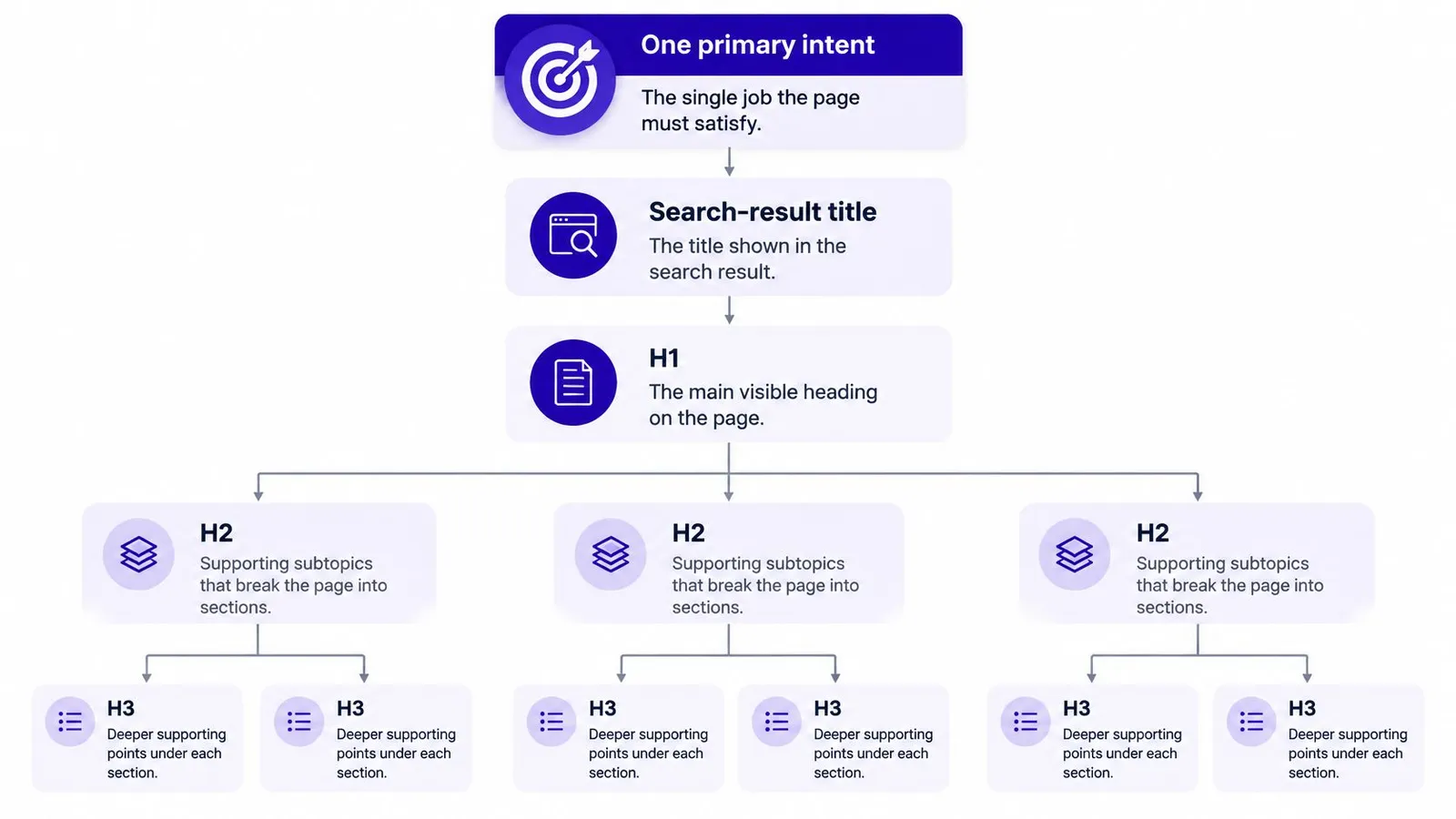
The hierarchy below illustrates how that promise can organize the page.
Distinguish the title from the visible heading
The HTML title is a page-level title that Google may use when generating a search-result title link. The H1 is the main visible heading readers encounter on the page. Supporting H2 and H3 headings organize the explanation beneath it.
Google can draw title links from several sources, including the title element, visible main title, headings, prominent text, and anchor text. Its SEO Starter Guide also recommends using language people search for in prominent locations, including titles, main headings, alt text, and link text.
That flexibility explains why filling in an SEO title doesn't guarantee Google will display it unchanged. When the title and visible page tell different stories, the merchant has created competing signals.
For the hypothetical travel-bag article, aligned wording could look like this:
| Page element | Illustrative wording |
|---|---|
| HTML title | How to Choose a Carry-On Backpack for Travel |
| Visible H1 | Choosing a Carry-On Backpack for the Way Someone Travels |
| Supporting H2 | Compare Packing Access and Organization |
| Supporting H2 | Check Fit and Carrying Comfort |
| Supporting H3 | Evaluate the Shoulder Straps and Back Panel |
The wording isn't identical, but each element supports the same decision. A collection page, by contrast, should make its shopping purpose apparent rather than imitate the guide's informational promise.
Build the outline around unresolved questions
Before writing, a merchant can use a step-by-step keyword research process to clarify the intended query and distinguish it from nearby topics. Then the merchant can arrange headings in the order a shopper would reasonably need the answers.
Each heading should identify a useful question or decision. Labels such as Discover More and Our Passion provide less editorial direction than Choose Between Clamshell and Top Access.
- Opening copy: Confirm the reader's task promptly instead of beginning with a broad brand introduction.
- Supporting sections: Explain relevant trade-offs rather than repeating the main keyword.
- Final review: Remove headings that introduce a different purpose or make unsupported promises.
The accompanying video provides an additional visual learning resource.
Natural language matters more than mechanical repetition. A heading should earn its place by helping the reader find their way, not by providing another location for the same phrase.
Strengthen Pages With Links Images and Clean Metadata
A useful buying guide shouldn't end at an informational dead end. After explaining a product attribute, the merchant should make the relevant catalog destination easy to recognize.
For example, a section discussing packing access could direct readers to an appropriate backpack collection. A product-specific passage could point to the exact item being discussed. These are editorial choices, not instructions to insert links into every paragraph.
Make every destination understandable
Descriptive anchor text tells readers what they can expect after clicking. Browse travel backpacks identifies a destination more clearly than click here. Product anchors should likewise describe the item rather than reuse a generic keyword regardless of where the link leads.
A practical internal linking audit can begin with the article's existing links. The merchant should follow each destination and check whether the linked page continues the same decision.
- Collection links: Offer a relevant selection when the shopper still needs to compare.
- Product links: Point to specific items when the surrounding explanation establishes their relevance.
- Supporting references: Provide evidence for claims that require substantiation, rather than attaching unrelated authority links.
A useful link answers the reader's next question. An unnecessary link interrupts the current answer.
Repeated exact-match anchors and unrelated product promotions deserve editorial scrutiny. The test isn't how many links the merchant can add, but whether each destination helps.
Treat media and metadata as supporting copy
Images should explain something the surrounding text discusses. An image showing backpack compartments can support an organization comparison; an unrelated lifestyle photograph may add atmosphere without answering the shopper's question.
Alt text should describe the actual visual rather than repeat a sales phrase. The merchant should also check that the featured image remains legible and useful at the size shown on mobile.
For the URL, a readable topic-based slug is a sensible clarity check. An established address shouldn't be changed casually just to make it look neater; URL changes belong in a separate technical review.
A meta description should summarize the page's actual value. Instead of copying the headline, it can explain that the guide compares fit, access, and organization. Merchants should treat it as a concise editorial summary, not a guaranteed search snippet.
The final check is coherence: the image, snippet, URL wording, and destinations should all fit the page's promise. None should advertise an answer the body never delivers.
Improve Page Experience With Core Web Vitals
A shopper can find the right buying guide and still leave if a banner keeps pushing the text downward mid-sentence, or if a tap on the menu produces no response. Page experience belongs in on page optimization because the page works as one system: a headline can promise a clear answer, while a layout that jumps or a button that stalls sends a competing signal. The copy and the behavior of the page either reinforce the same intent or work against each other.
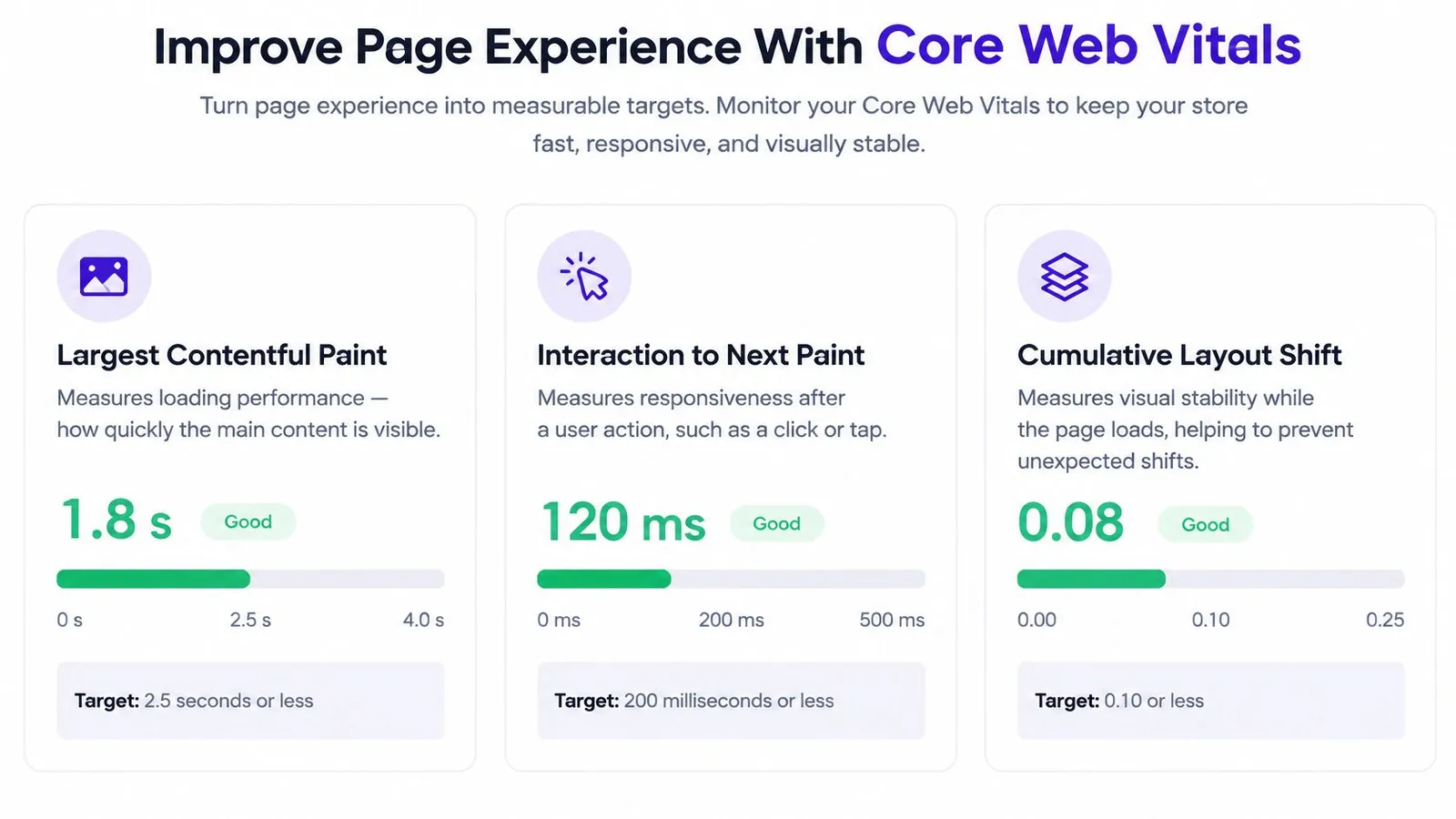
Core Web Vitals turn that judgment into measurable acceptance criteria. Google groups them into three dimensions: loading, responsiveness, and visual stability. Each one describes a different way the page can fail someone who is trying to read, tap, or buy.
Connect the measurements to visible symptoms
The three metrics work like three separate inspections of the same storefront. The first checks how quickly the main content appears. The second checks how quickly the page reacts when someone interacts with it. The third checks whether anything moves while the shopper is trying to read. Google's Core Web Vitals documentation sets the targets: Largest Contentful Paint at or below 2.5 seconds, Interaction to Next Paint below 200 milliseconds, and Cumulative Layout Shift below 0.1.
| Metric | Plain-language meaning | Shopify investigation |
|---|---|---|
| Largest Contentful Paint | How quickly the main content becomes visible | Check oversized featured images and resources that delay rendering |
| Interaction to Next Paint | How quickly the page responds after interaction | Investigate scripts and delayed interaction handlers |
| Cumulative Layout Shift | How much content moves unexpectedly | Check media dimensions and promotional elements added after loading |
Each measurement points to a different problem. Compressing a featured image may help loading without fixing a delayed menu interaction. Reserving space for an image may reduce movement without changing a word of the article.
Start with observations a merchant can make
Testing does not require a developer. A merchant can open the published article on a phone, scroll through the content, expand the navigation, and tap a product link. Useful notes describe symptoms precisely: the promotional banner pushes the heading down, the menu responds late, or the hero image stays blank while the copy appears.
- Prepare images: Compress and appropriately size featured media before publication.
- Review app overhead: Flag storefront features that add weight for technical investigation rather than removing functions the store depends on.
- Escalate template issues: Ask a theme specialist to investigate reserved image space, blocking resources, and noncritical scripts when editorial controls are not enough.
Search Console's Core Web Vitals report should guide prioritization using real-user field data. Lab tests can help diagnose a problem; they cannot replace evidence from the published experience.
Teams with development support can go further. Arch's guide on how to automate performance checks with Puppeteer shows a repeatable way to run browser tests, which complements field monitoring rather than proving every shopper receives the same experience.
Diagnostic reminder: A passing performance report is not evidence that the page answers the right question.
The most useful outcome is a specific fix tied to an observed symptom, followed by monitoring after deployment. That keeps the experience layer supporting the same promise the copy makes.
Apply It to Shopify and Choose a Workflow
Consider a hypothetical Shopify merchant preparing a carry-on backpack guide. The original draft has an inspirational headline, a long brand introduction, a generic Shop Now link, and an image caption that doesn't explain the photograph.
This is an illustrative editorial exercise, not a reported customer result. The improvement is a more coherent page, not an assumed traffic increase.
Turn the draft into a usable buying guide
The merchant first defines the article's task as helping shoppers choose a travel backpack. The revised title and H1 express that task, while the outline progresses through packing access, carrying comfort, organization, and product suitability.
The meta description summarizes those decisions without promising a universal winner. The introduction explains what the reader can evaluate, and each recommendation remains tied to verified catalog information.
The catalog connections can then become specific:
- Collection destination: Place a travel-backpack collection link after the main selection criteria.
- Product destinations: Link relevant products within the passages that explain their verified attributes.
- Image context: Describe the visible compartments or carrying features, using an alt attribute SEO checklist during review.
- Publication check: Inspect the live mobile article for missing sections, incorrect destinations, and unexpected movement.
For an international version, literal translation isn't a sufficient review standard. The merchant should check local terminology, currency, availability, delivery and returns context, and whether links lead to the appropriate regional catalog. Shopify's ecommerce localization guidance provides relevant context for treating localization as a complete shopping experience.
Ways to Maintain On Page Optimization on Shopify
The sustainable workflow depends on publishing volume, available expertise, and review capacity.
| Workflow | Best For | Main Risk | Where Rankira Helps |
|---|---|---|---|
| Manual checklist | Merchants maintaining a small content library | Checks may be skipped when store operations take priority | Provides an alternative for recurring research, drafting, and publishing work |
| Generic SEO apps | Teams needing assistance with isolated fields or checks | Completed fields may conceal an inconsistent page | Connects article creation with catalog context and internal links |
| Agency-led program | Stores needing strategy and editorial oversight | Merchants still need clear responsibilities for approval and implementation | Can support production alongside an agency-managed review process |
| Shopify content application | Teams seeking a repeatable publishing process inside Shopify administration | Unreviewed drafts can retain factual or linking errors | Combines keyword research, articles, metadata, images, scheduling, and search reporting |
Automation should reduce repetitive production work without removing accountability. A merchant still needs to verify product claims, regional suitability, link destinations, and whether the article meaningfully supports a buying decision.
For pages that may inform AI-mediated shopping answers, a sensible editorial standard is explicit, extractable information. Materials, compatibility, intended use, and limitations should appear plainly when verified. Structured information shouldn't become an excuse for vague visible copy.
The strongest workflow is the one the team can review consistently. Publishing fewer complete, accurate pages is a more defensible operating choice than approving a queue nobody has checked.
Run a Focused Audit and Take the Next Step
An audit becomes useful when the merchant can decide what to fix first. Starting with the entire catalog can produce an unmanageable task list; a small group of revenue-adjacent articles, collections, and products offers a more practical starting point.
Priority should follow the severity of the problem. A page answering the wrong question needs editorial attention before decorative changes. A broken product destination deserves attention before a minor wording preference.
Use a decision-led review
The merchant can record a simple status and action beside each check:
- Purpose: State the page's intended task and flag competing promises.
- Relevance: Compare the title, H1, and section order for unresolved mismatches.
- Completeness: Confirm that the mobile version retains the important substance.
- Shopping route: Follow catalog anchors and verify the destination.
- Supporting elements: Inspect image descriptions, the readable address, and the meta description.
- Experience: Identify reported template problems and assign technical follow-up.
The audit should produce specific instructions, such as replacing an unrelated collection destination or rewriting a vague heading. An entry that merely says improve SEO isn't actionable.
Measure outcomes rather than completed fields
Before making changes, the merchant should record the page's current search performance and the date of the edit. Impressions, clicks, positions, and engagement provide context for subsequent review, without turning every movement into proof of causation.
A consistent process to check ranking on Google can support that record. The merchant should consider search visibility alongside whether visitors can use the page and reach relevant merchandise.
The immediate next step is modest: select a manageable group of commercially relevant pages, fix the clearest conflicts, and review the published result. If recurring production remains the bottleneck, a draft-first automated workflow can be evaluated while a human retains approval over claims, titles, and destinations.
Rankira offers Shopify-focused keyword research, article generation, catalog linking, scheduling, and search performance reporting to support recurring on-page work. Merchants can visit Rankira to evaluate a draft-first workflow, then review titles, product claims, and links before publication.
Keep reading
All articles
Shopify SEO
SEO Content Writing Principles for Readers and Search
Learn the principles of SEO content writing that balance search relevance, clear structure, and real reader value, with examples for online stores.
10 min read
Shopify SEO
Internal Linking Audit That Actually Improves Rankings
Run a practical internal linking audit to find orphan pages, fix broken links, and prioritize fixes that move revenue on your Shopify store.
10 min read
Shopify SEO
Share of Voice SEO: A Practical Measurement Guide
Learn how share of voice SEO works, how to calculate it, and how to use intent-based metrics to assess search visibility and business impact.
12 min read
Put your Shopify blog on autopilot
Rankira researches keywords, writes SEO articles, adds internal links, and publishes them to your store — every week. Start with a 7-day free trial.