How to Improve Ranking on Google in 2026
Learn how to improve ranking on Google for a Shopify store with technical health, useful content, crawlable links, and Search Console checks.
Published 10 min read
In this article
Publishing more blog posts is the most popular advice for stores that want to improve ranking on Google, and for many Shopify merchants it's the wrong first move. A catalog can gain dozens of articles while product pages stay slow, collections stay orphaned, and every post sounds interchangeable. Ranking improves when each page has a clear job, loads cleanly, earns credible references, and points shoppers and crawlers toward commercial pages. Volume only helps after that system works.
Table of Contents
- Why Google Rankings Stall for Store Pages
- Fix Technical Health Before Publishing More
- Create Content People and Google Can Cite
- Connect Articles to Products with Crawlable Links
- Read Search Console Before You Wait Longer
- Choose a Repeatable Shopify Content Workflow
Why Google Rankings Stall for Store Pages
A common stall looks busy from the inside. A store publishes thin buying tips on a schedule, none of them cite hands on product knowledge, and none link readers to a relevant collection. Search impressions stay flat because the store has added URLs without adding reasons to rank. That's not a frequency problem. It's a page role problem.
Google's current guidance addresses visibility in generative AI features, including AI Overviews and AI Mode, while emphasizing that ranking fundamentals remain relevant and recommending non-commodity content plus stronger shopping, image, video, and local information, according to Google's updates on succeeding in AI search features. Traditional results still matter. They aren't the only surface where a product page or guide needs to be useful and quotable.
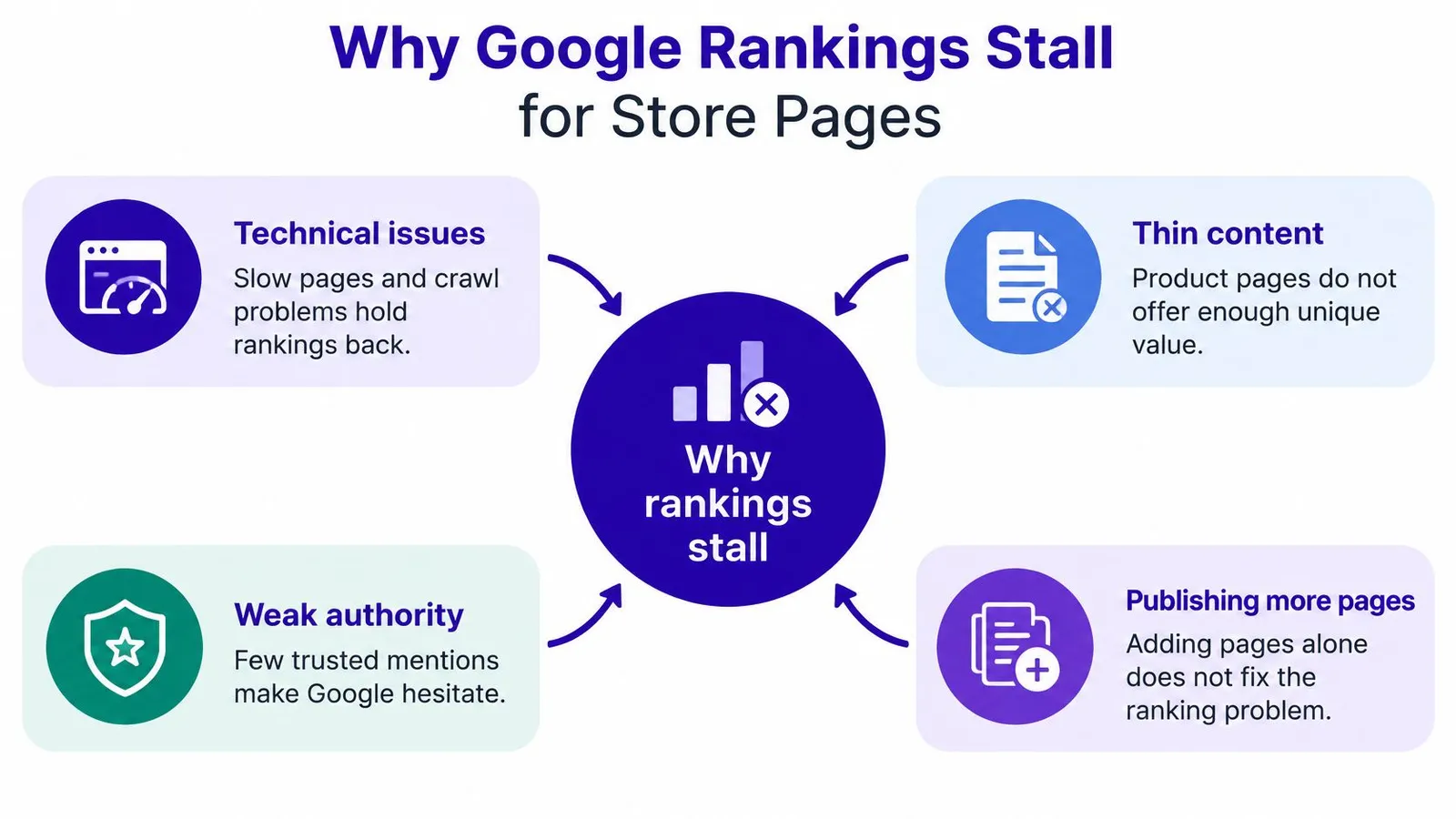
Assign Each Page One Search Job
- Transactional pages: Product and collection pages should answer purchase intent with clear names, prices, availability, specifications, and images.
- Consideration pages: Original buying guidance should compare options from the actual catalog, name tradeoffs, and link to the matching collection.
- Citation-worthy answers: First-hand answers should state a specific conclusion, show evidence from testing or fitting or use, and avoid repeating generic category advice.
That separation prevents a blog from competing with the page that should make the sale. It also gives keyword planning a commercial destination instead of a list of disconnected topics, a discipline covered in a step by step keyword research workflow for stores. Merchants who already publish elsewhere face the same distribution logic. A credible article still needs readers and references beyond the store, much like the practical guidance on social distribution for newsletter creators treats sharing as part of discoverability rather than an afterthought.
A technically polished page can still be absent from a generated answer if it adds nothing beyond commodity text.
Google warns against assuming that AEO or GEO tactics replace normal SEO, and spam policies apply to AI-generated search responses. Merchants shouldn't chase a separate trick for every surface. The stronger plan is consistent. Fix templates, publish reference worthy guidance, connect articles with crawlable links, and judge results by impressions, clicks, and conversions rather than article count.
Fix Technical Health Before Publishing More
Speed advice fails when it stays generic. Shopify ranking work should start as template engineering, because one bloated product template can repeat the same flaw across an entire catalog. The checklist below gives merchants a template level starting point before any new article enters the queue.
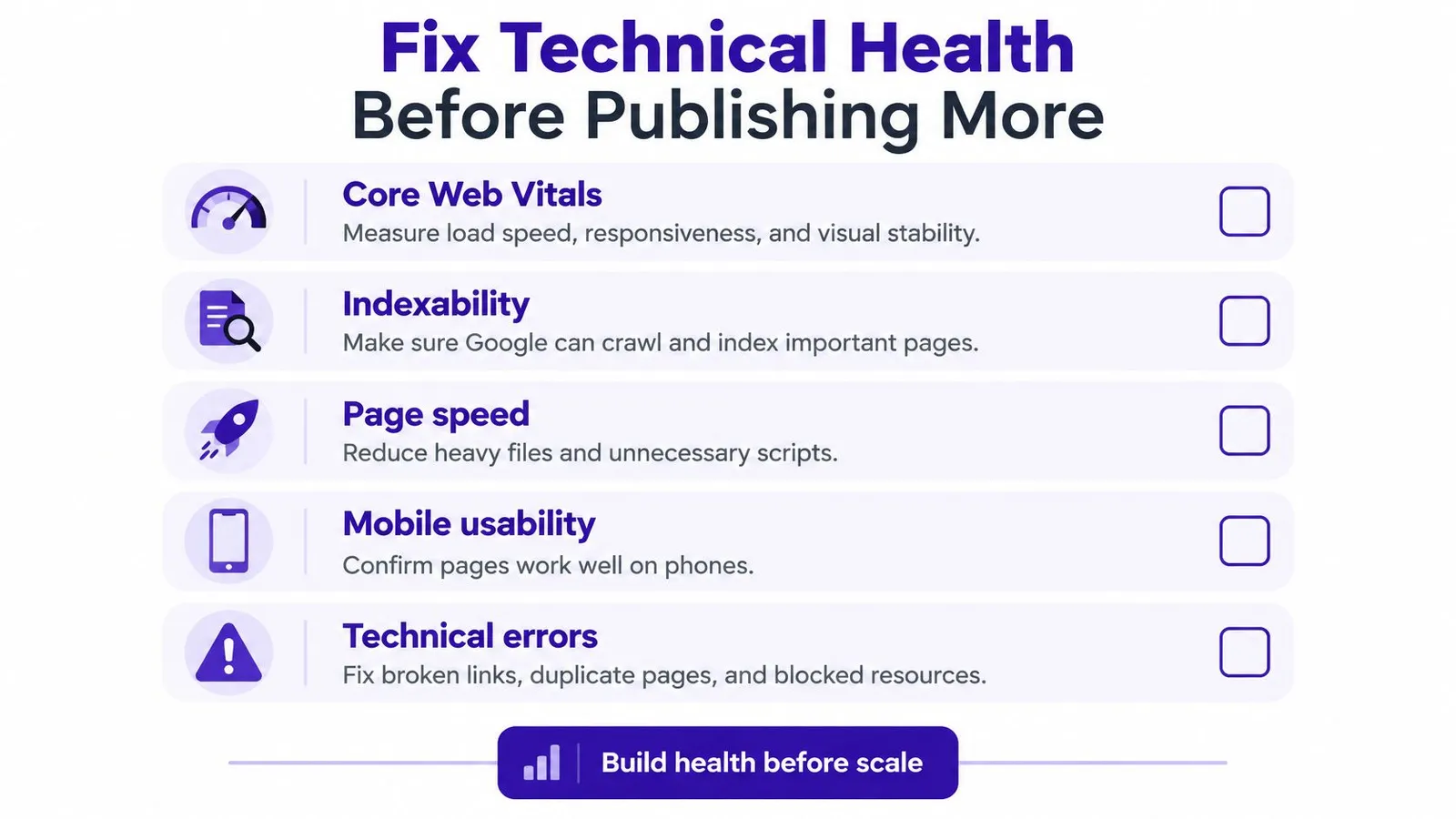
Segment Core Web Vitals by Template
The first move is opening the Core Web Vitals report in Google Search Console and grouping URLs by product, collection, blog article, and homepage. Field data reflects real shoppers, and it can expose mobile problems that a quick desktop test hides. A store shouldn't average those templates together. A fast blog can't excuse a slow product template where revenue depends on the page.
Google's thresholds give merchants clear pass and failure lines. Targets are LCP of 2.5 seconds or less, INP below 200 milliseconds, and CLS below 0.1, while Search Console classifies LCP above 4 seconds, INP above 500 milliseconds, and CLS above 0.25 as poor, per Google's Core Web Vitals guidance for Search. Those poor boundaries should be treated as defects, not aspirations. Any template beyond them needs repair before new content gets layered on top.
Remove the Usual Shopify Causes
- Oversized featured images: Compress and resize the largest above the fold asset so the hero product image doesn't dominate LCP.
- App injected scripts: Audit review stars, chat widgets, popups, and recommendation apps, then remove or defer scripts that shoppers don't need immediately.
- Unreserved space: Set dimensions for images, banners, embeds, and dynamic widgets so content doesn't jump after loading.
- Heavy interaction code: Reduce JavaScript and third-party execution on filters, variant selectors, and quick add controls to protect INP.
The short walkthrough below shows the same template first mindset in practice, with attention on field data rather than a single lab score.
Validation matters as much as the fix. Merchants should recheck field data over time instead of trusting one Lighthouse pass, because a lab test doesn't prove that shoppers on slower mobile networks get a good page. Systemic template repairs come first. Only then should effort shift to polishing individual high value landing pages.
Performance also has a hard limit. A fast page with weak relevance or thin copy won't rank because it's fast. Technical health removes friction. It doesn't replace useful content, accurate product details, or a reason for Google to choose one store over another.
Create Content People and Google Can Cite
Links still matter, but not as a counting exercise. PageRank was one of Google's core ranking systems at launch and remains one component among many today, analyzing how pages link to one another to help estimate which pages may be authoritative or useful, as described in Google's SEO starter guide on links and ranking. That history points to a simple standard. A page earns references when another editor can point readers to it without embarrassment.
For a Shopify store, citation worthy content usually comes from catalog knowledge that competitors can't copy cleanly. A comparison of two materials should name care requirements, failure points, sizing edge cases, and which shopper should skip each option. A product guide should show photos from real use and state where the product underperforms. Generic category filler does none of that, so nobody cites it.

Apply a Keep Rewrite or Skip Filter
Every draft should pass a blunt review before publication. Merchants can use practical methods to humanize AI content before publishing to replace interchangeable phrasing with store specific detail, but editing alone doesn't save a weak premise. The decision comes first.
- Keep: The article contains original experience, product specific comparisons, clear claims, and images that prove a point.
- Rewrite: The topic fits the catalog, but the draft needs testing notes, measurements from product pages, customer questions, or staff recommendations.
- Skip: The text could describe any store in the niche, repeats an existing post, or exists only to hit a publishing quota.
Editorial test: If swapping in a competitor's logo wouldn't make the article false, it isn't distinctive enough yet.
External links should follow the same standard. Google warns against paying for links intended to manipulate rankings, so outreach needs relevance and editorial value rather than artificial volume. A supplier resource page, a local guide, or a specialist publication might reference a useful comparison. A purchased placement on an unrelated site creates risk without building trust.
Internal discovery starts with the same link principle. Crawlers find URLs by following links, and important pages need crawlable paths from other pages. Content quality decides whether a page deserves attention. Links decide whether that attention can travel.
Connect Articles to Products with Crawlable Links
A useful article that never points to a product wastes commercial intent. A product page with no internal links asks Google to guess its importance. Merchants should build a deliberate map between informational posts and the pages that sell, then verify that map in rendered HTML.
Google states that links help discovery and relevance, that a crawlable link generally requires an HTML a element with an href attribute, and that every important page should receive at least one internal link from another page, according to Google's guidance on making links crawlable. JavaScript only navigation and clickable cards without real anchors don't meet that bar reliably. The link has to exist in the page code, not just look clickable in an editor.
Build the Map in Four Passes
- Assign one primary topic: Each target product or collection gets a single clear subject so articles don't scatter links randomly.
- Find orphan URLs: Audit the store for important pages with no internal links, using a structured internal linking audit process for Shopify pages before adding anything new.
- Map each article once: Connect every post to one primary commercial destination and a few supporting pages that relate to the claim nearby.
- Write descriptive anchors: Use concise anchor text that names the destination naturally, and don't repeat identical keyword anchors across the blog.
Placement matters. A link belongs in prose next to the relevant comparison, sizing note, or recommendation, not in a dumped list at the bottom. Readers follow it because the sentence creates a reason. Crawlers get context from the surrounding text.
Verify and Measure the Linked URLs
After publishing, merchants should inspect the rendered HTML and confirm valid anchors are present. Editor preview isn't proof. Theme code, apps, and lazy loaded blocks can change what a crawler receives.
Measurement should track the destination, not just the article. In Search Console, merchants can compare impressions, clicks, and average position for linked product and collection URLs before and after implementation. Seasonality and new demand can distort that comparison, so changes should be noted with dates and judged over a sensible window.
Common failures are easy to spot. Stores link everything to the homepage, bury products behind long click chains, rely on JavaScript only menus, or insert links that have nothing to do with the article subject. Internal linking improves discovery and topical interpretation. It doesn't substitute for unique product value, accurate metadata, or content worth reading.
Read Search Console Before You Wait Longer
How long does ranking take is the wrong first question. A page can be unindexed, undiscovered, irrelevant, buried by site structure, or unattractive in search results. Each problem has a different fix, and waiting helps none of them. Search Console tells merchants which problem exists before another article gets commissioned.
Google's ecommerce guidance treats site structure, URL design, navigation, internal linking, pagination, and incremental loading as distinct crawling and indexing concerns, as detailed in Google's ecommerce SEO guidance on site structure. Those aren't writing quality issues. A strong article can still stay invisible if navigation doesn't signal importance or if paginated collections hide products from crawlers.
Run the Diagnosis in Order
First, confirm that important product, collection, and blog URLs are indexed. A store can't improve ranking on Google for a page Google hasn't included. Merchants who need the checking routine itself can follow a practical method to check ranking on Google by URL and record the baseline before changing titles or links.
Second, read impressions before clicks. Impressions prove Google is showing the page for something. No impressions point elsewhere. Third, separate branded from non-branded queries, because brand demand can mask weak category visibility. Only after those checks should a store expand content production.
| Signal | Likely problem | First move |
|---|---|---|
| Not indexed | Discovery, crawl, or indexability block | Check coverage, internal links, sitemap inclusion, and page directives |
| Indexed with no impressions | Weak relevance, low demand, or strong competition | Reassign the target topic and strengthen links from relevant pages |
| Impressions with weak clicks | Title, snippet, price signal, or offer mismatch | Rewrite the title and description around the actual query intent |
| Branded clicks only | Category pages lack non-branded relevance | Build guidance and links around the collection topic |
| Many thin new URLs | Prioritization diluted by low value pages | Pause volume, consolidate overlap, and connect keepers properly |
Publishing daily can make prioritization worse when each new post is weak, isolated, and competing for attention the store hasn't earned.
Navigation deserves special scrutiny because ecommerce navigation helps Google understand which pages matter most. If bestsellers sit several clicks deep while seasonal leftovers dominate menus, the structure contradicts the business. Fix the hierarchy before blaming the algorithm. The calendar doesn't diagnose a store. Signals do.
Choose a Repeatable Shopify Content Workflow
Stores without an in-house content team usually pick one of three workflows, often by accident. Each option can work, but the costs show up in different places. The right choice depends on where time disappears.
Compare the Three Operating Models
Manual production gives merchants full control over research, writing, images, links, and scheduling. It also makes the store owner the bottleneck. A skipped week becomes a skipped month, internal links get forgotten, and Search Console checks happen only after traffic disappoints.
Disconnected tools split the job across a keyword database, a writing app, an image generator, a spreadsheet, and Shopify admin. Each tool may be capable, but staff still copy topics, exports, images, and URLs between systems. Reporting lives somewhere else again. The workflow breaks at the handoffs, which is why a documented approach to developing a content strategy that connects topics to pages matters before any tool gets selected.
An in-Shopify workflow keeps planning, editing, publishing, and reporting inside the place where products and blog posts already live. In that category, Rankira is an AI-powered SEO content app for Shopify stores that researches keywords from store information, competitors, and Google Search Console, using volume and difficulty scores to organize a content plan. Its drag-and-drop calendar schedules one keyword per day up to seven days a week, with articles published automatically or saved as drafts for review.
Generation in that workflow includes meta descriptions, tags, featured images, clean URLs, and links to relevant products, collections, and pages. Settings cover 12 tones, more than 150 languages, and over 190 regions, while editing includes a rich-text editor, an AI section rewriter, and five image styles. Reporting covers clicks, impressions, positions, and Ahrefs Domain Rating, and a credit based backlink exchange connects participating stores. The Standard plan costs USD 39 monthly with a seven-day trial, installs from the Shopify App Store, bills through the Shopify invoice, and doesn't request customer, order, or payment data. Posts and images stay in the store after uninstall.
Tooling shouldn't set the sequence. The next action stays small. Pick one commercial URL, confirm it's indexed, fix its template if Core Web Vitals are poor, and attach one useful article with a crawlable internal link. Scale only after that single loop produces cleaner signals.
Stores that want to improve ranking on Google without stitching together separate research, writing, image, linking, and reporting tools can run that workflow inside Shopify admin with scheduled drafts or automated publishing. Start with one priority product or collection, build the supporting article properly, and visit Rankira to set up a repeatable content plan around the pages that sell.
Keep reading
All articles
Shopify SEO
SEO Content Writing Principles for Readers and Search
Learn the principles of SEO content writing that balance search relevance, clear structure, and real reader value, with examples for online stores.
10 min read
Shopify SEO
Internal Linking Audit That Actually Improves Rankings
Run a practical internal linking audit to find orphan pages, fix broken links, and prioritize fixes that move revenue on your Shopify store.
10 min read
Shopify SEO
Share of Voice SEO: A Practical Measurement Guide
Learn how share of voice SEO works, how to calculate it, and how to use intent-based metrics to assess search visibility and business impact.
12 min read
Put your Shopify blog on autopilot
Rankira researches keywords, writes SEO articles, adds internal links, and publishes them to your store — every week. Start with a 7-day free trial.