Meta Description SEO: How to Write One That Gets Clicks
Meta description SEO explained: what the tag does, how it shapes click-through rates, and a step-by-step method for writing ones that get clicked.
Published 10 min read
In this article
- Table of Contents
- Why Meta Descriptions Matter for Shopify Blog Posts
- Character Limits and Where Snippets Get Cut
- Does a Meta Description Change Rankings or Clicks
- How to Write a Meta Description Step by Step
- Before and After Examples for Blog Posts and Collections
- Mistakes That Get Your Snippet Rewritten
- Audit Your Store's Descriptions and Fix the Priority Pages
A meta description is a short summary of a web page, set in its HTML head, that search engines may show beneath the page's title in results; it can influence clicks rather than directly change rankings.
A Shopify merchant finishes a helpful blog post, uploads an image, and reaches the search engine listing editor. The description field looks like another place to add keywords, but the more useful question is simpler: what can this page promise someone searching for help?
Good meta description SEO starts with that question. The description should help the right reader recognize a useful page, then arrive to find exactly what the snippet suggested.
Table of Contents
- Why Meta Descriptions Matter for Shopify Blog Posts
- Character Limits and Where Snippets Get Cut
- Does a Meta Description Change Rankings or Clicks
- How to Write a Meta Description Step by Step
- Before and After Examples for Blog Posts and Collections
- Mistakes That Get Your Snippet Rewritten
- Audit Your Store's Descriptions and Fix the Priority Pages
Why Meta Descriptions Matter for Shopify Blog Posts
A meta description works like a book's back-cover blurb. It doesn't contain the whole story; it gives someone enough information to decide whether the contents match their interests.
A typical search result includes a title link, a URL or breadcrumb line, and a snippet beneath. The title identifies the page, the URL provides context, and the snippet helps the searcher judge its usefulness.
Practical rule: A description should explain what makes this particular page worth opening, not merely announce that the store has helpful content.
For a Shopify store, a care guide and a collection page serve different purposes. Someone researching how to wash linen needs instructions; someone browsing linen bedding needs help choosing merchandise. Giving both pages the same store-wide message blurs that distinction.
The Shopify editor provides a practical place to make those differences explicit.
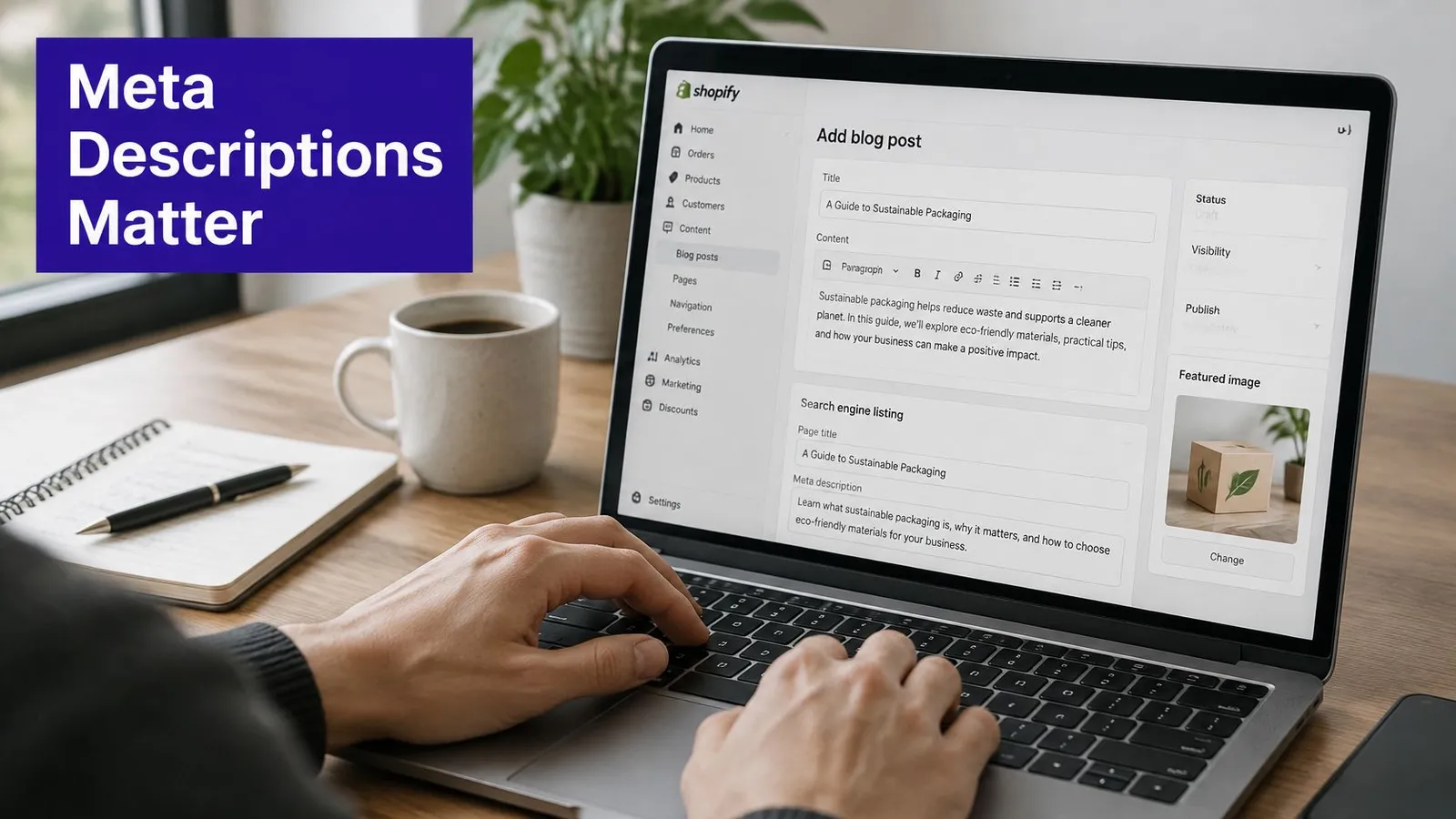
Blog posts, collections, and pages have their own SEO description fields, usually within the search engine listing editor. Reviewing these fields alongside titles and page content makes metadata part of on-page optimization, rather than an isolated publishing chore.
A useful starting check is to open several store pages, search their topics, and record what appears beneath each result. A generic store slogan under a detailed tutorial signals an opportunity for a more informative summary.
Character Limits and Where Snippets Get Cut
There isn't a universal character count that guarantees a complete snippet. A concise description with its main point near the beginning is more useful than wording stretched or trimmed to satisfy an arbitrary counter.
Google's snippet documentation explains that snippets primarily come from visible page content, may use the meta description when it offers a more accurate summary, and can be truncated to fit the device width. The document also explains that snippet selection can change with the search query, so a saved description isn't guaranteed to appear word for word.
Meta description length by context
| Context | Approximate limit | What to do |
|---|---|---|
| Desktop search results | Constrained by available display width | Keep the full message compact enough for a brief snippet |
| Mobile search results | Constrained by the mobile layout | Put the key point in the opening words |
| HTML meta tag | No fixed maximum | Write for readers and treat counts as a guide |
| Shopify SEO description field | Follow the editor's displayed guidance | Check any counter shown in the editor before saving |
Character counts can help compare drafts, but they don't measure the space occupied by text. Wide letters such as W and M take more room than narrow letters such as i and l. Bolded query matches and different result layouts can also affect how a snippet looks.
Write for a useful opening
A description shouldn't need its final phrase to make sense. Opening with the subject and useful answer gives the reader meaningful information even when the remainder isn't visible.
For example, a linen-care article might begin with washing and drying guidance, then mention storage. Beginning with a long brand introduction would postpone the information the searcher needs.
Treat a snippet preview as a drafting aid, not a promise about the live result.
Verification requires checking actual searches related to the page. Search Console helps identify the queries bringing impressions; searching representative queries allows the merchant to inspect the displayed wording. Neither an editor counter nor a preview can establish exactly what every searcher will see.
Does a Meta Description Change Rankings or Clicks
Adding a keyword to the description isn't a shortcut to a higher position. The description's practical role is to help someone decide whether a visible result deserves a visit.
In its September 2007 guidance on meta descriptions, Google explained that accurate descriptions can improve click-through without affecting ranking, and recommended distinct descriptions for specific URLs rather than broad site-level wording.
That distinction separates visibility from persuasion. Ranking determines where a result appears; the description helps explain why the page might satisfy the search.
A better click isn't necessarily a higher position
Consider a hypothetical search for cleaning cast iron. A lower result describes removing stuck food without soaking the pan, while a higher result displays a vague sentence about quality kitchenware. Someone seeking cleaning instructions may prefer the more specific result.
That's a possible reader decision, not a guaranteed traffic outcome. Searchers also consider the title, store familiarity, competing results, and the kind of answer they need.
- Separate the page types. A collection summary should support browsing, while a tutorial summary should support learning.
- Avoid keyword rituals. Repeating terms doesn't turn metadata into a ranking lever. The distinction also matters when considering meta tag keywords and SEO.
- Judge the resulting visit. A compelling description is only useful when the destination delivers the advertised information.
For measurement, Search Console can compare click-through rate before and after an edit while checking whether average position and query mix stayed reasonably similar. Such a comparison offers context, not proof that the description alone caused a change. Different demand, competing snippets, and title changes can also affect clicks.
How to Write a Meta Description Step by Step
The strongest draft usually comes from the finished page, not the keyword list. Search intent establishes what the reader wants; the article establishes which promises the store can support.
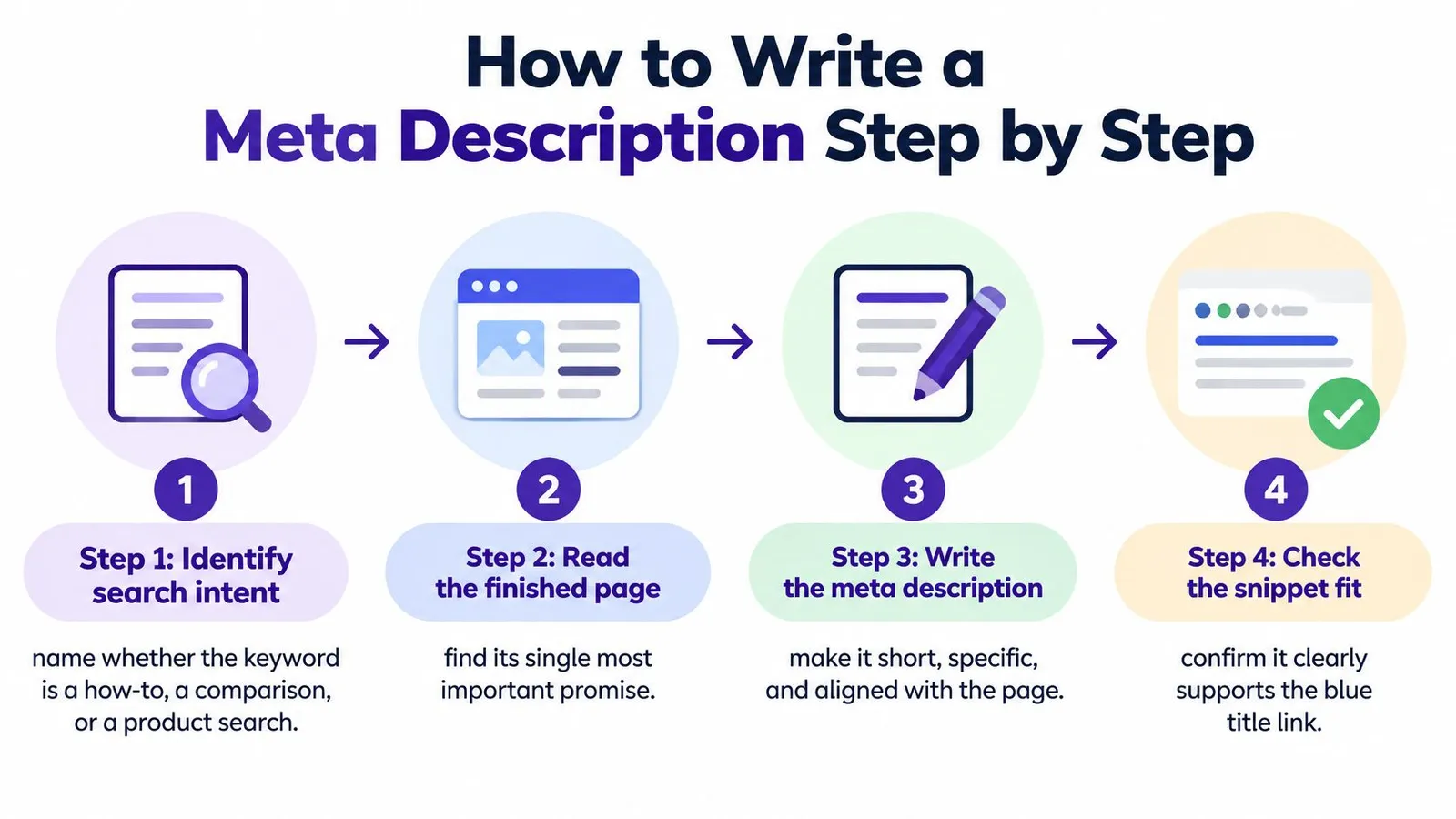
The workflow begins with intent and ends with a check against the actual content.
Build the promise from the page
Identify the search intent. Determine whether the searcher wants instructions, a comparison, or a product. A buying guide should promise decision support, not pretend to be a collection available for immediate browsing.
Find the most useful answer. Read the completed page and identify its central benefit. For a cast-iron guide, that might be removing stuck residue while preserving the seasoned surface.
Put the answer at the front. Start with the task or outcome in plain language. An opening about the store's passion for cooking delays the useful part.
Use the main keyword naturally. Include the phrase where it helps identify the subject. If the wording sounds awkward aloud, rewrite the sentence instead of forcing an exact-match phrase into it.
These choices work best when the underlying SEO content writing already answers a clear question. Metadata can summarize a useful explanation, but it can't substitute for one.
Add evidence and check the fit
Choose a concrete detail. Mention a method, material, comparison criterion, or relevant use case that the page covers. Coarse salt is more informative than amazing cleaning tips, provided the article explains that method.
Give a meaningful reason to click. State what the reader can decide or accomplish afterward. For a yoga-mat article, that might mean matching surface grip and cushioning to a practice style.
Verify every claim. Check the description against the headings and body. If it promises a material comparison that the article lacks, either improve the article or remove the promise.
Check for duplicate wording. Compare the draft with related pages. The final text should make the destination recognizable, especially when several articles discuss similar products.
Accuracy test: Every meaningful promise in the description should have an identifiable answer on the page.
A final read beside the title can reveal wasted repetition. If both fields make the same broad claim, the description can provide the missing method or qualification instead.
A video walkthrough offers another format for considering the drafting process.
Before and After Examples for Blog Posts and Collections
A weak description could fit almost any page in a store. A stronger description gives the searcher information that belongs to the destination.
The following hypothetical examples assume that each page contains the details named in its stronger version. Those details are examples of accurate promises, not claims about any particular store.
Weak and strong meta descriptions by page type
| Page type | Weak description | Stronger description |
|---|---|---|
| Blog guide about cleaning cast iron | Learn how to clean cast iron pans with helpful tips. | Remove stuck food from cast iron with coarse salt, then dry and oil the pan without soaking. |
| Collection page for linen bedding | Shop the linen bedding collection today. | Compare linen sheet sets by fabric weight, available bed sizes, and care requirements. |
| Product-led article about choosing a yoga mat | Find the best yoga mat in this post. | Compare yoga mat cushioning, surface grip, and materials to choose a mat for home practice or studio classes. |
The cast-iron example replaces a vague offer of tips with a recognizable method. It also identifies an important constraint, avoiding soaking, that matters to a reader concerned about damaging the pan. That wording belongs only on a guide that explains the procedure appropriately.
What makes the revisions stronger
The collection description supports a different decision. Instead of promising instructions, it names the attributes a shopper can compare. If the collection doesn't provide fabric-weight information, that phrase needs to change.
The yoga-mat article moves away from an unsupported best claim. Cushioning, grip, and materials give the reader a clearer picture of the comparison, while home practice and studio classes explain how the advice may be used.
- Specificity earns its place. Each added detail helps distinguish the page rather than just making the sentence longer.
- Scope stays honest. A page about basic care shouldn't imply that it handles restoration, repairs, and every possible stain.
- The destination remains recognizable. Removing the store name shouldn't make the description indistinguishable from unrelated content.
A practical editing exercise is to place an existing description beside a fresh draft and underline the new information. If the revision adds only enthusiasm, stronger adjectives, or another keyword, the promise probably still needs work.
Mistakes That Get Your Snippet Rewritten
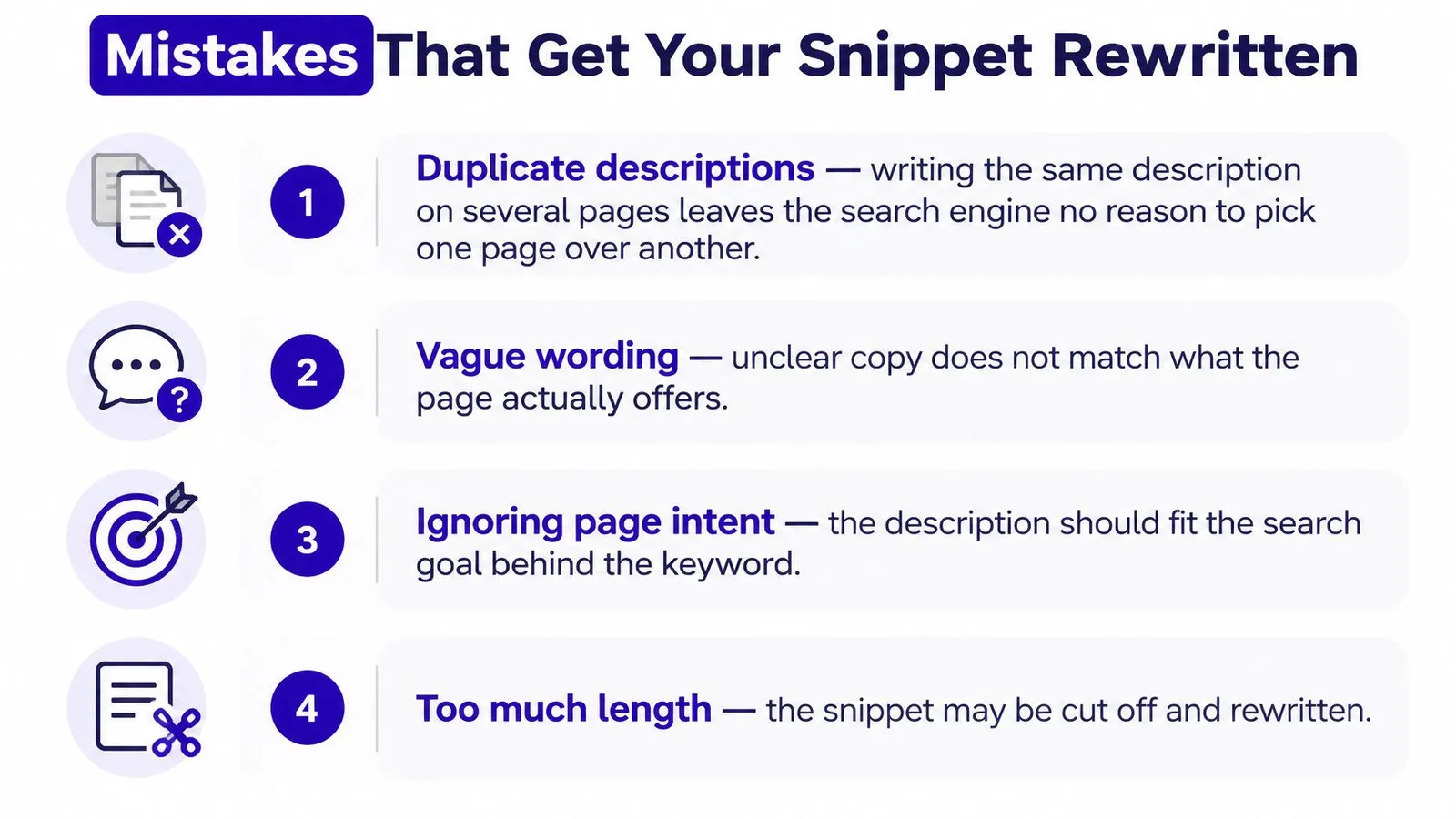
Duplicate descriptions are an expensive missed opportunity because related pages lose their individual explanations. They don't automatically cause a ranking penalty, but they make it harder for searchers to understand which destination suits their needs.
The common problems are easier to catch with a short checklist.
Check the wording and the destination
- Repeated keywords. A list of near-identical search phrases reads like a tag field rather than a summary. Guidance on avoiding keyword stuffing helps keep the wording readable.
- Missing answers. A description that promises a tool comparison needs an actual comparison on the page. Mentioning tools in passing isn't enough.
- Misplaced product copy. Pasting a product sales pitch into an educational article misrepresents what the visitor will find.
- Clickbait claims. Secret methods and unbelievable results create expectations the content may not satisfy.
- Delayed meaning. Lengthy introductions can leave the useful detail outside the visible snippet. Remove the preamble rather than chopping off the conclusion.
- An empty field. Leaving the description blank removes an opportunity to supply an intentional summary, although usable page text may still produce a helpful snippet.
A rewrite isn't always a failure
Even an accurate description may be replaced with wording that better matches a particular query. Rewriting alone doesn't establish that the merchant made a mistake.
The useful response is to inspect whether the displayed text fits the search and the destination. When it doesn't, both the description and the relevant page passage deserve review.
Audit Your Store's Descriptions and Fix the Priority Pages
An audit should begin with an inventory, not a rewrite of whichever article happens to be open. A spreadsheet can record the page URL, page type, current description, intended query, and proposed edit.
Flag missing summaries, duplicated wording, and descriptions that no longer match updated content. Collections with changed inventory and articles with revised recommendations deserve particular attention.
Choose pages with a clear opportunity
- Review visibility. In Search Console, inspect pages receiving impressions but attracting relatively few clicks.
- Check the search context. Review queries, device categories, and average positions before treating a low click-through rate as a copy problem.
- Inspect competing results. Search the relevant topic to see whether the store's title and snippet answer the same need as nearby results.
- Record the edit. Save the previous wording and change date so later comparisons have a reliable reference.
Understanding how to check rankings on Google helps prevent a change in visibility from being mistaken for a description-writing result. A narrower query comparison is usually more informative than a store-wide average.
Publish without disturbing the URL
Edit the SEO description in the Shopify page's search engine listing area. Editing a published article's title, body, images, or meta description doesn't change its URL; the handle is the field that controls the address.
A finished Rankira article includes a meta description saved to Shopify's SEO meta description field and the Excerpt. The merchant's review should still confirm that the wording matches the finished article before publication.
A manageable test is to select a small batch of high-impression pages with weak click-through, revise their descriptions this week, and allow time for observation. Later comparisons should consider the same pages' queries and positions, without assuming that every movement came from the edit.
Rankira researches keywords, generates Shopify blog articles, and includes meta descriptions alongside relevant internal links and featured images. For stores building a repeatable publishing workflow, Rankira offers a way to prepare those elements together while keeping the final promise-to-page accuracy check with the merchant.
Keep reading
All articles
Shopify SEO
Search Engine Optimization Plan for Shopify: 2026 Guide
Build a search engine optimization plan for your Shopify store: set a baseline, pick keywords, publish in batches and measure results.
11 min read

Shopify SEO
10 SEO Software Platform Options for Shopify Stores
Compare 10 SEO software platform options by capabilities, use cases, and Shopify fit, from keyword research to publishing and reporting.
11 min read

Shopify SEO
Keyword Density SEO: How to Calculate and Use It
Keyword density SEO is a percentage, not a ranking target. See the formula, sample counts, and how to place phrases without stuffing.
12 min read
Put your Shopify blog on autopilot
Rankira researches keywords, writes SEO articles, adds internal links, and publishes them to your store — every week. Start with a 7-day free trial.