Meta Tags Keywords: Why They No Longer Rank
Meta tags keywords do not affect Google rankings. Learn which metadata still matters and how to write titles and descriptions in 2026.
Published 12 min read
In this article
Google does not use the keywords meta tag for indexing or ranking and documents it as unsupported. Its public announcement that the tag wasn't used for web-search ranking dates to 2009.
Advice to paste a keyword list into every metadata box confuses keyword research with keyword metadata. For a Shopify merchant, the useful question isn't which hidden field should hold the list. It's how those terms should shape a page that answers a shopper's question and connects that answer to relevant products.
Table of Contents
- What Meta Tags Keywords Do in 2026
- Why the Keywords Tag Failed and What Its Syntax Does Not Do
- How to Write Titles and Descriptions Google Can Use
- A Keyword List Turned into a Real Page
- How AI Search Reads a Page Without Hidden Keywords
- Audit Your Templates and Drop the Hidden List
What Meta Tags Keywords Do in 2026
The phrase meta tags keywords usually refers to the HTML element <meta name="keywords">, not every place a publisher can write a keyword. Google's documentation on supported meta tags classifies this element as unsupported and explicitly states that it has no effect on indexing or ranking.
An old theme might still contain a keywords field inside the document's head, separate from the content a visitor reads. Its presence doesn't make it useful for search. A valid HTML field isn't automatically a ranking input.
The distinction matters because several fields sit beside each other in publishing tools. A merchant might see a title, description, tags, URL handle, and an app's keyword box, then assume they all perform the same job. They don't.
Metadata fields and what Google uses in 2026
| Field | Ranking effect | What searchers see | 2026 action |
|---|---|---|---|
meta name=keywords | None; unsupported | Nothing; hidden in the head | Omit unless a non-search system requires it |
| Title element | Strong relevance signal | Search-result title link, which Google can rewrite | Write a unique title matching page intent |
meta name=description | Not a ranking factor | Suggested snippet text, often rewritten | Summarize the visible page truthfully |
| Headings | Help Google understand the topic | On-page structure | Use a primary topic and descriptive headings |
| URL handle | Mild clarity signal | Page address and sometimes the result | Choose a short descriptive slug and keep it stable |
| Body copy | Primary relevance signal | The page itself | Publish original text that answers the query |
| Structured data | No ranking boost by itself | Rich results when eligible | Use markup that matches visible content |
The table separates hidden keyword storage from the elements that describe or deliver the page's actual subject. The title identifies the promise. Headings organize the explanation. Body copy fulfills it.
A description serves a different purpose: it offers a concise preview for a search result. Structured data also has a separate job, expressing eligible information in a machine-readable format rather than adding invisible persuasion.
Keep the research, change its destination
A keyword list remains useful in an editorial plan. It can record the customer's problem, related questions, relevant catalog items, and the page assigned to answer that intent. That planning document is the right place for variations that don't belong naturally in the finished text.
Before publishing, an editor can use the table as a pass-fail check. Does the title match the answer? Do the headings organize useful information? Can the reader reach an appropriate product or collection?
Practical rule: Keep target terms in the content plan. Publish their meaning through useful page elements, not through a hidden keywords field.
Removing an obsolete field won't improve rankings by itself. The valuable change is redirecting editing time toward the content a shopper can evaluate.
Why the Keywords Tag Failed and What Its Syntax Does Not Do
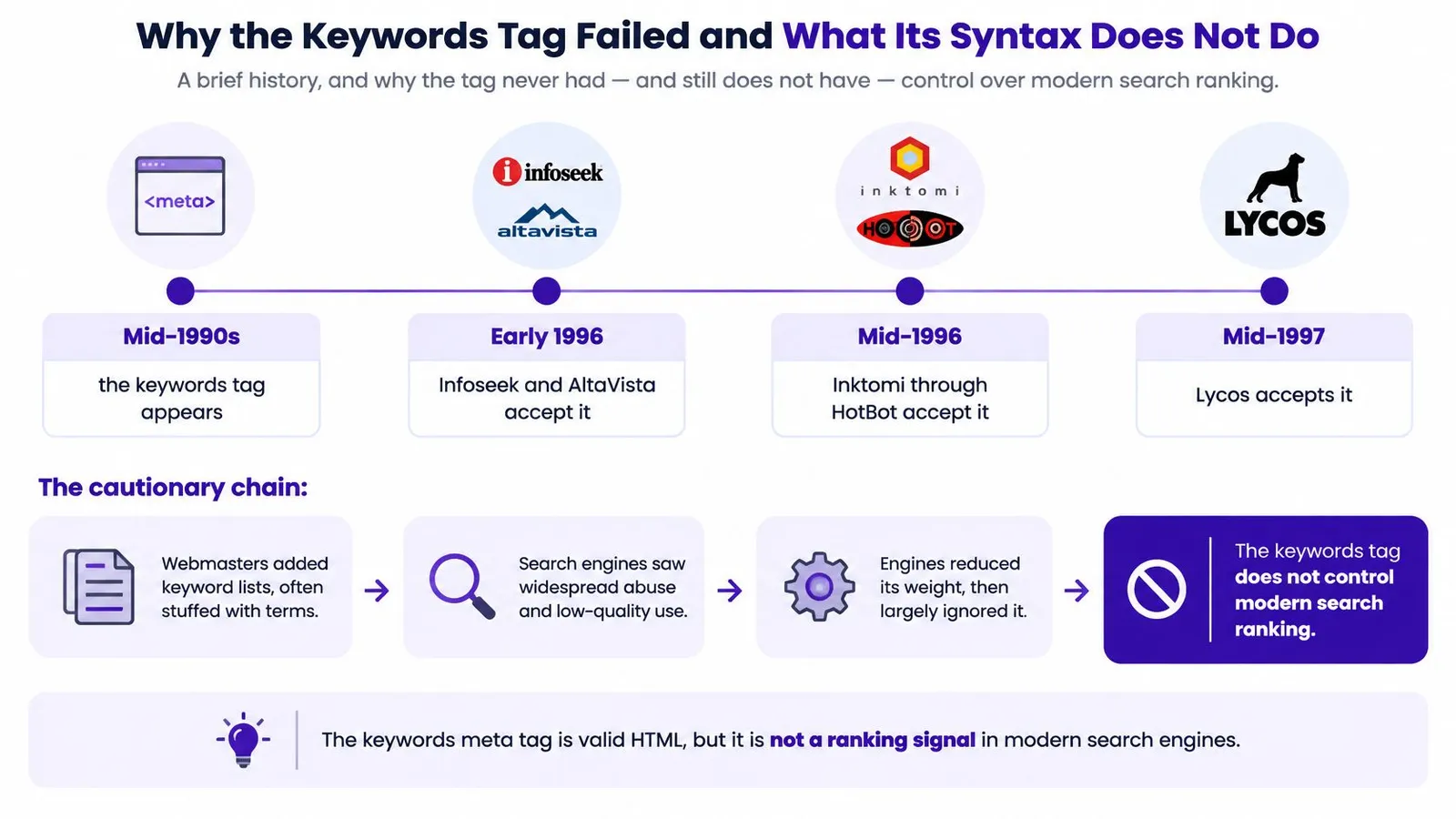
The keywords tag was created for a different search environment. The ClickZ history of its decline dates its emergence to the mid-1990s, with Infoseek and AltaVista accepting it by early 1996, Inktomi through HotBot following in mid-1996, and Lycos joining in mid-1997.
Those engines gave publishers a convenient way to declare a page's subject. The problem was equally convenient: publishers could declare a subject that the page didn't cover.
A shoe merchant could list famous brands the store didn't sell, repeat popular search terms, or add unrelated products. Visitors wouldn't see the list, so the publisher faced no immediate pressure to make it accurate.
The timeline illustrates how an apparently useful publishing shortcut became an unreliable search signal.
Search engines stopped trusting the declaration
Engines withdrew support as abuse undermined the field's usefulness. Google never adopted it as a web-search ranking signal, and its announcement on September 21, 2009 explained that irrelevant keyword stuffing had made the field easy to abuse.
There wasn't a replacement box that inherited the keywords tag's role. Search optimization shifted toward visible content, descriptive titles, relevant links, and other evidence that could be evaluated against the page itself.
A signal that publishers fully control, visitors cannot see, and page content barely supports is easy to fake.
That principle also explains why avoiding keyword stuffing matters beyond obsolete metadata. Moving a repetitive list from hidden HTML into a paragraph doesn't turn it into a useful answer.
What the markup actually means
The specimen is simple: <meta name="keywords" content="running shoes, trail footwear">. The element belongs in the document head, its name identifies the metadata type, and its content holds comma-separated terms.
The W3C HTML metadata specification defines that syntax while noting that many search engines ignore it because it has historically been unreliable and misleading. The standard doesn't assign a ranking algorithm, keyword weighting, a required keyword count, or a retrieval benefit for repetition.
In practical terms:
- Commas separate tokens. They don't distribute ranking authority among terms.
- Repeating a word adds text. It doesn't establish importance through a guaranteed weighting formula.
- Valid syntax proves validity. It doesn't prove that a search engine uses the field.
Shopify blog tags are different again. They're organizational labels that can help readers browse related posts, not another spelling of this HTML element. A theme printing a keywords tag is evidence of a template decision, not evidence that the tag works.
The same distinction applies to international stores. Translating a hidden keyword list into German, Japanese, or Portuguese doesn't create equivalent search visibility. Localized titles, explanations, product context, and navigation give each market something usable; a translated list merely changes the contents of a field an engine may ignore.
How to Write Titles and Descriptions Google Can Use
Useful metadata begins with a writing decision, not a character counter. A title should identify the page's promise, and a description should explain what a visitor can expect after opening it.
Practical lengths for metadata that can appear in results
| Element | Practical length | Must include | Common failure |
|---|---|---|---|
| Title | A concise, finished phrase | The primary intent | Stuffing or a title cut off mid-thought |
| Meta description | A brief, complete summary | The page outcome and a reason to click | A keyword list or a claim the page doesn't make |
| URL handle | A few short words | The topic in plain language | Unnecessary IDs, dates, or changing an established slug |
| Headings | Long enough to express a clear question or claim | The question that section answers | Repeating the exact keyword throughout |
These are editing targets, not guaranteed display limits. A complete, accurate phrase is more useful than a sentence damaged to satisfy a counter.
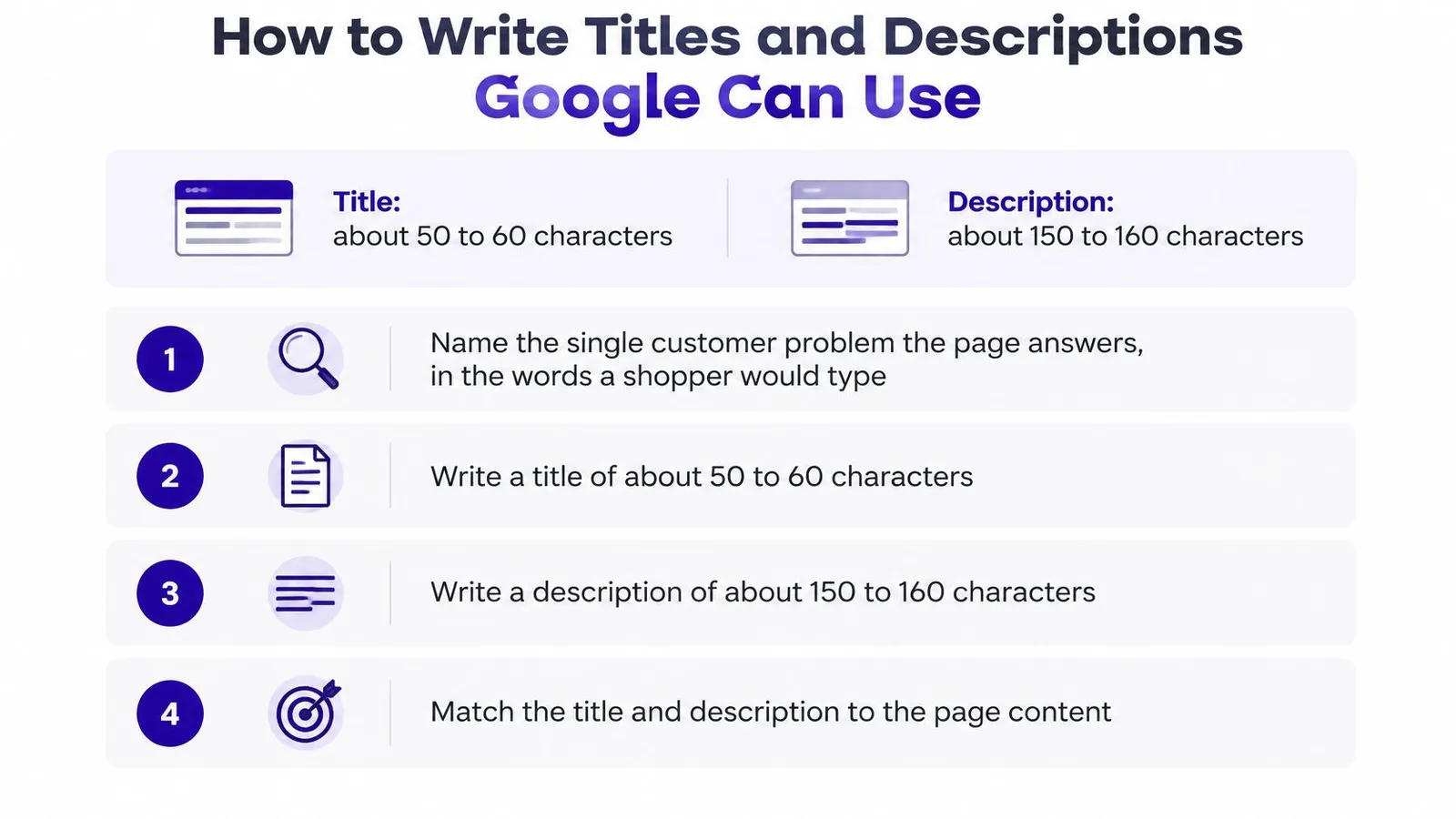
The checklist provides a visual starting point, while the page's meaning should determine the final wording.
A writing procedure that starts with intent
- Name the customer problem. A useful brief might say that a runner needs footwear for muddy weekend trails. That's more actionable than a broad instruction to target running shoes.
- Write the title as a finished phrase that identifies that problem. Add the brand at the end only when it doesn't obscure the subject.
- Summarize the actual outcome. The description should explain what the page helps a shopper compare, understand, or choose. Product claims belong there only when the page supports them.
- Keep the URL handle short and descriptive. Once other pages link to it, avoid changing it casually.
- Give each heading a distinct job. A section about drainage needs a heading about drainage, not another variation of the page's main keyword.
- Compare the metadata with the opening answer. If the title promises a comparison but the introduction offers only general advice, either the content or the promise needs revision.
For more detailed editing examples, the guide to meta description SEO helps distinguish a useful preview from promotional filler.
Rewrites make accuracy more important
Ahrefs' large-scale study, as published by Site.pro in 2026, found that Google rewrites meta descriptions 62.78% of the time. That finding isn't a reason to leave descriptions blank; it's a reason not to treat submitted copy as guaranteed display text.
Google can select text that better fits a particular query. Even an accurate description won't necessarily appear for every search, so a rewrite alone doesn't prove that an editor made a mistake.
Editing test: A search preview should remain honest even when read without the rest of the page.
Technical delivery matters too. If a custom storefront uses Next.js and the intended metadata isn't appearing in rendered output, Raze's guide to fixing metadata problems in Next.js offers a relevant troubleshooting resource. That's a rendering problem to investigate, not a reason to add another keyword field.
A Keyword List Turned into a Real Page
Say a Shopify merchant starts with this list: running shoes, best running shoes, trail running shoes, marathon shoes, cushioned running shoes, shoes for flat feet. The title becomes Best Running Shoes | Buy Running Shoes, the description repeats the list, and the body contains a short introduction above a product grid.
The page names several shopping needs without helping with any particular decision. A marathon runner, a road runner seeking cushioning, and a shopper preparing for muddy trails may need different explanations.
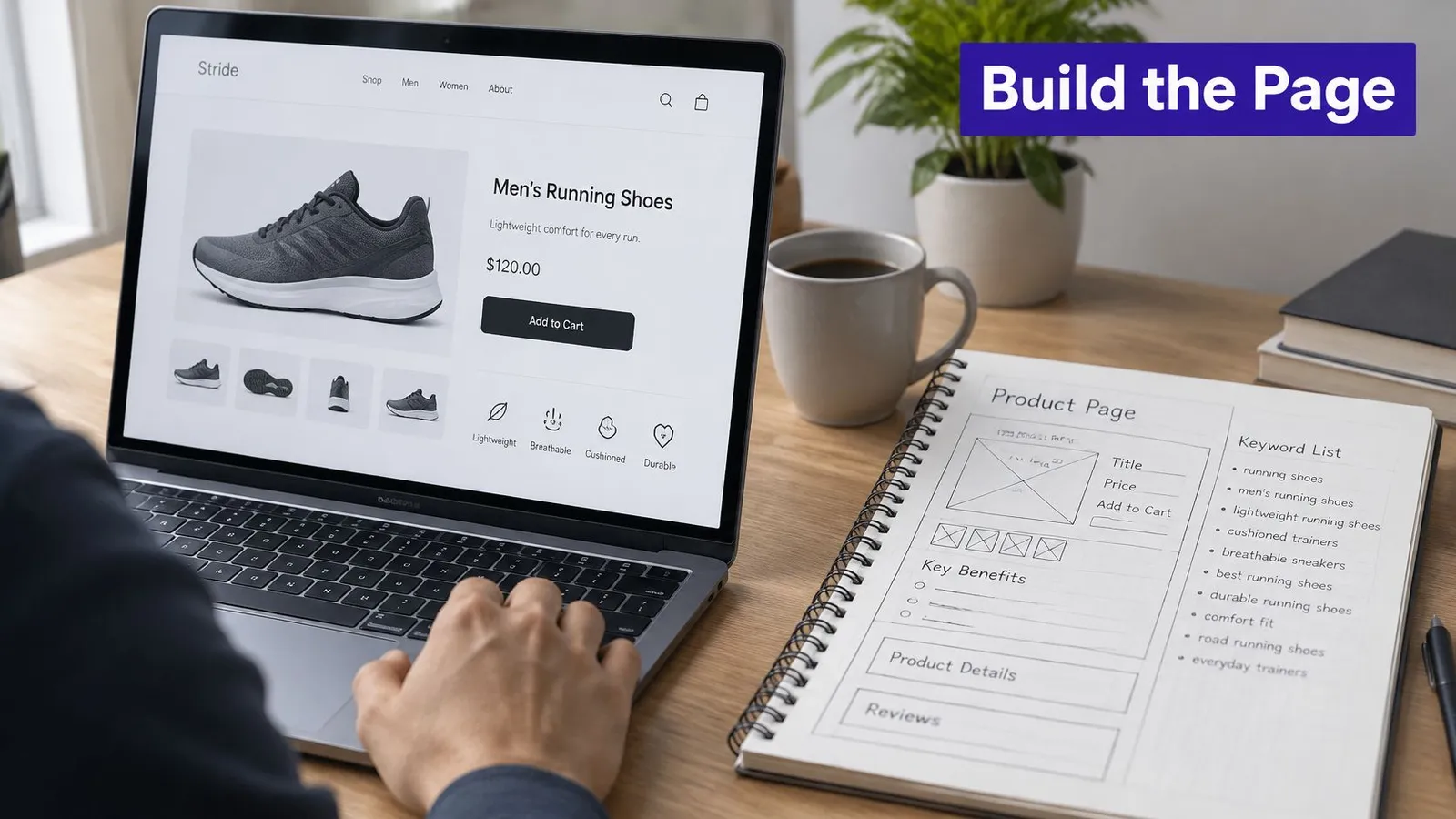
The redesign starts by choosing a customer problem, not by finding more places to paste the list.
Build around a muddy weekend run
For this hypothetical page, the primary problem is choosing a trail shoe for muddy weekend runs. The title becomes Trail Running Shoes for Muddy Weekend Runs.
The description could read: Compare trail shoes for muddy weekend runs, including grip, drainage, fit, and the conditions each pair suits. It describes the planned answer without adding unrelated marathon or flat-foot claims.
The outline gives the writer concrete work:
- What fails on slick trails. Explain the limitations of the footwear being compared without inventing performance claims.
- How to compare grip and drainage. Use catalog specifications and clearly identified product features.
- Which catalog pairs suit which conditions. Compare relevant products using the same criteria.
- How road training changes the choice. Explain the compromise for shoppers who run on mixed surfaces.
The body then answers those headings in original sentences. If product specifications don't support a claim about drainage or grip, the writer leaves it out or explains what remains uncertain.
Connect the answer to the catalog
Internal links should help readers act on the explanation. The trail collection belongs beside the trail-shoe discussion, the road collection beside the mixed-surface comparison, and a sizing page beside fit guidance.
An optional product card can follow the comparison rather than interrupting the opening answer. Image alt text should describe the outsole photograph, including visible tread features when relevant, instead of hosting another keyword list.
If structured data is used, its article or product details should agree with names and facts already visible on the page. This is practical SEO keyword optimization: research informs the information a shopper needs, rather than a phrase-insertion quota.
A keyword variation deserves a separate page only when it requires a meaningfully different answer.
That test prevents a calendar full of near-identical posts about muddy, wet, slick, rainy, and soft-ground shoes. When the intent, products, and advice are the same, a complete comparison is more useful than superficial rewrites with different titles.
How AI Search Reads a Page Without Hidden Keywords
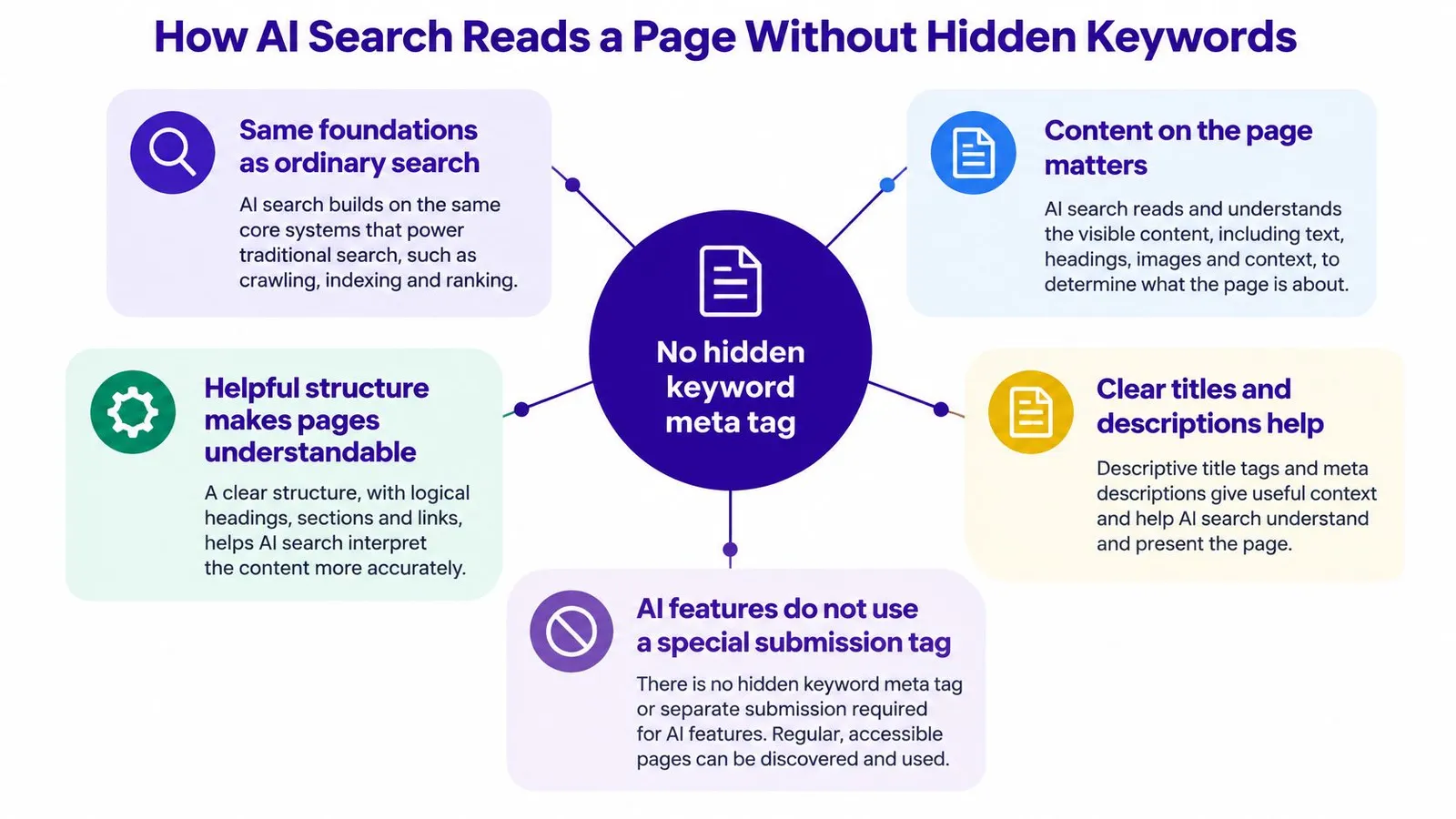
There's no special meta tag that submits a page to Google's AI Overviews or guarantees inclusion in an AI answer. Google's guidance for AI features points publishers toward familiar foundations: crawlable pages, internal links, textual content, good page experience, and structured data that matches visible information.
Google also explains that its systems can understand synonyms and general meaning. A writer doesn't need to force running shoes, trail footwear, and off-road trainers into every paragraph to communicate the subject.
The diagram connects those foundations to the page elements a merchant can improve.
Make the answer easy to retrieve and understand
For a product-led article, the useful unit is a customer problem and its supported answer. A concise explanation near the top establishes the decision, while descriptive sections supply the evidence and qualifications needed to interpret it correctly.
An editor can check the page through distinct questions:
- Access: Can a crawler reach the page and its important text?
- Meaning: Does the introduction answer the question without relying on an unexplained product grid?
- Evidence: Are comparisons grounded in visible specifications or clearly identified supporting material?
- Context: Do product links and markup refer to the same items the article discusses?
Agentable's guide can help teams find issues blocking AI retrieval when the obstacle appears technical rather than editorial. The companion guidance on SEO content writing supports the separate task of making the explanation useful.
The accompanying video offers another format for examining the topic.
Measure usefulness rather than phrase totals
Google's emphasis on valuable, unique content gives publishers little reason to manufacture near-duplicate long-tail articles. Each planned post should add a distinct answer, comparison, or market-specific perspective.
For international stores, localization should change the examples, available products, and relevant shopping conditions where necessary. Translating the same article mechanically may leave readers with advice that doesn't fit their market.
Performance review should compare impressions, clicks, average position, and onward visits to relevant product or collection pages. These measures help an editor evaluate whether the article serves its topic and catalog. They don't establish a guaranteed AI citation mechanism, and Google's guidance makes no such promise.
Audit Your Templates and Drop the Hidden List
A useful audit ends with a better published page, not a larger metadata spreadsheet. The merchant should search the theme, blog template, and SEO app output for meta name="keywords" and identify which system prints it.
If new articles would generate that element, the publisher can disable it unless a non-search integration requires it. An old tag doesn't need an emergency cleanup campaign, but maintaining and translating its contents is unnecessary work.
Separate template cleanup from content editing
The audit can stay focused:
- Inspect the output. Browser page source can reveal whether the keywords element is present even when no visible editor field exists.
- Check dependencies. Confirm that an internal search tool or another non-search system doesn't require the field before removing it.
- Choose a live article. Start with a published post that already receives impressions.
- Preserve the handle. Record the existing URL before changing the title or description.
A merchant evaluating reporting options can compare SEO monitoring and metadata tools through Web Mage's guide. The useful selection criterion is whether a tool helps detect and verify real publishing issues, not whether it offers another keyword box.
Finish with the fields worth keeping
A finished Rankira article includes a full-length structured article with headings, a featured image in the selected style, a clean URL handle, topic tags, internal links to products, collections, and pages, plus optional product cards and a call-to-action. Its meta description is saved to Shopify's SEO meta description field and the Excerpt.
Editing the published title, body, images, or meta description is safe and doesn't change the URL; only the handle matters for the URL. That allows a focused revision without rebuilding the article.
The editor should align the title and description with the visible answer, then check headings and links against the customer problem. The on-page optimization guide provides a broader checklist if that review uncovers missing content. After the revised article is saved and checked, the same approach can be applied to the next scheduled post instead of bulk-filling a hidden list.
Rankira researches product-relevant keywords, creates structured articles, and publishes them to a Shopify blog with useful metadata and internal links. Merchants can visit Rankira to turn a keyword calendar into customer-focused pages, then review a published article's title, description, and answer before continuing the schedule.
Keep reading
All articles
Shopify SEO
Compare SEO Software for Shopify: Features and Fit
Compare SEO software by capabilities, data accuracy, workflow and cost, with Shopify fit for merchants, agencies and international teams.
13 min read

Shopify SEO
Keyword Research Services Compared: 10 Options for 2026
Compare 10 keyword research services by price, deliverables, and best-fit use case. Selection criteria, limitations, and when a Shopify-native option fits.
13 min read
Shopify SEO
SEO CMS System: A Shopify Merchant Guide
An SEO CMS system plans, optimizes, publishes, and tracks Shopify content. See the gates, AI review rules, and what to measure in 2026.
13 min read
Put your Shopify blog on autopilot
Rankira researches keywords, writes SEO articles, adds internal links, and publishes them to your store — every week. Start with a 7-day free trial.