SEO CMS System: A Shopify Merchant Guide
An SEO CMS system plans, optimizes, publishes, and tracks Shopify content. See the gates, AI review rules, and what to measure in 2026.
Published 13 min read
In this article
Publishing more blog posts is common SEO advice, but a faster writer isn't an SEO system. A Shopify store can publish regularly while sending readers to unavailable products, repeating generic advice, and learning nothing about which pages attract useful search visibility.
A useful SEO CMS system connects editorial decisions to the store's catalog, publishing controls, and search results. Its advantage isn't maximum output. It's controlled automation, with accurate product context, human approval where facts can change, and measurement that goes beyond a publishing streak.
Table of Contents
- Four Jobs of an SEO CMS System
- How the Four Jobs Share One Catalog
- Gates Before an Article Goes Live
- AI Drafts That Still Need a Person
- One Shopify Week from Keyword to Post
- Visibility Beyond Clicks and Rankings
- Choose a Workflow You Can Run Weekly
Four Jobs of an SEO CMS System
A theme controls presentation, a blog holds articles, and a keyword tool suggests demand. Each one does a piece of the work, and none of them finishes it alone. The simplest scorecard asks whether the store can complete the whole job, from choosing a subject to evaluating the resulting URL.
Four jobs an SEO CMS system has to finish
| Job | Question it answers | Shopify output | If you skip it |
|---|---|---|---|
| Plan | Which subject is worth a URL this week? | One keyword on a calendar day, tied to a product or collection | Random posts that never match demand or inventory |
| Optimize | Can a crawler and a shopper tell what this URL is? | Title, meta description, clean handle, headings, internal links | Unfocused pages with no clear search purpose or route to products |
| Publish | Is the approved piece live in the store? | Shopify blog post, Files images, tags, draft or scheduled state | Copy trapped in a separate tool the theme never serves |
| Track | Did search actually see and use it? | Clicks, impressions, and average position on that URL | A publishing streak with no idea which articles earn visibility |
CMS architecture matters because these tasks happen inside a specific publishing environment. A store-focused workflow needs to understand commerce objects such as products, variants, collections, and availability rather than merely provide an empty text editor. A generic editor can hold paragraphs. It cannot know whether the kettle an article recommends is still in stock.
What completion looks like
Planning starts with merchandise, customer questions, competitor coverage, and Search Console queries. The operator assigns a primary query to a proposed article and records the product or collection that makes the subject commercially relevant. A topic without a useful destination needs a stronger editorial reason to exist.
Optimization turns that decision into a recognizable page. The title and headings establish the subject, the handle stays readable, and descriptive internal links help readers reach the relevant merchandise. A meta description should summarize the actual article rather than promise a discount the page never explains.
Publication must leave something the Shopify storefront can serve. The operator should be able to locate the blog article, its images in Files, its tags, and its publication state without reopening a separate writing tool. If the finished piece lives outside the store, the theme never serves it and the work stays invisible to shoppers.
Tracking then returns results to that same article URL. Storewide traffic can hide an unsuccessful article behind a strong product page, so the scorecard needs page-level results: clicks, impressions, and average position for that URL specifically.
Stack audit: Each job needs a named owner and a visible output. A tool subscription isn't evidence that the job gets finished.
The operator can mark which jobs the current stack performs. Any blank identifies a handoff where content can lose value, and a blank in Tracking is the most common one: stores publish for months without ever checking whether a single URL earned impressions.
How the Four Jobs Share One Catalog
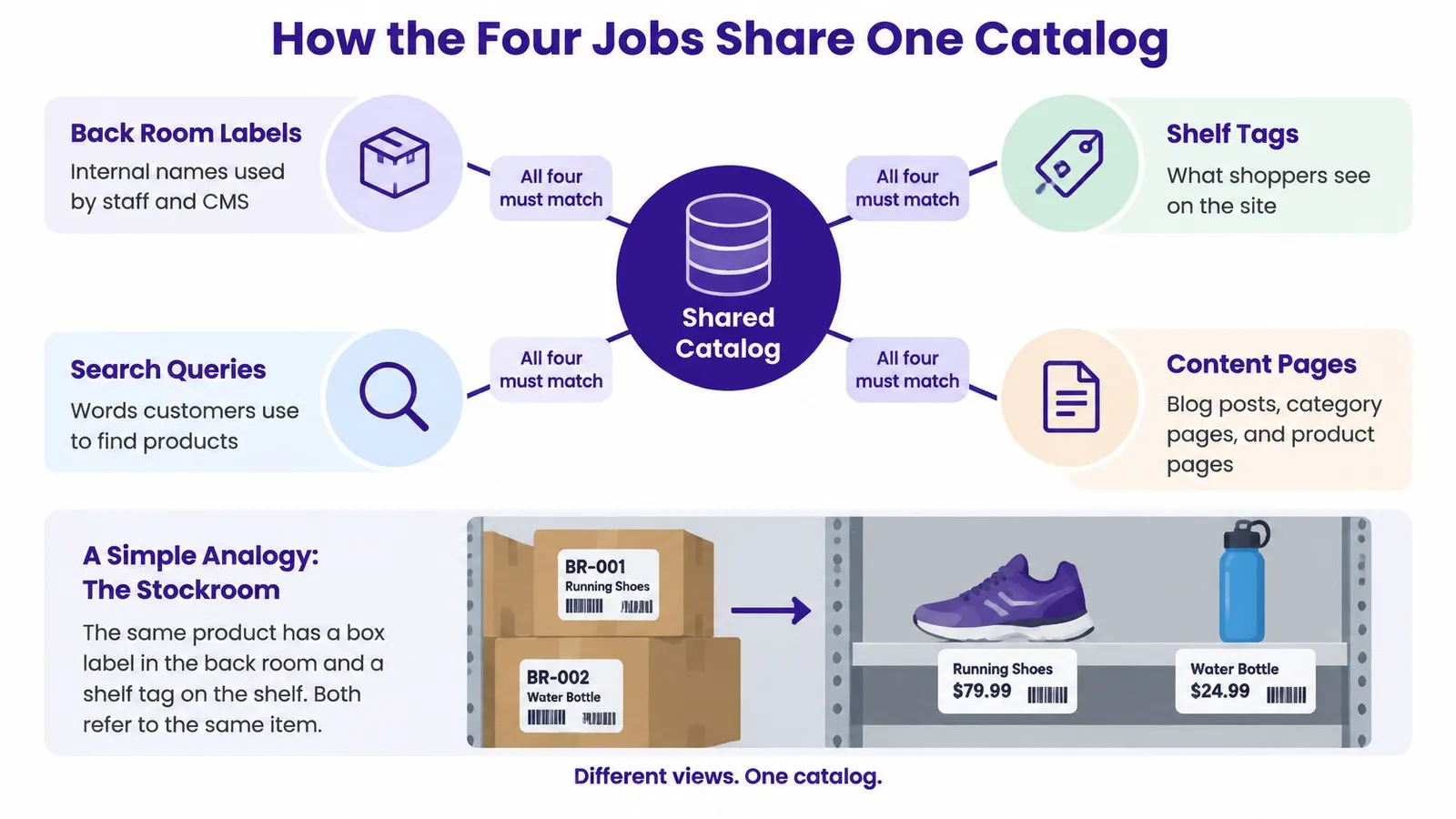
A stockroom label and a shelf tag must describe the same merchandise. If staff call a kettle ceramic while the product page describes stainless steel, the problem isn't wording alone. Staff and shoppers are making decisions from different facts.
The catalog serves that same coordinating role in an SEO CMS system. Product titles, materials, variants, availability, and canonical destinations should inform the article rather than compete with it.
A kettle moving through the workflow
Consider a hypothetical homeware store with an in-stock ceramic pour-over kettle. The operator selects pour over kettle guide because the store has a relevant product and can clearly explain its use. A step-by-step keyword research process helps distinguish a useful buying question from a phrase that merely contains the product name.
The brief records the kettle's product reference and the variant being discussed. The writer can then explain spout control, capacity, and care using confirmed specifications rather than guessing from an image.
- Search presentation: The title and meta description describe the guide's actual scope. Neither implies that every kettle in the collection has the featured model's characteristics.
- Article navigation: A descriptive link leads to the kettle's product page before a generic homepage link. A collection link offers relevant alternatives without repeatedly interrupting the explanation.
- Publication review: The reviewer checks that the photographed color and linked variant still exist. If that color has sold out, the draft needs an updated recommendation or an explicit availability qualification.
- Measurement: Search performance belongs to the article URL. Product-link clicks require separate event measurement, so they shouldn't be mistaken for Search Console clicks.
Matching meaning, not identical wording
Catalog consistency doesn't mean repeating the product title in every sentence. Shoppers may search for a gooseneck kettle while the internal catalog uses a longer merchandising name. The language can differ while the underlying product remains unambiguous.
The topics in Google's original SEO Starter Guide include descriptive metadata, URL structure, navigation, content, and anchor text. The practical lesson is coordination: those elements should help people discover and understand the same page.
A link to an unavailable product isn't automatically wrong. An evergreen guide may explain that item or offer alternatives. The failure occurs when the article promises a purchasable variant that its destination doesn't provide, leaving shoppers to reconcile the disagreement.
Gates Before an Article Goes Live
Publication should be treated as a release, not a send button. Google's Core Web Vitals guidance defines good Largest Contentful Paint as within 2.5 seconds, Interaction to Next Paint as below 200 milliseconds, and Cumulative Layout Shift as below 0.1, while noting that good scores don't guarantee prominent rankings.
Release gates for a Shopify article URL
| Check | Pass condition | What fails if it's ignored |
|---|---|---|
| Largest Contentful Paint | Meets the good loading threshold | Hero images or theme delays make the article feel unloaded |
| Interaction to Next Paint | Meets the good responsiveness threshold | Third-party scripts can make taps and clicks lag |
| Cumulative Layout Shift | Meets the good visual-stability threshold | Images without reserved space push text around during loading |
| Product structured data | Catalog-based JSON-LD with appropriate identifiers, price, currency, availability, and canonical references | Conflicting variants make product interpretation harder |
| Crawl and index controls | Intended public pages aren't blocked by robots.txt, noindex, or authentication | Crawling or indexing can be prevented |
| Sitemap | XML sitemap reflects publication and removal | Discovery signals become incomplete or stale |
Test templates before expanding the schedule
Field measurements describe real visitor experience. Lab diagnostics help an operator investigate the causes, especially when a new URL hasn't accumulated enough field data. Neither should be reduced to a screenshot of an overall performance score.
Representative article, collection, and linked product pages need testing on the storefront. The operator should compress images, supply suitable dimensions, reserve image-container space, and investigate scripts that delay interaction. An otherwise lightweight article can inherit slow behavior from the theme or an installed app.
The release decision belongs partly at template level. If the same hero component repeatedly causes loading problems, approving individual drafts won't repair it. New articles using that component should remain drafts until the theme or image pipeline is corrected.
Validate meaning as well as speed
Google's ecommerce documentation identifies relevant structured-data types including Product/ProductGroup, BreadcrumbList, Organization, Review, and VideoObject, and recommends unique identifiers for variants and their product group. These types describe different entities; a blog article shouldn't receive every type just because the store sells products.
Product markup should come from authoritative catalog fields such as SKU, GTIN, productGroupID, price, currency, and availability. A variant's identifier must refer to that variant, not an interchangeable parent record. Existing theme and app output also needs inspection so competing implementations don't describe conflicting offers.
The reviewer should run representative URLs through Google's Rich Results Test and inspect the rendered page. Valid markup supports interpretation and rich-result eligibility, not a ranking promise. The visible content still needs to support what the markup says.
An on-page optimization workflow can organize the editorial checks, but technical approval must include crawl controls, canonical destinations, and sitemap maintenance. Passing those checks doesn't force Google to index a URL. It removes preventable obstacles that writing alone can't fix.
AI Drafts That Still Need a Person
Every generated draft belongs in a review bin: safe to automate, needs a person, or hold and rewrite. The classification should depend on the article's claims, not how polished its sentences sound.
Google's guidance on generative AI content doesn't prohibit AI-generated material. It emphasizes Search Essentials and spam-policy compliance, accuracy, trustworthiness, and care with metadata, structured data, and image alt text.
The review bins
- Safe to automate: A bounded educational explainer uses approved source material and current catalog references. Its image description is checked, its product mentions are factual, and its markup repeats only supported, visible information. Automation is safest after the template and inputs have already passed review.
- Needs a person: Claims about materials, health, comparative performance, discounts, or suitability require evidence. A product-led sales ending also deserves review because the recommendation may be technically accurate but poorly suited to the reader's situation.
- Hold or rewrite: Unsupported superlatives, nonexistent variants, invented reviews, and prices absent from the visible page should stop publication. Smoother prose won't repair a missing factual basis.

Approval needs a record
Catalog facts can change after generation. A draft that accurately described an offer when written may become misleading before its scheduled release. The reviewer therefore needs to check the current product page, not merely accept the catalog snapshot attached to the original brief.
The audit trail should record who approved the draft, which factual issues were corrected, and when sensitive claims were checked. Draft and published states are operational controls, not cosmetic labels. An editor needs a reliable way to prevent an unapproved article from entering the queue.
More AI articles aren't an advantage when they're interchangeable. Useful automation preserves a reason for each page to exist.
Human editing should add judgment, not just conversational phrasing. A useful approach to humanizing AI content includes removing unsupported assertions, adding concrete explanations, and making recommendations that reflect actual product limitations.
The final review also compares visible prices and availability with product pages and, where relevant, Merchant Center information. Image alt text should describe the image rather than smuggle in promotional claims.
The operating rule is deliberately conservative: scheduled publication stays off for any article that states a price until a reviewer has compared that price with the product page.
One Shopify Week from Keyword to Post
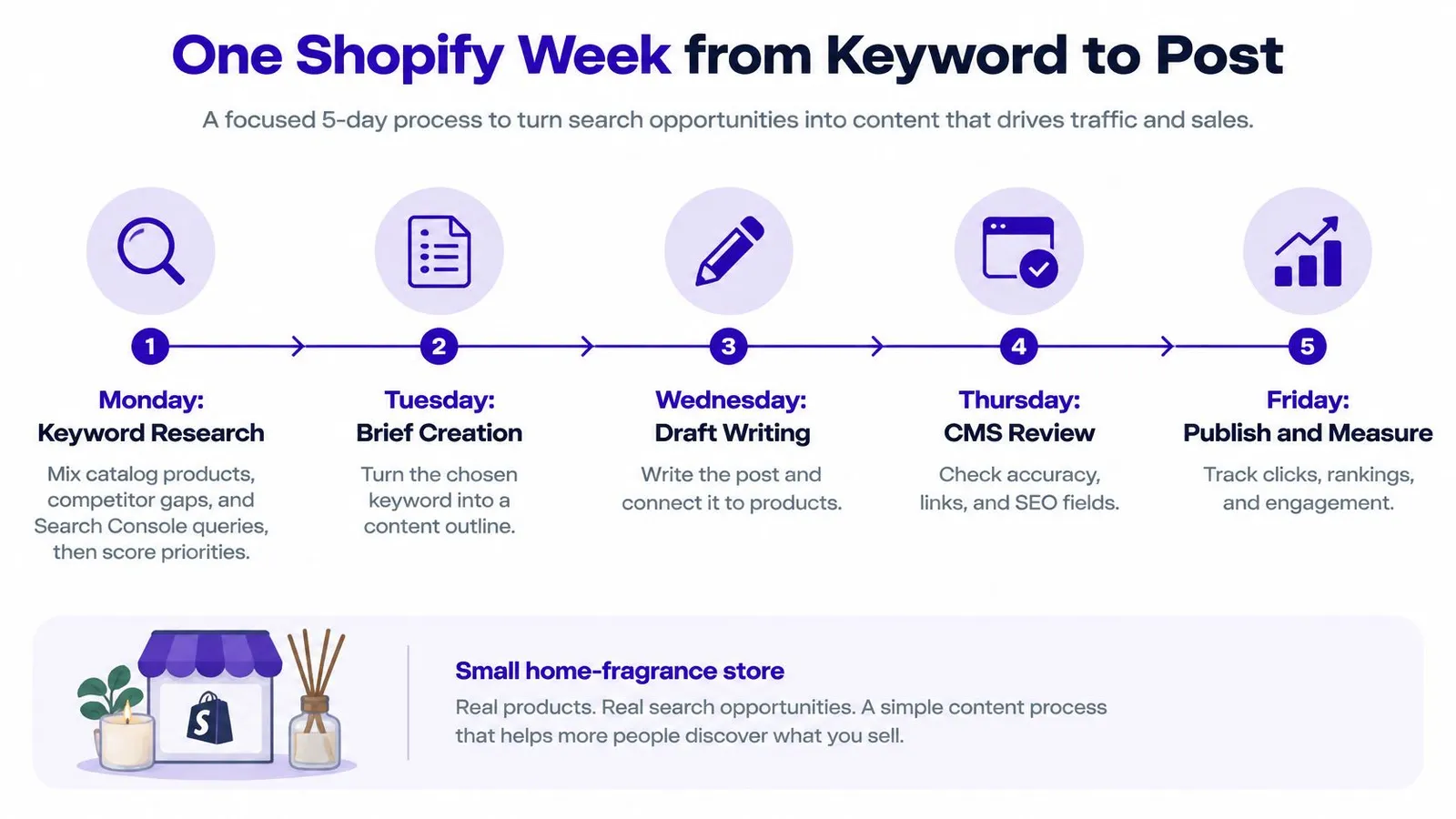
Consider a small home-fragrance store planning educational content around its available candles. The weekly process should produce useful articles without forcing the owner to reconstruct the brief, product references, and publishing settings each time.
The calendar below represents an operating rhythm, not a requirement to publish every day.
The operating sequence
Monday begins with demand and inventory. The operator combines catalog products, competitor gaps, and Search Console queries, then uses demand and difficulty scores to prioritize subjects. A beeswax-candle idea moves off the calendar when that candle becomes unavailable. A strong query isn't a reason to recommend stock the store can't supply.
The calendar becomes a set of decisions. Rankira's Content Scheduler supports adding or generating keywords, dragging them to new days, and creating articles on demand. Each calendar entry should retain its intended product or collection destination so a rescheduled topic doesn't lose its context.
The brief gets a content goal. Balanced, the default, teaches first while linking product pages and showing matching products as cards. Awareness remains purely educational. Sales-driven content builds around products and ends with a shop-now direction, making the choice an editorial decision rather than a tone adjustment.
Presentation settings follow the subject. The operator chooses writing tone, internal-link count, image style, brand color, and optional table of contents or call to action. A candle-care explainer needs clear instructions and relevant links, not every available extra. Consistent settings can reduce editing without making every article identical.
Generation produces the Shopify fields. The finished article includes headings, a featured image, tags, a clean handle, and a meta description saved to Shopify's SEO field and the Excerpt. Product and collection links take priority for Balanced and Sales-driven content. When enabled, the closing call to action points to a specific product or collection rather than the homepage.
Thursday separates review from scheduling. The merchant checks product claims and links, then edits in the app or Shopify, which stay in step. Educational drafts with approved inputs can proceed through the automation policy; sales-led drafts wait for approval.
Friday leaves a traceable publication. The Main blog setting selects the destination, and a separate blog can keep evergreen SEO articles apart from store announcements. The operator records the published URL and its intended commercial next step.
Keep the week commercially coherent
A broader SEO content marketing approach helps connect these individual decisions to customer needs. The store shouldn't alternate randomly between candle safety, unrelated home trends, and aggressive product roundups to fill calendar slots.
Balanced explainers qualify for automatic publication only when their facts and inputs satisfy the review policy. Sales-driven drafts remain a human decision, even when generation finishes ahead of schedule.
Visibility Beyond Clicks and Rankings
A merchant opens the dashboard and finds steady impressions, an improving average position, and fewer clicks. An AI answer may be summarizing the brand's explanation, but that chart alone can't establish the cause. The pattern isn't automatically a failure, and it isn't proof of valuable exposure.
Google's guidance on AI features says the foundations still include crawlability, internal links, textual content, page experience, and structured data. It also states that inclusion doesn't require special AI-only technical requirements or new machine-readable files.
Read the signals together
Search Console remains useful because it shows how URLs appear and receive clicks in search. It doesn't replace storefront analytics, product-link events, or a careful check of what appears in search results.
| Signal | Question for the operator |
|---|---|
| Impressions and average position | Is the article appearing for relevant searches? |
| Clicks and click-through behavior | Are searchers choosing to visit? |
| Live product-link coverage | Does the article still offer a valid commercial destination? |
| Product-page engagement | Do article visitors continue into useful shopping activity? |
| Country and language performance | Does each market receive relevant wording and merchandise? |
| Structured-data validity | Are machine-readable facts still consistent with the page? |
A share-of-voice SEO perspective can broaden the discussion beyond isolated ranking movements. However, exposure should remain distinct from visits, engagement, and sales. A brand mention doesn't demonstrate that a reader considered a product.
Connect reporting without overclaiming
The Google Search Console connection is read-only and can be disconnected at any time. Setup can be skipped initially and completed later through Settings › Google Search Console. Once connected, it feeds search data into keyword research and performance charts; an article appears in the Home dashboard after it begins collecting impressions.
That search view still needs complementary storefront measurement. Product-link destinations and engaged product visits shouldn't be presented as though Search Console measures them directly.
Localization adds another interpretation problem. A translated guide can use the wrong local product term, currency, or seasonal context while remaining grammatically correct. Regional review should consider local queries, idioms, available inventory, time zones, and competing offers.
A publishing calendar measures activity. A visibility report should help the merchant decide what to improve, retain, or retire.
When an AI summary appears, the operator should verify the referenced page's accessibility, factual accuracy, and useful next step. The monthly question is specific: which informational URLs still send people to an in-stock product in each target region?
Choose a Workflow You Can Run Weekly
Workflow fit matters more than the number of tools. An in-admin process suits a merchant without a content hire when articles need catalog context and someone can approve sensitive claims. A separate stack can work when an agency already owns research, editing, publication checks, and reporting.
| Decision | In-admin workflow | Separate agency stack |
|---|---|---|
| Editorial ownership | Merchant oversees exceptions and approval | Agency manages the editorial process |
| Catalog coordination | Product context stays close to publishing | Agency maintains a reliable catalog handoff |
| Publication | Approved content moves into the store workflow | Shopify receives finished, checked content |
| Reporting | Operator reviews article-level results | Agency combines sources into actionable reporting |
| Main risk | Unreviewed automation | Lost context between tools and teams |
A practical implementation choice
Rankira runs inside Shopify admin, installs through the Shopify App Store, and bills through the Shopify invoice. Its five-minute setup covers connecting the store, approving the content plan, letting the app write and publish, and tracking rankings. Scheduled articles can also be saved as drafts for review.
The single plan costs $39 per month and includes keyword research, unlimited scheduled article generation, auto-publishing, internal linking, backlink exchange, AI images, and the Search Console dashboard. Those capabilities reduce handoffs, but they don't remove the merchant's responsibility for editorial approval or technical checks.
Articles remain ordinary Shopify blog posts, and images reside in Shopify Files, so content remains after uninstalling. Permissions cover products, blog content, and files, not customer, order, or payment data.
For agencies consolidating results from several systems, SourceLoop's guide to streamline monthly SEO reports offers reporting-workflow context. The useful report should end with decisions, not a larger collection of charts.
The first month should be judged by indexable pages, accurate destinations, relevant impressions, and evidence of useful shopping journeys. Post count belongs in the production log, not at the top of the success scorecard.
For merchants seeking a catalog-connected SEO CMS system, Rankira brings keyword planning, article generation, Shopify publishing, and search reporting into the store's admin. A practical starting point is a focused content plan with draft review enabled for product-led articles, followed by an evaluation of which published URLs earn relevant visibility and lead shoppers toward available products.
Keep reading
All articles
Shopify SEO
Competitive Backlink Analysis: Find and Rank Outreach Gaps
Learn how competitive backlink analysis works: pick rivals, judge link quality, find gaps, and rank outreach targets for your Shopify store.
13 min read

Shopify SEO
Search Engine Optimization Plan for Shopify: 2026 Guide
Build a search engine optimization plan for your Shopify store: set a baseline, pick keywords, publish in batches and measure results.
11 min read

Shopify SEO
10 SEO Software Platform Options for Shopify Stores
Compare 10 SEO software platform options by capabilities, use cases, and Shopify fit, from keyword research to publishing and reporting.
11 min read
Put your Shopify blog on autopilot
Rankira researches keywords, writes SEO articles, adds internal links, and publishes them to your store — every week. Start with a 7-day free trial.