Organic Search Traffic: How Shopify Stores Grow It
Learn what organic search traffic is, how to read it in Search Console, and which steps grow it for Shopify stores in 2026.
Published 11 min read
In this article
Organic search generated 51% of trackable website traffic in a BrightEdge study of business-to-business and business-to-consumer websites, compared with 10% from paid search and 5% from social media, according to BrightEdge's 2014 findings. For Shopify merchants, that benchmark reframes SEO: unpaid search can be a primary way to reach people researching products and purchase decisions, not merely a supporting channel. But a store's success isn't measured by matching an industry-wide percentage. It's measured by finding where search visibility turns into qualified visits, product exploration, and revenue.
Table of Contents
- What Organic Search Traffic Is and How Big It Gets
- Impressions, Clicks, CTR and Position Explained
- Store Factors That Decide Whether Pages Get Found
- Set a Baseline and Grow Organic Traffic Step by Step
- Why Clicks Fall While Rankings Hold
- Targeting Qualified Clicks Over Raw Traffic
What Organic Search Traffic Is and How Big It Gets
Organic search traffic is the visits a website receives when people click its unpaid listings in search engines. Unlike paid search, where advertisers bid for placements, organic listings are ranked by search systems; organic social, direct visits, and referral traffic come from different channels and should be assessed separately.
BrightEdge's 2014 study found that organic search generated 51% of trackable website traffic, compared with 10% from paid search and 5% from social media. In its 2019 research, BrightEdge reported that organic search accounted for about 53% of website traffic, while organic and paid search together represented 68% of trackable traffic. Organic social stayed near 5%, roughly one-eleventh of organic search, according to the company's organic search findings.
| Traffic share by channel in the BrightEdge studies | 2014 share | 2019 share |
|---|---|---|
| Organic search | 51% | 53% |
| Paid search | 10% | Not reported |
| Organic plus paid search | 61%, calculated from the reported figures | 68% |
| Organic social media | 5% | About 5% |
These figures describe aggregate findings, not a target for an individual Shopify store. Traffic mix changes with industry, brand awareness, geography, device use, and business model. A store that relies on repeat customers may see a different balance from one introducing a new product category to shoppers who don't yet know its name. The useful conclusion is narrower: organic search can be a substantial acquisition channel, and its contribution deserves measurement alongside other sources.
For Shopify merchants, search can connect a shopper's question to an informative article, then to a relevant collection or product page. That path works best when a page matches the query and gives readers a clear next step, rather than attracting visits that have little connection to the catalog. Keyword research and content planning can help merchants examine that relationship; SEO statistics for content research can also provide context when evaluating search as one part of a broader marketing mix.
A practical starting point is to open the store's channel report and compare its organic share over the last 90 days with the BrightEdge benchmarks. The comparison is a diagnostic prompt, not a pass-or-fail score. If the store's share is lower, the next question is whether pages lack search visibility, fail to earn clicks, or attract visitors who don't continue toward products.
Impressions, Clicks, CTR and Position Explained
Organic search traffic is a funnel, not a single number. Impressions measure how often a site link appeared in Google Search. Clicks count visits from those results. Click-through rate (CTR) is clicks divided by impressions. Average position is calculated from the topmost result a property held for each impression, averaged across queries, as described in Google Search Console's performance report documentation.
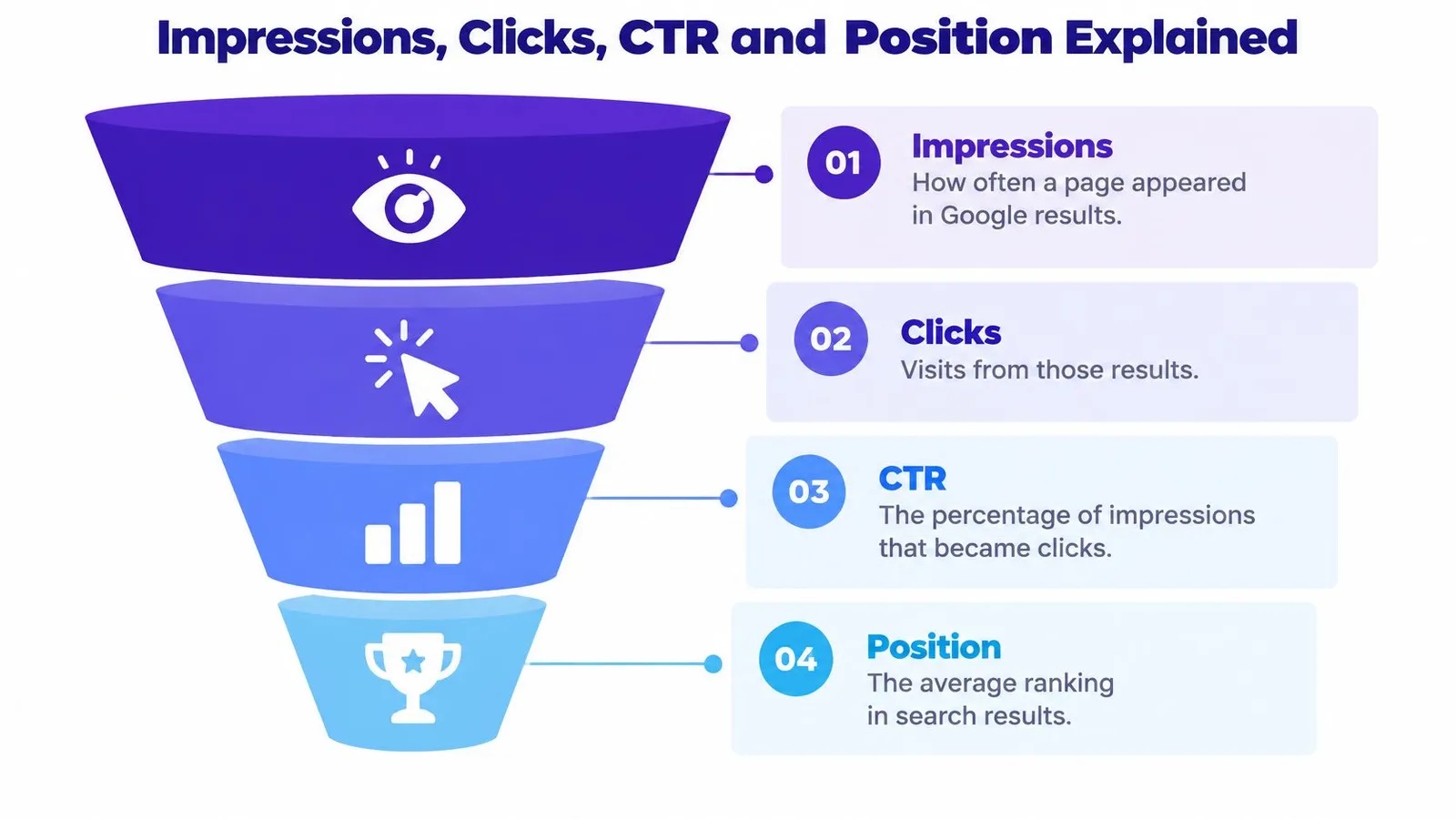
Each measure answers a different question. Impressions show whether Google is surfacing a page. Clicks show whether searchers choose it. CTR helps assess how often exposure becomes a visit. Position gives context about where a result appears, but because it's an average across impressions and queries, it isn't a fixed rank every searcher sees.
| Diagnosing organic traffic patterns in Search Console | Likely cause | First check |
|---|---|---|
| Impressions rise, CTR stays flat | Pages appear for more queries, but titles or snippets aren't earning the visit | Rewrite titles and descriptions on those URLs |
| CTR rises, impressions stay flat | Result presentation improved or the page matches intent more closely | Keep the change and test similar queries |
| Impressions fall | Demand decline, indexing problems, cannibalization, or ranking loss | Check index coverage and duplicate query targeting |
| Position improves, clicks stay flat | Average position blends results across many queries | Compare position by query group, not site-wide |
A page with rising impressions and flat CTR may be gaining visibility without gaining visits. The title could be vague, the description may not reflect the query, or searchers may see a result feature that competes for attention. Conversely, higher CTR alongside stable impressions can indicate that a result now better matches what people want, even if overall exposure hasn't changed.
Use Search Console's URL, query, country, and device dimensions to isolate the pattern. A store-wide average can conceal a collection page losing clicks while an unrelated article gains them. Compare similar query groups before concluding that a change in average position caused a change in traffic.
Google Analytics and Search Console also measure different things. GA4's Organic Search sessions count visits attributed to organic search across search engines, while Search Console reports Google impressions and clicks. Their totals won't match; use each platform to compare trends within its own measurement system. A fuller guide to SEO metrics can help teams keep visibility and visits distinct in their reporting.
Store Factors That Decide Whether Pages Get Found
A crawler can't rank a page it doesn't discover or index. Google uses links both to find pages and to help assess relevance, and it generally can crawl a link when it's an HTML anchor with an href attribute. Its search process moves through crawling, indexing, and serving, so a Shopify page needs to be accessible before its content can compete in results, as explained in Google's guide to crawlable links.
Start with crawlable routes and indexable URLs
Check whether important products, collections, and articles can be reached through ordinary links. A JavaScript-only click handler can be a risk if it doesn't render as a crawlable anchor. For example, a guide to choosing a bamboo cutting board should link through a standard HTML anchor to the relevant bamboo board collection. A natural anchor such as “bamboo cutting boards” gives readers a clear route and gives crawlers context about the destination.
Next, inspect whether the destination URL is eligible for indexing. Check for a noindex directive, robots restrictions, and canonical tags that point elsewhere. Filtered or sorted collection pages can create several URLs for similar content; verify that the canonical version is the one the store intends search engines to index.
Make relevance useful to people
An article should link to a product or collection that answers the question it addresses. Repeated blocks of unrelated links won't make a weak connection stronger. A guide on choosing a cutting board, for example, can explain material differences and link in context to the matching collection, rather than repeating the same link list after every paragraph.
Unique page titles and descriptions matter too. A title should make the page's subject clear, while the description should reflect what a searcher can expect to find. Then consider external trust: a backlink is a link to the store from someone else's website, which search engines read as a vote of confidence and one of the strongest ranking signals.
For a quick audit, select five pages and check whether each:
- Has a crawlable route: Reach it through a standard HTML link.
- Can be indexed: Review its robots directives,
noindexstatus, and canonical URL. - Has a clear purpose: Match the page to one relevant product, collection, or search need.
- Uses specific metadata: Write a unique title and description that fit the page.
- Connects naturally: Add contextual internal links, then review whether credible external sites link to the store.
Merchants can review on-page optimization practices as they work through the audit. After publishing an article with links to a destination, compare the destination's indexed coverage, impressions, clicks, and query associations. That helps distinguish a technically present link from a useful discovery path.
Set a Baseline and Grow Organic Traffic Step by Step
A baseline separates search visibility from the visits and product interest it may produce. Record the store's current performance before changing titles, publishing articles, or adding internal links. Connecting Google Search Console feeds real search data into Rankira's keyword research and Home screen charts. You can skip the connection during setup and add it later from Settings › Google Search Console.
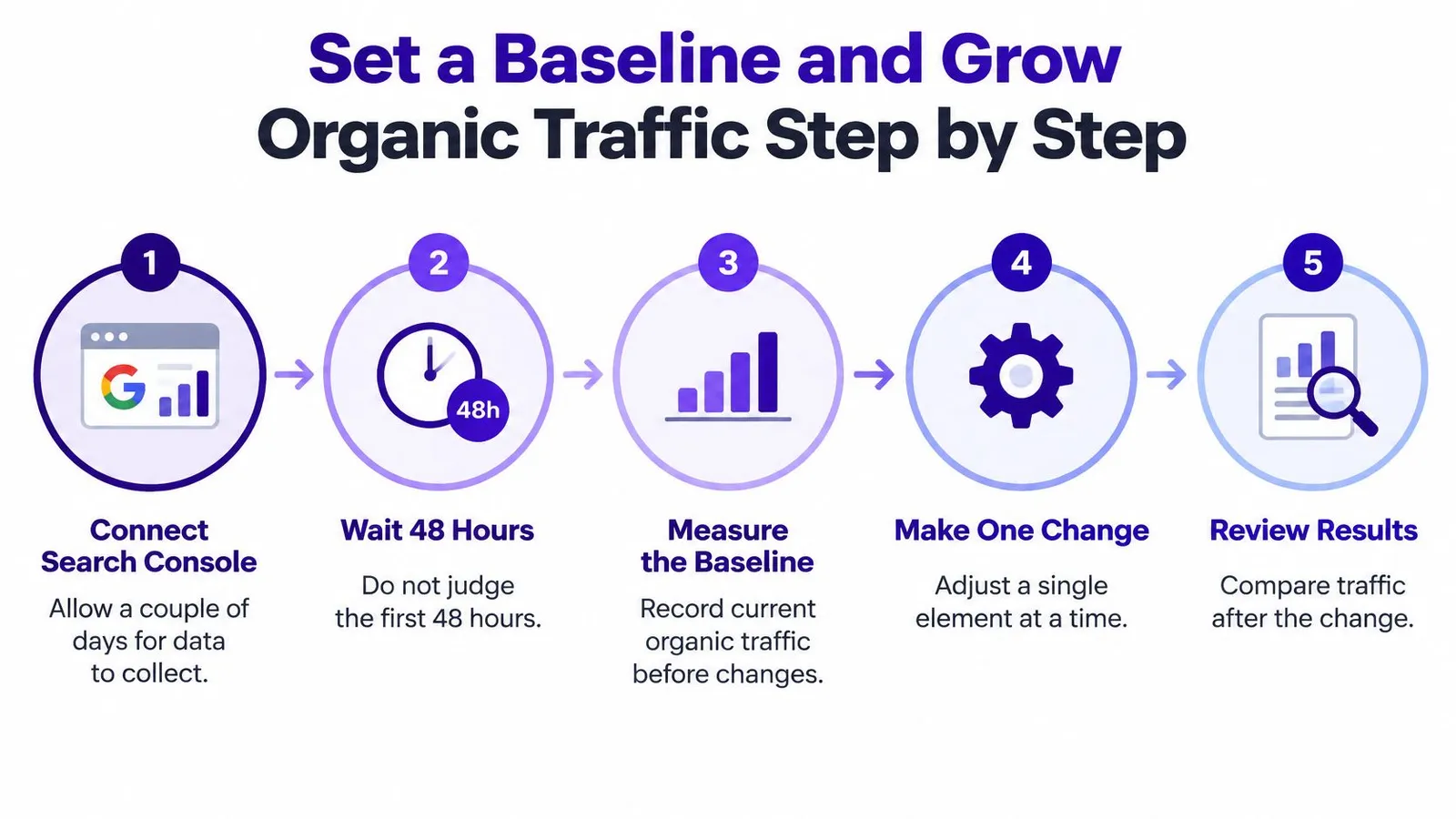
Connect Search Console and allow time for data to appear. Rankira may need a couple of days after connection to collect data. Avoid treating an incomplete dashboard as a performance diagnosis.
Export clicks, impressions, CTR, and position for the last 28 days. Break results down by URL and query. Store-wide totals can conceal a strong product page and a declining article behind the same average.
Identify pages with room to improve. Record the pages with the most impressions and those where CTR seems low relative to visibility. A page that appears often but earns few clicks may need a more precise title, a clearer description, or a closer match to the query.
Assign each query to its best-fit page. Map queries to URLs so multiple articles do not target the same intent. If a new post overlaps with an existing guide, choose which page should answer that search and make the other support it.
Make titles and descriptions specific to the searcher's decision. Explain what the page offers and why it fits the query. Inserting keywords without making the result useful does little to clarify its value.
Answer the question near the top. Give readers a direct response, then support it with evidence, specifications, or comparisons. A long introduction can delay the information that confirms whether the page meets their need.
Link articles to relevant products and collections. Use descriptive, crawlable links where the destination helps the reader. A sizing guide should lead to the relevant product range, not an unrelated best seller.
Keep published URLs stable. Changing an article's URL can leave existing links pointing to a page that no longer exists, along with the ranking strength those links passed.
Choose a query group and set a review date. Track its target page and whether article readers continue to product or collection pages, not just last-click sessions. New articles can take days to weeks to be indexed. Rankira recommends two to three months of consistent publishing before judging results.
Practical rule: Change one meaningful element at a time. If you change a title, page structure, and internal links together, the next report cannot show which adjustment helped.
Judge progress by funnel stage. Rising impressions show more visibility; clicks show that searchers choose the result; visits to product pages indicate whether the article helps move qualified shoppers toward merchandise. Location-specific queries may also matter to a catalog with a defined service area. For that angle, see how Shopify stores can grow Shopify sales with local search.
Start this week by connecting Search Console and exporting a 28-day baseline. A structured SEO plan can turn those page-level findings into a sequence of decisions rather than a publishing schedule detached from performance.
Why Clicks Fall While Rankings Hold
Clicks can fall even when a page's ranking position appears stable because the search results page may answer more of the query before a shopper visits a website. In findings on AI summaries, users clicked a traditional organic result on 8% of visits when a summary appeared, compared with 15% when it didn't, according to zero-click search findings from Elite Content Marketer.
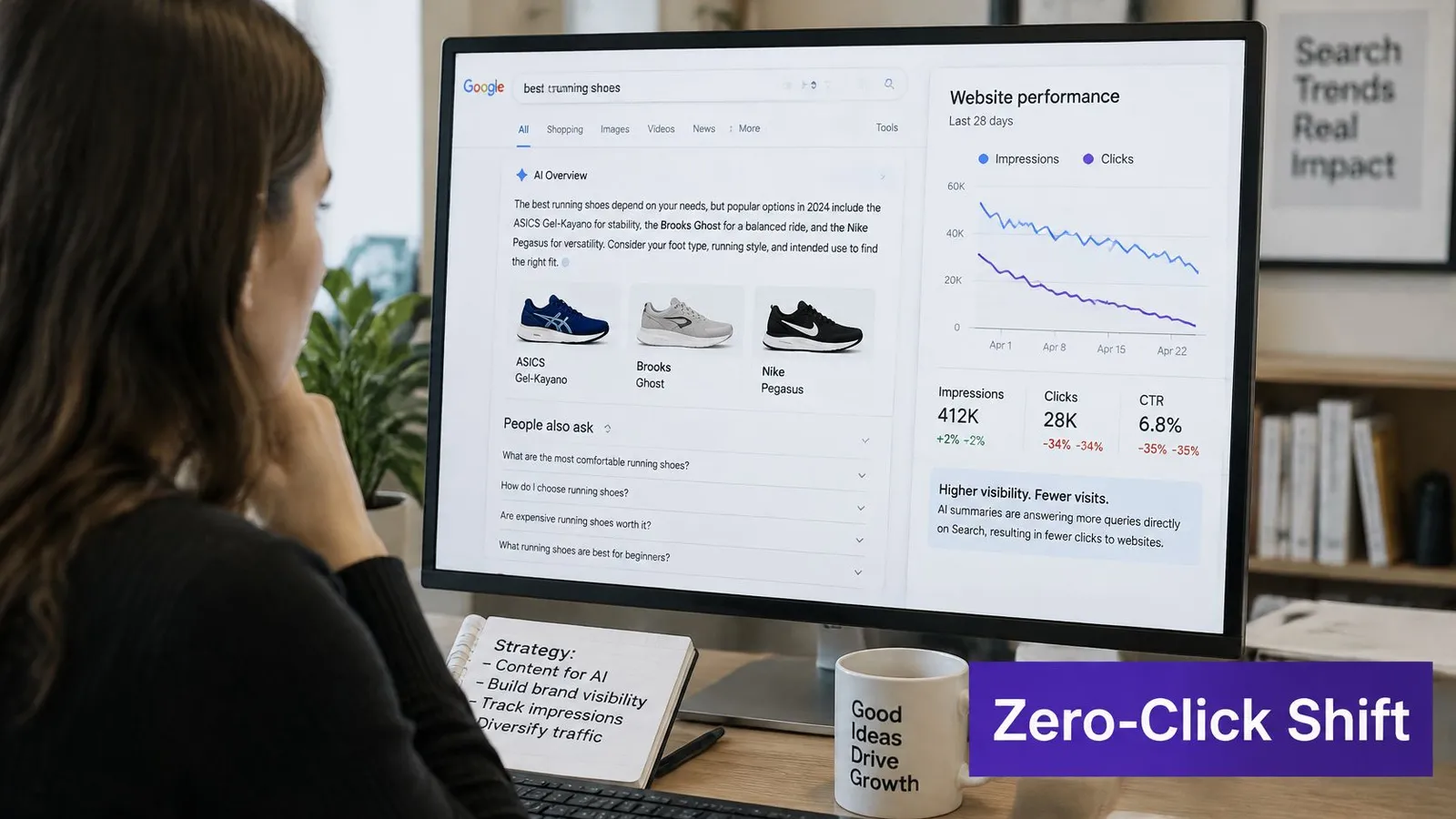
That gap changes how a Shopify merchant should interpret a traffic report. A shopper might see a brand mentioned while reading an answer, search for that brand later, and visit the store directly before buying. The article may have helped create product awareness without receiving the first click. That possibility doesn't prove that a particular post influenced a sale, but it does show why sessions alone can leave part of the customer path uncounted.
A practical review separates the search signals before making changes:
- Group queries by intent: Separate informational, comparison, and product searches.
- Compare exposure with visits: Read impressions and position alongside clicks to see whether visibility remains while traffic changes.
- Watch branded searches: Track whether more people search for the store or its products by name over time.
- Check assisted journeys: Review whether visitors who read an article later reach a product page or contribute to a sale.
For example, a store might see sessions from a buying guide decline while branded queries rise. Looking at the two trends together gives the merchant a better basis for investigation than treating the guide's falling sessions as proof that the content has stopped helping. Search Console can show search performance, while the store's analytics and commerce reporting are needed to evaluate visits and sales that follow.
The reporting should also distinguish pages that need stronger commercial pathways from pages that have lost search exposure. A revised meta description and search-result snippet may help a relevant listing earn a visit, but it can't repair a page that no longer answers the query or reaches the right audience.
The section's video offers another perspective on changing search behavior:
International Shopify stores should compare performance by country and language before judging an article. Search-result features and click behavior can differ across markets, so a combined report may hide a page that still works well for one audience.
Targeting Qualified Clicks Over Raw Traffic
For ecommerce, maximum impressions aren't the same as maximum value. A high-volume article can attract attention without giving a shopper a reason to visit, while a narrower page can help someone compare products, check fit, or confirm compatibility before making a decision. Recent tracking across 53 brands reported that organic CTR for queries showing AI Overviews fell from 3.19% in January 2025 to 1.31% in December 2025, then recovered to 2.36% by February 2026, according to PikaSEO's AI Overview analysis. That movement is a warning against relying on one universal content formula.
The store's advantage is the detail its catalog and merchant expertise can provide. Prioritize questions where generic answers are incomplete and the page can help a shopper take the next step.
| Query types where a store's catalog adds value | Why a summary falls short | Element to add to the page |
|---|---|---|
| Product comparison | It may list general features but not the store's stock or product fit | A side-by-side table linking to each product |
| Sizing or fit | Generic charts don't reflect the store's product dimensions | Store-specific measurements and a size guide link |
| Compatibility | Broad answers can miss exact model numbers | A compatibility table for each product |
| Ingredients or materials | General descriptions omit exact formulations | A full ingredient or material list for each product |
| Delivery or returns | A generic answer can't address the shopper's region | A region-specific shipping and returns block |
The page rule is straightforward: answer the main question quickly, then add information that makes a store visit worthwhile. Product context, comparison tables, sizing checks, compatibility details, reviews, and collection links can all help shoppers assess a real purchase rather than settle for a general explanation. A step-by-step keyword research guide can help merchants find topics aligned with both search intent and the catalog.
Judge the result by qualified clicks, product views that begin from the article, and assisted sales over the review window. A lower-volume article that brings motivated shoppers to relevant products can outperform a broad question whose answer is complete on the results page. The strongest content isn't necessarily the content that gets the most exposure. It's the content that gives the right visitor a useful reason to continue.
Rankira helps Shopify merchants research product-related keywords, create and publish blog articles, connect informational pages to relevant products and collections, and monitor search performance. Merchants can connect Google Search Console to support keyword research and track clicks, impressions, and positions, then use those signals to refine their content plan. Visit Rankira to explore a workflow for turning organic search visibility into more relevant product visits.
Keep reading
All articles
Shopify SEO
10 Proven Ways to Increase Traffic Site in 2026
Discover 10 proven ways to increase traffic site visits through search, content, and email, with practical steps for Shopify stores.
15 min read

Shopify SEO
Meta Description Check: How to Audit and Fix Yours
Run a meta description check in page source or an SEO editor, judge length and query fit, and rewrite only the descriptions that mislead or repeat across pages.
10 min read
Shopify SEO
Title Tags SEO: How to Write Titles That Earn Clicks
Title Tags SEO explained: what a title tag is, how Google picks the title shown in results, and how to write titles that earn clicks.
10 min read
Put your Shopify blog on autopilot
Rankira researches keywords, writes SEO articles, adds internal links, and publishes them to your store — every week. Start with a 7-day free trial.